peripherals
Best Ultra‑Budget Gaming Mice for CS2 & Valorant 2026: Redragon M602 vs Razer DeathAdder Essential vs Logitech G203 Lightsync vs Redragon M656
Four retail mice in the ultra‑budget category with gaming on the label — including one wireless contender. Which one actually tracks a flick accurately? Let's dive into the specs.
- 10 min read
The ultra‑budget mouse market in 2026 is a minefield of inflated DPI claims and creaky plastics. With many esports mice costing several times as much, stepping onto the most affordable shelf feels like an inevitable compromise. But some manufacturers have managed to squeeze a genuine entry‑level sensor and decent build quality into an absurdly low price — and finding that diamond in the rough is the difference between a crisp flick and a missed shot in CS2 or Valorant. We compared the specs of four of the most popular ultra‑budget gaming mice — Redragon M602, Razer DeathAdder Essential, Logitech G203 Lightsync, and the wireless Redragon M656 Gainer — to see which one actually holds up when you need it most.
Info
Mouse Buying Guide for FPS Games
Sensor performance is the single most important spec for competitive shooters — yet it's the one most often hidden on the box. A ‘7200 DPI sensor’ could mean a flawless optical sensor or a jittery office part with digital interpolation.
Genuine sensors vs marketing numbers A mouse with 8000 DPI but a weak sensor is worse than a properly implemented 6400 DPI unit for CS2. Consistent tracking and no angle snapping matter more than a large number on the box. For wireless options, the sensor must also deliver low power consumption without sacrificing precision.
Four specs to verify in any ultra-budget gaming mouse:
- Malfunction speed (MSS) is too low - When you flick quickly in Valorant, the sensor may lose track entirely — a spin‑out that costs you a round.
- Heavy weight and stiff cable - A 135g mouse with a braided cable that drags like a rope makes micro‑adjustments exhausting and slow.
- Poorly implemented switches and debounce - Low‑quality mechanical switches can double‑click or fail within months, and firmware with aggressive debounce adds input lag.
- Wireless tracking overhead - Budget wireless implementations can introduce subtle latency or jitter in tracking. A low polling rate and a power-saving sensor are not ideal for fast FPS games.
Four rules to avoid a disappointing mouse purchase:
- Look for a listed IPS (inches per second) rating — 100+ IPS is the baseline for competitive FPS
- Weight under 100g is strongly preferred; light mice improve micro‑corrections in CS2
- A braided cable is not automatically better — a flexible rubber cable can be less intrusive
- Wireless under $20 is a trade-off: check the sensor model and polling rate before buying
How to set up a mouse for CS2 and Valorant:
Raw input, proper DPI selection, and disabling acceleration unlock the potential of a mouse.
Mouse Setup TutorialMouse Comparison: Key Specs & Features
Redragon M602 NEMEANLION 2 RGB Gaming Mouse | ✘ | 7200 | 135.8 g | 9 | 1000 Hz | Check price on Amazon |
Razer DeathAdder Essential Wired Gaming Mouse | ✘ | 6400 | 96 g | 5 | 1000 Hz | Check price on Amazon |
Logitech G203 LIGHTSYNC RGB Gaming Mouse Best pick | ✘ | 8000 | 85 g | 6 | 1000 Hz | Check price on Amazon |
Redragon M656 Gainer Wireless Gaming Mouse | ✔ | 4000 | 87 g | 7 | 500 Hz | Check price on Amazon |
Redragon M602 NEMEANLION 2 RGB Gaming Mouse
Optical7200 DPI135.8 g1000 HzRight-handed (ergonomic)Razer DeathAdder Essential Wired Gaming Mouse
Optical6400 DPI96 g1000 HzRight-handed (ergonomic)Logitech G203 LIGHTSYNC RGB Gaming Mouse Best pick
Optical8000 DPI85 g1000 HzAmbidextrous (6 buttons)Redragon M656 Gainer Wireless Gaming Mouse
Optical4000 DPI87 g500 HzRight-handed (ergonomic)
* As an Amazon Associate I earn from qualifying purchases.
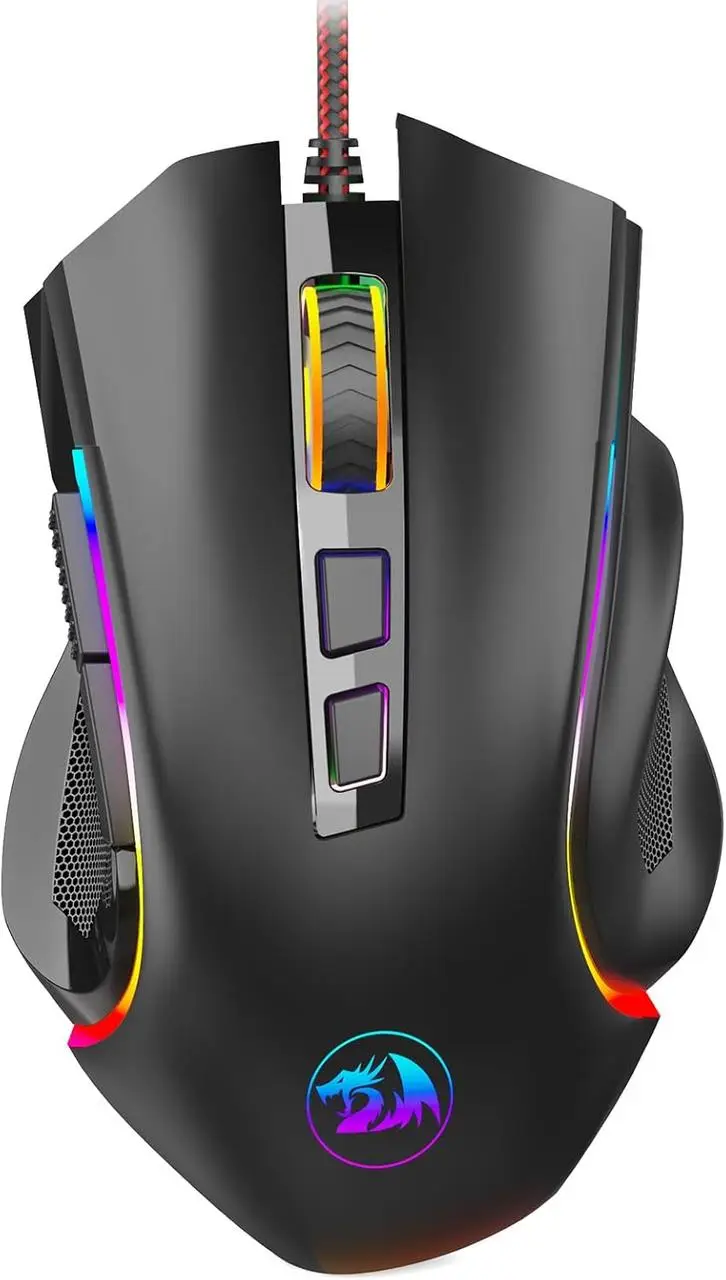
Redragon M602: Big on specs, light on execution
* As an Amazon Associate I earn from qualifying purchases.
- 1
7200 DPI and 9 buttons for the lowest price — where's the catch?
The Redragon M602 offers a staggering feature list for its price: 7200 DPI, RGB lighting, 9 buttons, and a braided cable. However, community teardowns and user reports consistently note that the sensor inside is a generic office optical part that uses digital interpolation to hit its maximum DPI — not a native gaming sensor. At low to moderate speeds it tracks adequately for RTS or casual games, but fast flick shots in CS2 can cause the sensor to momentarily lose tracking. Build quality is acceptable for the price, though the 135g weight makes it one of the heaviest 'gaming' mice on the market, and the stiff braided cable noticeably pulls against small adjustments.
- 2
A casual all‑rounder that wears a gaming suit
The M602's ergonomic shape (123.5x71x38 mm) fits most right hands comfortably, and the 7 programmable buttons offer genuine utility in MMOs and macro-heavy workloads. But under sustained competitive FPS pressure, the sensor's low IPS rating — estimated under 60 — shows its limits. If your aim is casual, this mouse is serviceable. If you care about your CS2 rank, you'll outgrow it fast.
Pros and Cons: Redragon M602
Pros
Most affordable in the comparison
9 buttons provide extra utility for MMOs
Braided cable for durability
Bright 7‑mode RGB lighting
Ergonomic design fits most right hands
Cons
Unknown sensor spins out on fast flicks
Heaviest mouse at 135g
Stiff braided cable drags during swipes
No onboard memory; software required
Conclusion
The Redragon M602 offers impressive features on paper but its unknown sensor and heavy chassis hold it back in competitive FPS games. Best suited to casual RPGs and MMOs.Razer DeathAdder Essential: The proven shape with a budget brain
* As an Amazon Associate I earn from qualifying purchases.
- 1
6400 DPI on a genuine gaming sensor — but a dated one
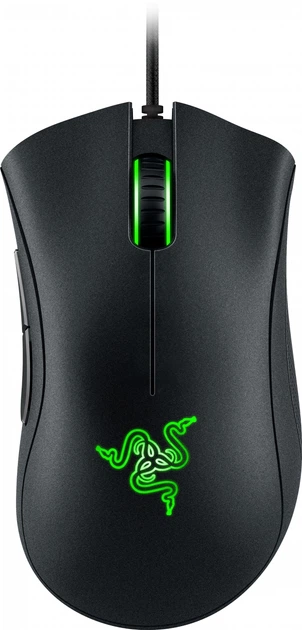
The DeathAdder Essential uses a sensor built around the PixArt PAW3328 — a genuine entry‑level gaming optical sensor. It tracks accurately up to around 6400 native DPI (the sensor itself may go slightly higher, but Razer caps it via firmware). With a 220 IPS maximum tracking speed and 30G acceleration, it handles CS2 flick shots without spinning out, a huge step above no‑name sensors. The 96g weight and famously comfortable right‑handed ergonomic shape are battle‑tested for hours of play. Razer's mechanical switches are rated for 10 million clicks and deliver a crisp, consistent feel that holds up under hours of competitive play.
- 2
Cut down in the right places — and the wrong ones
To hit its most affordable price, Razer trimmed the RGB to a single‑color green LED and dropped the DPI clutch button. The standard rubber cable (2.1m) is lighter and more flexible than the braided Redragon cable, which helps during fast swipes. The more critical omission is memory: settings require Razer Synapse running in the background, which means your custom DPI steps and button bindings disappear on any PC where the software is not installed — a real inconvenience at a LAN event or a friend's setup.
Pros and Cons: Razer DeathAdder Essential
Pros
Genuine gaming optical sensor (PixArt PAW3328)
220 IPS tracking speed — handles fast flicks
Lightweight at 96g, comfortable palm‑grip shape
Mechanical switches rated for 10M clicks
Cons
Single‑color green LED — no full RGB
Limited to 5 programmable buttons
Shape is only for right‑handed users
No onboard memory — Razer Synapse required; settings lost on other PCs
Conclusion
A genuine gaming sensor in a proven ergonomic shell makes the DeathAdder Essential a safe choice for players who value comfort above all else.Logitech G203 Lightsync: The smallest budget king
* As an Amazon Associate I earn from qualifying purchases.
- 1
A true 8,000 DPI gaming sensor and the lightest chassis
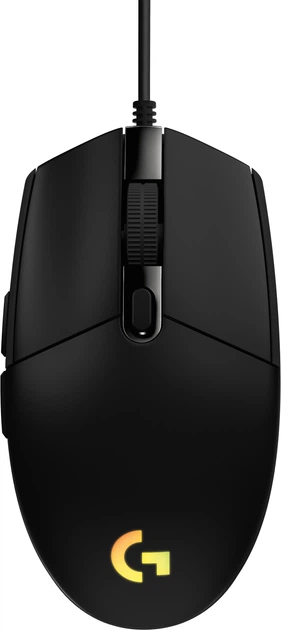
Logitech's G203 uses the proprietary Mercury sensor — a part that it developed in‑house and that has been proven in the G102/G203 family across multiple generations. The sensor delivers a genuine 8000 DPI range with solid tracking accuracy and zero smoothing at low‑to‑mid DPI. The 85g weight (the lightest in this comparison by a wide margin) and the flexible 2.1m rubber cable allow fast, fluid swipes. With a 1000Hz polling rate, 6 programmable buttons, and the well‑regarded metal spring button tensioning system, the G203 feels far more premium than its price suggests. Ambidextrous shape suits fingertip and claw grips — though very large hands may find it cramped for palm gripping.
- 2
A legitimate esports entry point with onboard memory
The inclusion of onboard memory — absent on the DeathAdder Essential and the Redragon — means you can set your sensitivity, DPI levels, and button bindings once and carry them to any PC without needing software. Logitech's mature G Hub software and the metal spring button tensioning system complete a package that, in independent testing, has proven it can keep up with mice costing significantly more. It's the only mouse in this comparison that esports reviewers consistently describe as genuinely usable for competitive play.
Pros and Cons: Logitech G203 Lightsync
Pros
Best sensor of the four (Logitech Mercury, 8000 DPI)
Lightest weight at 85g — effortless micro‑corrections
Onboard memory — carry settings anywhere
Metal spring button tensioning for crisp clicks
Ambidextrous shape suits multiple grip styles
Cons
May feel too small for large hands
Only 6 buttons — fewer than the Redragon
Rubber cable, not braided
Conclusion
With the best sensor, lightest weight, and onboard memory, the Logitech G203 Lightsync is the clear winner for competitive CS2 and Valorant on a strict budget.Redragon M656 Gainer: Wireless freedom at a cost
* As an Amazon Associate I earn from qualifying purchases.
- 1
The only wireless mouse in the group — but with a budget sensor
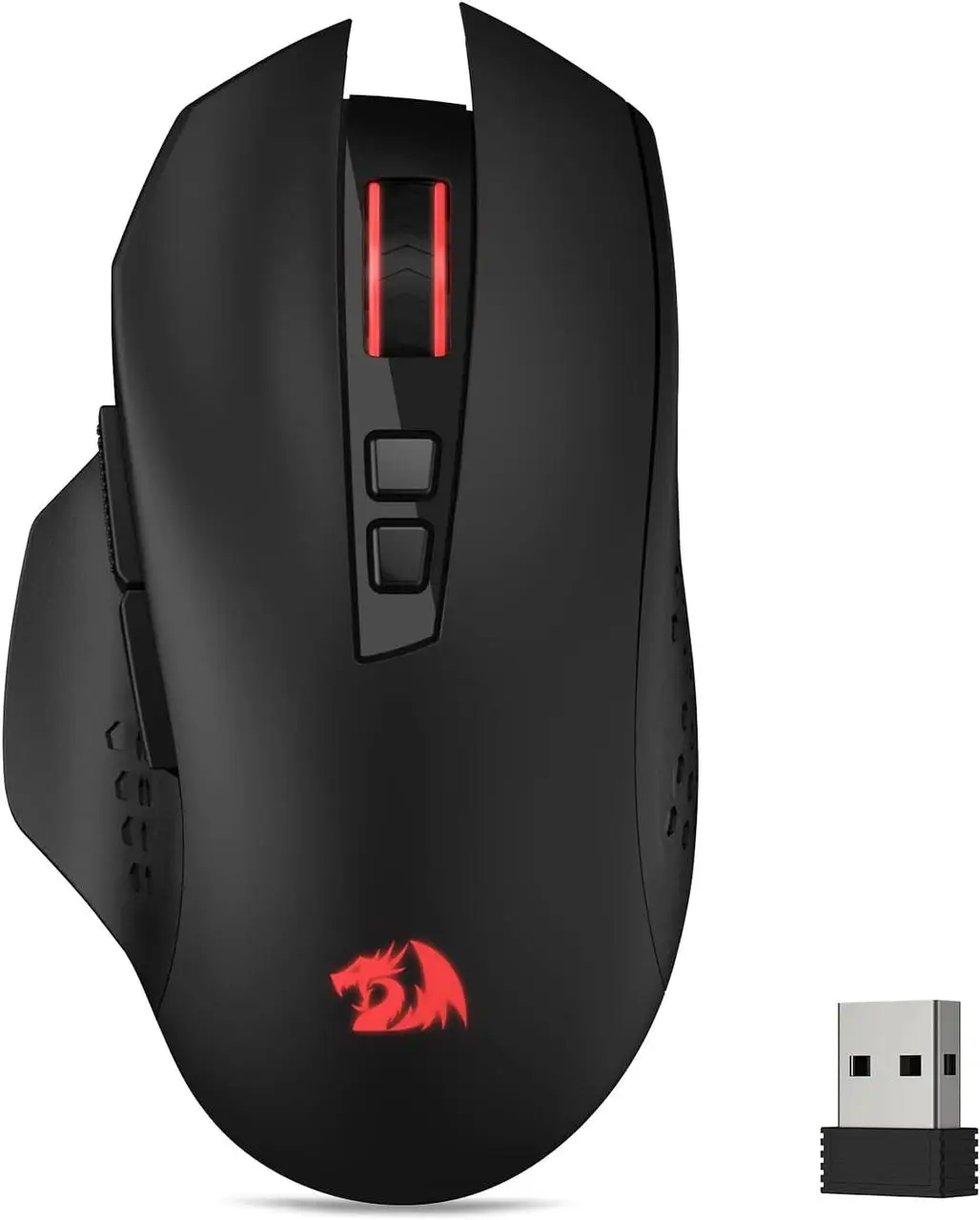
The Redragon M656 Gainer is the standout in this comparison for one reason: it is the only wireless mouse. Its 2.4 GHz nano receiver promises a stable, lag‑free connection, and the 87g weight (without battery) makes it one of the lighter mice in this group. The PAW3104 optical sensor from PixArt supports up to 4000 DPI across five levels (1000, 1500, 2000, 2400, 4000) and is rated for 45 IPS tracking speed and 15G acceleration — firmly placing it in the entry‑level category. The 500 Hz polling rate, while typical for a power‑saving wireless mouse, is half that of the wired competitors, which can result in a slightly less responsive feel in fast‑paced FPS games. Seven programmable buttons and dedicated software support are welcome extras at this price.
- 2
A trade‑off for cable‑free gaming — but not for competitive shooters
The M656 Gainer delivers on comfort and convenience: the ergonomic shape fits most right hands well, the red LED backlighting is subtle rather than distracting, and battery life with a single AA is decent thanks to the smart ECO sleep mode. The weak point is tracking consistency — at the PAW3104's limits, fast movements can feel imprecise rather than fluid, which is noticeable in tactical shooters where crosshair placement needs to be exact. The mechanical switches rated for 10 million clicks are standard for the segment and hold up fine. If wireless freedom matters more to you than absolute sensor performance, the M656 Gainer is a legitimate pick at this price — but CS2 and Valorant players chasing accuracy will be better served by the wired options in this comparison.
Pros and Cons: Redragon M656 Gainer
Pros
Wireless (2.4 GHz) — the only cordless mouse in the group
Lightweight at 87g (without battery)
PixArt PAW3104 sensor — a known entry‑level optical part
7 programmable buttons with macro support
Smart ECO sleep mode for extended battery life
Extremely affordable for a wireless gaming mouse
Cons
500 Hz polling rate — half that of wired competitors
45 IPS tracking speed limited for fast FPS flicks
Red LED only — no full RGB
No onboard memory
Conclusion
The Redragon M656 Gainer eliminates the cable but brings a budget sensor and 500 Hz polling. It's the best sub‑$20 wireless option for casual gaming, but competitive players will notice the difference.Verdict
One mouse is ready for ranked — the rest have something to hide Logitech G203 Lightsync
Logitech G203 Lightsync takes the crown in the ultra‑budget category for competitive shooters. It's the only mouse here with a genuine, well‑reviewed gaming sensor, onboard memory to keep your settings portable, and a light 85g frame that won't fight your wrist in Valorant or CS2. The metal spring button tensioning and Logitech's mature software ecosystem are bonuses that read like a mid‑range mouse, not a sub‑$20 unit.
Why the others fell short:
-
Razer DeathAdder Essential is a close second pick. Its 96g ergonomic shell and proven PAW3328 sensor are excellent for palm‑grip players who want comfort over absolute performance. The absence of onboard memory and single‑color LED keep it from the top, but it's still a safe bet for FPS beginners.
-
Redragon M656 Gainer is the wireless dark horse. It cuts the cord for a price that no other mouse in this group can match. But its 500 Hz polling rate and 45 IPS sensor are noticeable trade‑offs in competitive FPS. It is the best wireless option for casual gaming and a genuine value, but not the go‑to choice for ranked esports.
-
Redragon M602 is a fine casual mouse that dresses like a gaming mouse, and many users are satisfied with it for non‑competitive use. But in a direct comparison, its sensor, weight, and cable stiffness prevent us from recommending it for CS2 or Valorant at any rank where you want to improve.
Frequently Asked Questions
Most professional players use between 400 and 1600 DPI, combined with low in‑game sensitivity. Even a basic gaming sensor can handle these ranges well. What matters far more than maximum DPI is tracking accuracy at the DPI you actually use — and that's where sensor quality (IPS, acceleration, and lack of smoothing) separates the usable mice from the problematic ones.
Yes. Office sensors have a low malfunction speed, typically under 50 IPS. When you flick quickly — a fast 180‑degree turn, for example — the sensor may stop tracking and your aim stays in place or veers unpredictably. This phenomenon, called spinning out, is the number one reason to avoid ultra‑cheap mice for FPS games. The Logitech G203 and Razer DeathAdder Essential have gaming‑grade sensors that are immune to spin‑outs at normal human speeds.
Weight directly impacts how quickly and accurately you can make micro‑corrections. A heavy mouse (130g+) carries more momentum, meaning small, precise movements require more force to start and stop. In Valorant and CS2, where pixel‑perfect crosshair placement is king, a lighter mouse — under 100g — reduces wrist fatigue and improves consistency. The Logitech G203 (85g) and the Redragon M656 (87g without battery) are the best in this regard.
It will move your cursor, but we wouldn't recommend it for competitive FPS. The combination of an unknown sensor with a low malfunction speed and a heavy chassis mean you will likely encounter tracking issues during the fast mouse movements that CS2 demands. It's a fine mouse for its price for casual use, RPGs, MMOs, or office work, but not for a shooter where you expect to improve your rank.
Onboard memory is a feature Logitech includes even on its budget line — it stores your DPI presets and lighting settings inside the mouse itself. The DeathAdder Essential, to keep its price low, offloads this to Razer Synapse software. This means that on the Razer, if you plug the mouse into a different PC or Synapse crashes, your custom DPI steps will be lost until the software loads. For a LAN event or a secondary PC, the G203's onboard memory is a real advantage.
For casual wireless gaming, yes. The M656 Gainer brings 2.4 GHz connectivity at a remarkably low price, and its 87g weight keeps it nimble. However, the PAW3104 sensor's 45 IPS tracking speed and 500 Hz polling rate mean that very fast flicks can result in tracking inaccuracies. If you play CS2 or Valorant competitively and need absolute precision, the wired Logitech G203 or Razer DeathAdder Essential are better suited. If cables really get in your way and your gaming is more casual, the M656 is the best wireless option at this price.
The Logitech G203 Lightsync remains the strongest all‑rounder: it has the best sensor, the lowest weight, onboard memory, and is backed by a solid track record of reliability. The Razer DeathAdder Essential is a close second — pick it if you prefer a larger, right‑handed ergonomic shape and comfort is your priority. The Redragon M656 Gainer is the best choice if you want to go wireless on a tight budget, accepting some sensor compromises. The Redragon M602 is the most feature‑rich and the cheapest, but its sensor makes it a risk for competitive FPS play. Reserve it for casual or office use.
The Logitech G203 suits fingertip and claw grips best due to its compact 116mm length and 85g weight. The Razer DeathAdder Essential's taller hump and 127mm length make it the better fit for palm grip players with medium-to-large hands. The Redragon M602 at 123.5mm fits most right-handed palm grips but its weight makes prolonged claw gripping tiring.
You May Also Like
- Best Ultra-Budget LGA1700 Motherboards Under $80: ASRock H610M vs GIGABYTE S2H vs MSI H610M
- Best Ultra-Budget Gaming Mousepads Under $5 for CS2 & Valorant (2026)
- Valorant Mouse Settings Guide 2026: DPI, eDPI & Sensitivity Explained
- High LOD Tape Trick: How to Lower Sensor Lift-Off Distance for CS2 & Valorant
- CS2 Mouse Settings Guide 2026: DPI, eDPI & Sensitivity Explained