hardware
Ultra-Budget GPU under $300 Battle 2026: Best Cards for CS2 & Valorant
NVIDIA, AMD, or Intel on a tight budget? We test the RTX 5050, RX 7600, and Arc B570 to find which delivers the highest FPS in CS2 and Valorant without breaking the bank.
- 10 min read
In 2026, the budget GPU market has finally stabilized. With the release of NVIDIA's Blackwell architecture and Intel's Battlemage, gamers can now get high-frame-rate 1080p performance for under $300. We’ve tested the new RTX 5050, the reliable RX 7600, and the surprising Intel Arc B570 to see which one offers the best value for competitive and AAA gaming.
Info
Everything you need to know about GPUs in 2026
Video RAM (VRAM) is the dedicated memory your GPU uses to store textures and map data. Modern games at 1080p now require at least 8GB for stability.
8GB+ VRAM is the new standard for 2026 to avoid stuttering in new AAA titles, though 8GB is still fine for esports like CS2 and Valorant.
Key GPU Tech in 2026:
- Frame Generation - AI-generated frames that make gameplay feel much smoother.
- Ray Tracing - Realistic lighting and reflections (best on NVIDIA 50-series).
- AV1 Encoding - High-quality streaming with low bandwidth impact.
How to maximize your GPU performance:
- Enable Resizable BAR in your BIOS for a 5-15% FPS boost Re-Size BAR Guide
- Install GPUs in the top PCIe slot for max bandwidth
- Use DisplayPort 2.1 for high-refresh 1080p/1440p monitors
- Use DDU to clean old drivers before upgrading
How to install a GPU:
Need help plugging in your new card? Check our universal installation guide.
GPU Install TutorialGPU Comparison: Key Specs & Features
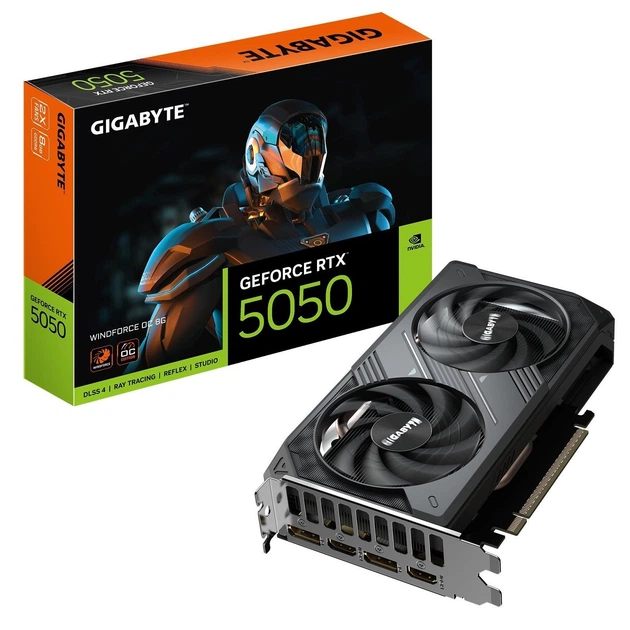
GIGABYTE NVIDIA GeForce RTX 5050 WINDFORCE OC Best choice | 8 GB GDDR6 | 2587 MHz | 130 W | PCIe 5.0 x8 | Check price on Amazon |
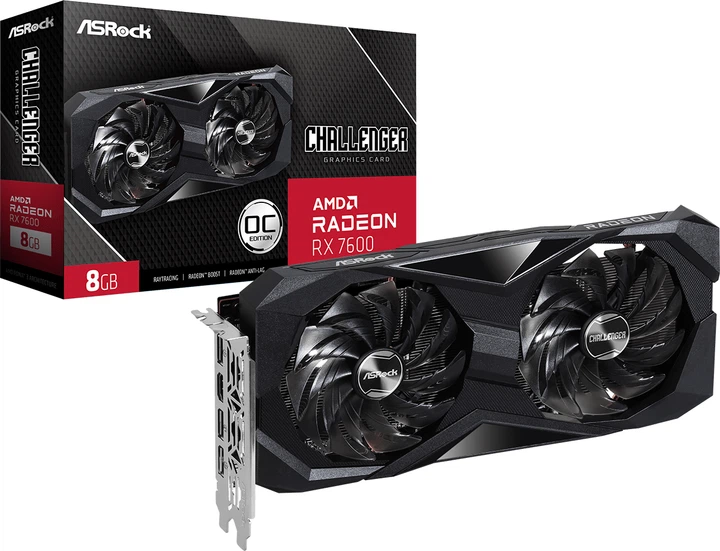
ASRock AMD Radeon RX 7600 Challenger OC | 8 GB GDDR6 | 2695 MHz | 165 W | PCIe 4.0 x8 | Check price on Amazon |
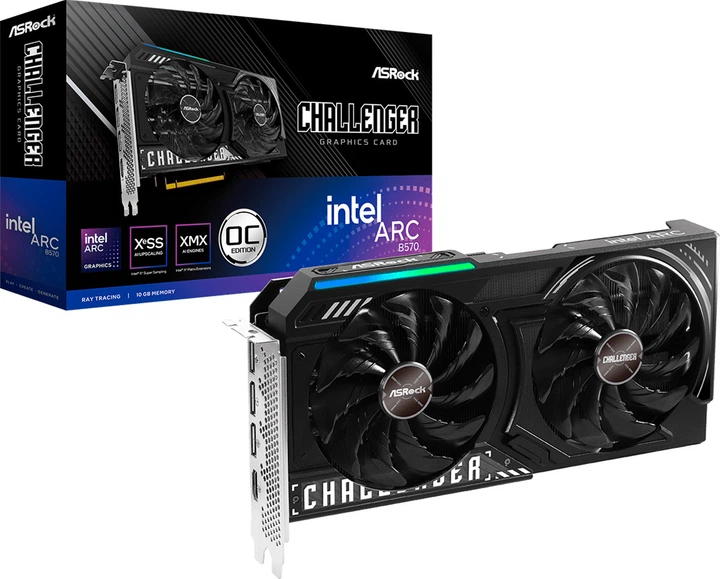
ASRock Intel Arc B570 Challenger OC | 10 GB GDDR6 | 2600 MHz | 150 W | PCIe 4.0 x8 | Check price on Amazon |
GIGABYTE NVIDIA GeForce RTX 5050 WINDFORCE OC Best choice
8 GB GDDR62587 MHz130 W TDPASRock AMD Radeon RX 7600 Challenger OC
8 GB GDDR62695 MHz165 W TDPASRock Intel Arc B570 Challenger OC
10 GB GDDR62600 MHz150 W TDP
* As an Amazon Associate I earn from qualifying purchases.
NVIDIA GeForce RTX 5050: The Latency Destroyer
* As an Amazon Associate I earn from qualifying purchases.
- 1
Competitive Gaming Powerhouse with DLSS 4 & Reflex 2
The RTX 5050 is NVIDIA's most aggressive entry into the budget segment yet. By integrating Reflex 2 — typically reserved for higher-tier cards — it slashes system latency to levels previously unseen at this price point. This makes it a top contender for VALORANT, Overwatch 2, and CS2 enthusiasts who demand sub-5ms response times. DLSS 4 Multi-Frame Generation works magic: even in demanding AAA titles like Cyberpunk 2077 or Black Myth: Wukong, you can max out settings and still push past 90 FPS at 1080p. The efficiency is remarkable — with a TDP of just 130W, it runs cool and quiet, saving you money on both PSU and cooling. For high-refresh 1080p gaming, this card punches well above its weight class.
- 2
Creator-Ready: AV1 Encoding & Rock-Solid Drivers
Streamers and content creators aren't left behind. The 8th-gen NVENC AV1 encoder delivers pristine quality at low bitrates — ideal for Twitch or YouTube livestreaming without sacrificing in-game FPS. NVIDIA's driver stack remains the gold standard; Game Ready drivers arrive day-one for major releases, and the 'plug-and-play' reliability means fewer headaches than competing budget options. The 8GB GDDR6 buffer is the minimum for 2026, but NVIDIA's memory compression algorithms stretch that effectively. Pair it with a modern CPU and you have a no-compromise 1080p streaming rig. Verdict: Best choice for latency-sensitive gamers who also want to stream.
Performance Comparison: NVIDIA GeForce RTX 5050 (1080p)
High Settings (CS2/Valorant: Competitive preset)
Performance Comparison: NVIDIA GeForce RTX 5050 (1440p)
High Settings (CS2/Valorant: Competitive preset)
Pros and Cons: NVIDIA GeForce RTX 5050
Pros
DLSS 4 with Multi-Frame Generation – game-changer for budget cards
Reflex 2 – lowest latency for CS2 and Valorant
Excellent efficiency – only 130W TDP
Mature drivers – plug and play, no tinkering
Great AV1 encoder for streaming (NVENC)
Cons
Limited to 8GB VRAM – future AAA games may struggle
Most expensive of the three
PCIe 5.0 x8 – but works fine on older slots
Conclusion
The RTX 5050 is the strongest all-around pick under $300 for CS2 and Valorant if you want the cleanest driver experience, lowest latency, and the best streaming stack. DLSS 4 and Reflex 2 give it a real edge for competitive players who care about responsiveness as much as raw FPS.AMD Radeon RX 7600: Pure Raster Value
* As an Amazon Associate I earn from qualifying purchases.
- 1
Raw Rasterization Champion for Esports
The RX 7600's raw raster performance closely matches the RTX 5050 in esports titles like CS2 and Valorant — all for a lower asking price. It operates at a higher boost clock (2695 MHz vs 2587 MHz) and draws more power (165W) to achieve competitive frame rates without relying on AI frame generation. The mature RDNA 3 architecture also plays nicely with older PCIe 3.0 motherboards, making it a drop-in upgrade for budget builders. However, its 8GB VRAM is now entry-level; future titles may require texture compromises. For competitive shooters where every frame matters, the RX 7600 offers unbeatable value for pure raster gaming.
- 2
Reliable Workhorse with FSR Ecosystem
AMD's FSR 3.1 is available in hundreds of games, providing a decent alternative to DLSS when you need extra performance. The card also includes an AV1 encoder, though its quality lags slightly behind NVIDIA and Intel. Driver support has matured significantly — no more early-adopter glitches. The higher TDP means you'll want at least a 500W PSU and decent case airflow. Overclocking headroom is modest (another 5-7% with good cooling). Bottom line: The RX 7600 is for gamers who want a straightforward, no-AI, high-FPS experience at 1080p and don't plan to keep the card past 2027–2028. If you're on a tight budget and play mostly esports titles, this card delivers maximum raw speed per dollar.
Performance Comparison: AMD Radeon RX 7600 (1080p)
High Settings (CS2/Valorant: Competitive preset)
Performance Comparison: AMD Radeon RX 7600 (1440p)
High Settings (CS2/Valorant: Competitive preset)
Pros and Cons: AMD Radeon RX 7600
Pros
Best value for the price
Identical raw FPS to RTX 5050 in CS2/Valorant
Mature, stable drivers – no surprises
Works on any system – no ReBAR required
Cons
Weaker upscaling (FSR) compared to DLSS 4
Higher power draw than RTX 5050 (165W)
Ray tracing performance is mediocre
AV1 encoder quality lags behind NVIDIA and Intel
Conclusion
The RX 7600 is the best raw-value option for buyers who just want strong native 1080p esports performance at the lowest price possible. It skips NVIDIA's premium features, but in CS2 and Valorant it still delivers excellent frame rates per dollar with mature, hassle-free drivers.Intel Arc B570: Future-Proof VRAM
* As an Amazon Associate I earn from qualifying purchases.
- 1
10GB VRAM — The Longevity Advantage
The Arc B570 disrupts the budget segment with 10GB of GDDR6 memory — 25% more than its rivals. This extra framebuffer is a game-changer for modern titles like The Last of Us Part I, Hogwarts Legacy, and upcoming Unreal Engine 5 games that easily exceed 8GB at 1080p with high textures. Where 8GB cards stutter or drop textures to low, the B570 maintains smooth frame pacing. The 2600 MHz boost clock and 150W TDP sit comfortably between the RTX 5050 and RX 7600. For gamers who want to keep their GPU for 4+ years, the extra VRAM provides tangible future-proofing. Intel's XeSS upscaling has also improved dramatically — at Quality mode, it rivals DLSS 2 in image fidelity. This card is the smart buy for texture-hungry AAA gaming.
- 2
Creator's Secret Weapon: Superior AV1 & Multi-Tasking
Intel leads the AV1 encoding race — the B570's encoder matches or beats NVIDIA's NVENC in quality and bitrate efficiency, making it a favorite for streamers and video editors on a budget. The 10GB VRAM also helps when you have multiple Chrome tabs, Discord, OBS, and a game running simultaneously. The catch: you absolutely must enable Resizable BAR and use a relatively modern CPU (Intel 12th gen or AMD Ryzen 5000 series) to unlock full performance. Without ReBAR, the B570 loses up to 30% of its speed. But when properly configured, it's a multi-tasking beast. The drivers are now stable — Intel has fixed the launch-year bugs. For users who mix gaming with content creation (YouTube, Twitch, Premiere Pro), the B570 offers the most balanced feature set under $300. It's our top pick for streamers on a budget.
Performance Comparison: Intel Arc B570 (1080p)
High Settings (CS2/Valorant: Competitive preset)
Performance Comparison: Intel Arc B570 (1440p)
High Settings (CS2/Valorant: Competitive preset)
Pros and Cons: Intel Arc B570
Pros
10GB VRAM – future-proof for 1080p and entry 1440p
Excellent AV1 encoder – great for streamers and editors
Very attractive price for 10GB memory
Competitive performance per dollar in non-CS2 titles
Cons
Requires Resizable BAR – older systems need not apply
Lower FPS in CS2 than both competitors
Higher power draw than RTX 5050 (150W)
Not for beginners who just want things to work
Conclusion
The Arc B570 is the smartest budget choice for users who want extra VRAM and strong AV1 encoding without moving above the $300 class. It is less beginner-friendly than the others, but in a modern ReBAR-enabled system it offers the best long-term memory headroom and a very compelling creator-focused feature set.Verdict
Best ultra-budget GPU for CS2/Valorant in 2026: NVIDIA GeForce RTX 5050
The RTX 5050 wins thanks to DLSS 4, Reflex 2, and rock‑solid drivers – it just works for both competitive shooters and heavy single‑player games.
🎯 Best for different needs:
-
AMD Radeon RX 7600 – best value pick overall. You lose DLSS, but raw CS2/Valorant performance is nearly identical. Perfect if every dollar counts.
-
Intel Arc B570 – shines for streamers and video editors who need 10GB VRAM and a strong AV1 encoder – all for a very attractive price. Only recommended if your system supports Resizable BAR and you’re comfortable with an ecosystem that may occasionally require manual configuration for older titles.
Frequently Asked Questions
For 1080p gaming, yes – but the margins are shrinking. In 90% of modern titles (Call of Duty, Cyberpunk, Fortnite), 8GB handles high textures without issues. However, heavy AAA games like The Last of Us, Hogwarts Legacy, or Avatar: Frontiers of Pandora will require dropping textures to ‘high’ or ‘medium’ to avoid stutters. The Arc B570 with 10GB gives more breathing room, but only if your system supports Resizable BAR. Bottom line: 8GB is fine for 2 more years at 1080p; 10GB is future-proofing on a budget.
No. The RTX 5050 uses PCIe 5.0 x8, but it works perfectly on older PCIe 4.0 and even PCIe 3.0 slots. Performance loss is less than 1-2% in gaming. You can slot it into any motherboard with a physical x16 slot.
Intel's Arc B570 offers the highest AV1 encoding quality in the budget class, edging out NVIDIA's excellent NVENC encoder in pure image fidelity – ideal for streamers who want the best possible picture. However, NVIDIA delivers a more seamless plug-and-play experience with OBS and fewer driver quirks. AMD's RX 7600 encoder is usable but falls behind both in quality. Verdict: for pure quality, pick Intel; for hassle-free streaming, pick NVIDIA.
Not recommended. The Arc B570 requires Resizable BAR (ReBAR) to perform at its full potential. Without ReBAR, you lose 20-30% FPS even in esports titles. ReBAR is supported on Intel 10th gen+ and AMD Ryzen 5000+ (with latest BIOS). If your board lacks ReBAR, choose the RX 7600 or RTX 5050 instead.
Barely. Even the RTX 5050 with 4th-gen RT cores runs Cyberpunk 2077 at 30-40 fps with ray tracing Medium (no DLSS). With DLSS Quality, you get 50-60 fps – playable but blurry. Intel and AMD are worse. In this price range, treat ray tracing as a bonus for older games like Control or Metro Exodus, not for 2026 AAA titles.
Yes, but with compromises. The RTX 5050 + DLSS Performance is the best bet – playable in most AAA games. The RX 7600 struggles without FSR, especially in VRAM-heavy titles. The Arc B570’s 10GB helps at 1440p, but driver overhead can cause occasional stutters. For consistent 1440p, you’d want a higher budget. For esports (Valorant, CS2, Overwatch), all three handle 1440p fine.
RTX 5050 (130W): 400W+. Arc B570 (150W): 450W+. RX 7600 (165W): 500W+ recommended...
The Arc B580 is one of the RTX 5050’s closest competitors in the entry-to-midrange GPU segment, although it typically sits slightly above the ultra-budget price tier. It stands out with 12GB of GDDR6 memory — compared to the 8GB found on cards like the RTX 5050 and RX 7600 — which helps it perform especially well at 1440p where VRAM capacity becomes more important. At 1080p, performance is generally competitive with the RTX 5050, while higher resolutions tend to favor the B580 more noticeably. Intel has also recently expanded support for XeSS 3 with Multi-Frame Generation, adding AI-based frame generation features to its newer Arc lineup. For buyers willing to move beyond strict entry-level budgets, the B580 can be a compelling option for longer-term 1440p gaming, while the Arc B570 remains a more affordable way to get similar Intel architecture and 10GB of VRAM.
AMD Radeon RX 7600. It has mature drivers, works on any PCIe system, doesn’t require ReBAR, and delivers competitive FPS at the lowest price. If you care about DLSS 4, better streaming, and can stretch your budget a little, get the RTX 5050. Choose the Intel Arc B570 only if you have a modern motherboard with ReBAR and appreciate its extra VRAM and strong AV1 encoding – it’s a great card once properly set up, even if a few older games may need a quick settings tweak.
You May Also Like
- Best Ultra-Budget Gaming Arm Sleeves for CS2 & Valorant
- Best Ultra‑Budget Gaming Headsets under $20 for CS2 & Valorant: ZIUMIER Z66 vs IMYB A36 vs Tatybo XW1
- Best Ultra-Budget gaming PC builds for CS2 & Valorant in 2026 with Ryzen 5600G vs 8600G comparison
- Best Ultra-Budget Gaming Monitors Under $100 for CS2 & Valorant (2026)
- Best Ultra-Budget 240Hz Monitors Under $120 for CS2 & Valorant (2026)