peripherals
Best Wireless Gaming Mouse Under $50 (CS2 & Valorant)
We compare the specs of four sub-$50 wireless gaming mice: PAW3395 tracking, wireless platform, shell weight, and grip ergonomics for CS2 and Valorant.
- 8 min read
Choosing the best wireless gaming mouse under $50 for competitive tactical FPS titles like CS2 and Valorant requires looking past marketing buzzwords and focusing on tracking specs, wireless platform, shell weight, and grip ergonomics. In low-time-to-kill environments, inconsistent wireless packet delivery or a sensor that runs out of headroom during fast swipes can cost rounds. Until recently, sub-$50 wireless pointers were dominated by heavy AA-battery platforms like the Logitech G305 Lightspeed. Modern manufacturing has shifted the baseline. Enthusiast-grade optical tracking powered by the PixArt PAW3395 sensor (650 IPS tracking speed, 50G acceleration) is now common in competitive sub-$50 builds, alongside efficient Nordic-based wireless platforms and sub-60g shell weights without honeycomb cutouts. We compared the published specifications of four distinct wireless mice representing different grip profiles and internal architectures: the VXE Dragonfly R1 Pro, Attack Shark X3, Darmoshark M3, and the legacy Logitech G305.
Info
Esports Hardware Mechanics: Sensor Tracking & Shell Dynamics
Sensor tracking headroom and wireless click latency define competitive reliability in tactical shooters. In CS2 and Valorant micro-angle holding, mouse movement and switch actuation must execute without added delay, smoothing artifacts, or sensor spin-out during high-velocity swipes.
Why the PAW3395 and modern MCUs replaced the 99g standard: Older wireless designs relied on heavy AA alkaline batteries (adding roughly 20-25g toward the rear of the shell) and mechanical switches rated for only 10 million clicks. Modern sub-$50 builds feature integrated lithium cells, more centered balance, and mechanical switches rated for up to 80 million clicks.
Four technical variables to verify before purchasing a sub-$50 wireless mouse:
- Microcontroller Unit (MCU) Processing Quality - The sensor captures raw surface counts, but the MCU handles wireless packet framing and USB reports. Nordic microcontrollers such as the nRF52840 are widely used in budget mice for stable 1000Hz polling and low power draw, while budget chips like the BK3633 are a cheaper option. Not every vendor publishes the exact MCU, so check the spec sheet.
- Structural Shell Rigidity vs Weight - Ultralight builds around 50g can suffer from sidewall flex. If squeezing the thumb rest triggers internal side-switch actuation, structural integrity is compromised.
- Main Switch Debounce & Travel - Tactical shooters require distinct single taps with rapid release. Huano Pink Dot and Kailh GM 8.0 switches are tactile, mechanical options rated for 80 million clicks, with a crisper feel than silent switches.
- Skate Material & Glide Friction - PTFE skates reduce initial static friction, allowing precise 1-pixel micro-corrections when holding long distances on Mirage or Ascent. Pure (virgin) PTFE is preferred over dyed or coated variants.
Three tactical tips for wireless mouse tuning in CS2 and Valorant:
- Use the included USB extender to place the 2.4GHz receiver within about 20 cm of your mousepad with a clear line of sight, away from USB 3.0 ports and your Wi-Fi router, to avoid 2.4GHz interference.
- Treat Motion Sync as optional: it aligns sensor reports with USB polling and adds roughly half a polling interval of latency (about 0.5 ms at 1000Hz). Use it only if your mouse software offers it and you prefer steadier report timing.
- Synchronize your sensitivity across titles using the conversion ratio: Valorant eDPI = CS2 eDPI / 3.18.
Sub-$50 Wireless Gaming Mice Specs & Competitive Performance
VXE Dragonfly R1 Pro Wireless Gaming Mouse Esports Claw Benchmark | PixArt PAW3395 650 IPS / 50G | Nordic nRF52840 1000 Hz | 48 g 120.6 x 64.0 x 37.8 mm | Huano Ice Berry Pink Dot (80M) PTFE (spare set included) | 250mAh Lithium (up to 75h at 1000Hz) Dual-Mode (2.4GHz / Type-C) | Check price on Amazon |
Attack Shark X3 Tri-Mode Superlight Mouse Accessible Entry Pick | PixArt PAW3395 650 IPS / 50G | BK3633 1000 Hz | 49 g 118.5 x 61.0 x 39.7 mm | Kailh GM 8.0 Black Mamba (80M) 100% Virgin-grade PTFE | 300mAh Lithium (up to 200h, manufacturer lab rating) Tri-Mode (2.4GHz / BT 5.2 / Type-C) | Check price on Amazon |
Darmoshark M3 Wireless Esports Mouse Best for Large Hands | PixArt PAW3395 650 IPS / 50G | Nordic (model not published) 1000 Hz | 58 g 129.5 x 66.0 x 39.0 mm | Kailh GM 8.0 Black Mamba (80M) 100% Virgin-grade PTFE | 500mAh Lithium (up to 83h) Tri-Mode (2.4GHz / Bluetooth / Type-C) | Check price on Amazon |
Logitech G305 Lightspeed Wireless Gaming Mouse Legacy Baseline | Logitech HERO 12K 400 IPS / 40G | Proprietary LIGHTSPEED RF 1000 Hz | 99 g 116.6 x 62.1 x 38.2 mm | Omron Mechanical (10M) PTFE | 1x AA Alkaline (up to 250h in performance mode) 2.4GHz Lightspeed Wireless | Check price on Amazon |
VXE Dragonfly R1 Pro Wireless Gaming Mouse Esports Claw Benchmark
Sensor: PixArt PAW3395Weight: 48 gMCU: Nordic nRF52840Battery: 250mAh Lithium (up to 75h at 1000Hz)Medium hands / Aggressive clawCheck price on AmazonAttack Shark X3 Tri-Mode Superlight Mouse Accessible Entry Pick
Sensor: PixArt PAW3395Weight: 49 gMCU: BK3633Battery: 300mAh Lithium (up to 200h, manufacturer lab rating)Small to medium hands / Claw & fingertipCheck price on AmazonDarmoshark M3 Wireless Esports Mouse Best for Large Hands
Sensor: PixArt PAW3395Weight: 58 gMCU: Nordic (model not published)Battery: 500mAh Lithium (up to 83h)Large hands (>18.5 cm) / Palm & relaxed clawCheck price on AmazonLogitech G305 Lightspeed Wireless Gaming Mouse Legacy Baseline
Sensor: Logitech HERO 12KWeight: 99 gMCU: Proprietary LIGHTSPEED RFBattery: 1x AA Alkaline (up to 250h in performance mode)Small to medium hands / FingertipCheck price on Amazon
* As an Amazon Associate I earn from qualifying purchases.
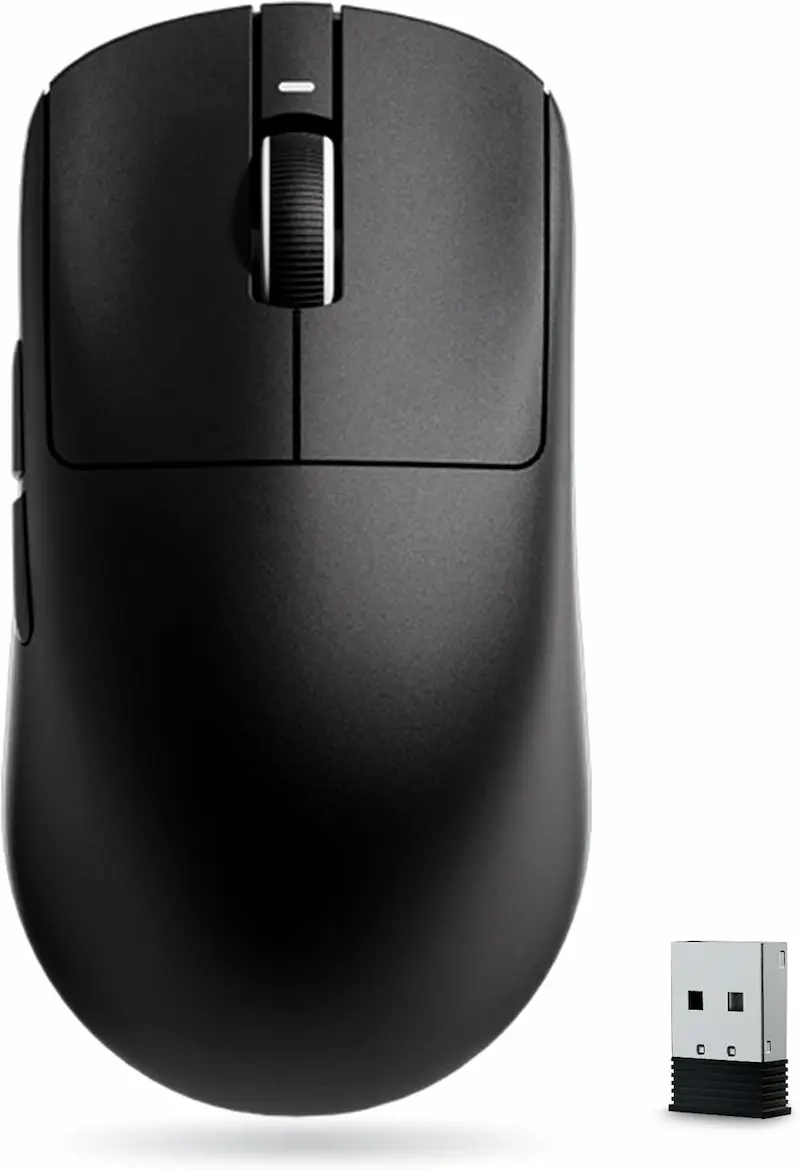
VXE Dragonfly R1 Pro: The Claw-Grip Esports Standard
* As an Amazon Associate I earn from qualifying purchases.
- 1
PixArt PAW3395 with Nordic nRF52840 MCU & 48g Frame
The VXE Dragonfly R1 Pro is built for competitive claw and fingertip aimers. It combines the flagship PixArt PAW3395 sensor (650 IPS tracking, 50G acceleration) with a Nordic nRF52840 MCU for stable 1000Hz wireless polling out of the box. The R1 Pro also supports up to 4000Hz, but that requires a separate 4K receiver sold apart from the mouse. At 48g, it is the lightest mouse in this comparison.
- 2
Pronounced Rear Hump & Huano Ice Berry Switches
Measuring 120.6 x 64.0 x 37.8 mm, the symmetrical chassis has a pronounced rear hump that supports the base of the palm during counter-strafing. Huano Ice Berry Pink Dot mechanical switches are rated for 80 million clicks. Its 250mAh battery is rated for up to 75 hours at 1000Hz. Connectivity is 2.4GHz or wired USB-C, with no Bluetooth.
Pros & Cons: VXE Dragonfly R1 Pro
Pros
PixArt PAW3395 sensor (650 IPS, 50G acceleration)
Nordic nRF52840 MCU for a stable low-latency 2.4GHz link
Lightest mouse in the group at 48g with a balanced symmetrical shell
Huano Ice Berry Pink Dot switches rated for 80M clicks
Rated up to 75 hours at 1000Hz; spare skates and grip tape in the box
Cons
Small 250mAh battery compared with the 500mAh Darmoshark M3
4000Hz polling requires a separate 4K receiver
No Bluetooth; 2.4GHz and wired only
Conclusion
On paper, the VXE Dragonfly R1 Pro is the strongest sub-$50 option for tactical FPS. The PixArt PAW3395 and Nordic nRF52840 MCU give it a top-tier sensor and wireless platform, and the 48g shell with a pronounced rear hump anchors the base of the palm during rapid counter-strafing. The main trade-offs are the 250mAh battery (rated for up to 75 hours at 1000Hz), the lack of Bluetooth, and the extra cost of the optional 4K receiver if you want 4000Hz polling.Attack Shark X3: Accessible Featherweight Performance
* As an Amazon Associate I earn from qualifying purchases.
- 1
49g Symmetrical Frame at the Lower Price Spectrum
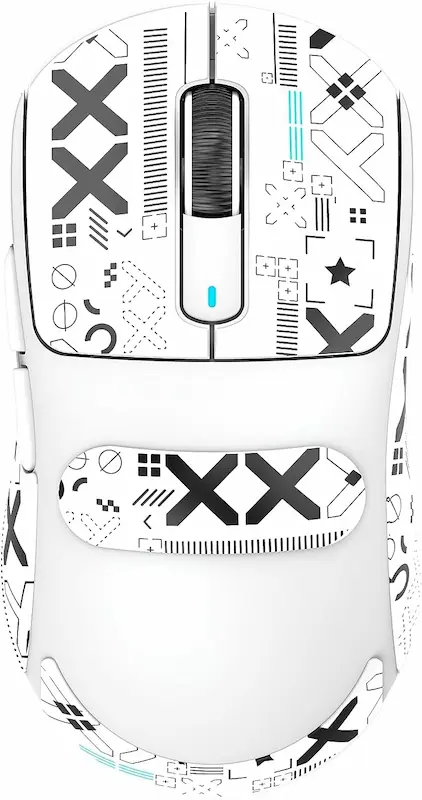
The Attack Shark X3 is the most accessible entry option among modern PAW3395 mice. It has a 49g (+/-3g) symmetrical chassis (118.5 x 61.0 x 39.7 mm) without holes in the shell and a 300mAh battery. The manufacturer rates it at up to 200 hours under laboratory conditions, so expect noticeably less at 1000Hz in real use. Tri-mode connectivity (2.4GHz, Bluetooth 5.2, and USB-C wired) offers versatile deployment.
- 2
Kailh GM 8.0 Switches & Build Compromises
Actuation is handled by Kailh GM 8.0 Black Mamba switches rated for 80 million clicks. The X3 runs on a BK3633 MCU and is capped at 1000Hz polling (higher polling requires the heavier X3 Pro). Some owner reviews mention a slick shell finish with sweaty hands and slight sidewall flex under firm thumb pressure, so grip tape is a sensible add-on.
Pros & Cons: Attack Shark X3
Pros
Most accessible price point for a true PAW3395 sensor mouse
Very light 49g symmetrical frame without surface holes
Tri-mode connectivity: 2.4GHz, Bluetooth 5.2, and USB-C
300mAh battery, manufacturer-rated up to 200 hours (lab conditions)
Cons
Some owners report a slippery shell finish with sweaty hands
Some owners report slight sidewall flex under heavy thumb pressure
Polling capped at 1000Hz (higher polling needs the heavier X3 Pro)
Budget BK3633 MCU instead of a Nordic chip
Conclusion
The Attack Shark X3 offers the lowest cost of entry among true PAW3395 ultralights. At 49g, it is easy on the wrist during long sessions. The trade-offs are a budget BK3633 MCU, a 1000Hz polling cap, and build compromises some owners mention, such as a slick shell finish and slight sidewall flex. It serves as an accessible gateway, but it is less refined on paper than the Nordic-based VXE R1 Pro.Darmoshark M3: Full-Size Ergonomics for Low-eDPI Arm Aimers
* As an Amazon Associate I earn from qualifying purchases.
- 1
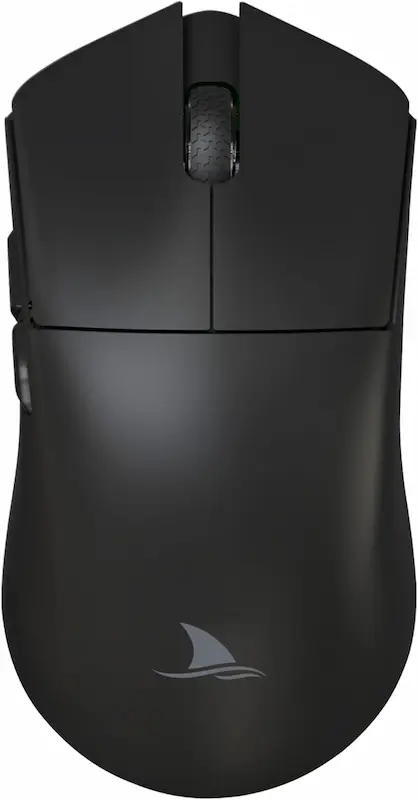
Spacious 129.5 mm Shell at 58g
Most ultralight mice downsize dimensions to hit target gram counts. The Darmoshark M3 takes the opposite approach: a full-sized 129.5 x 66 x 39 mm frame catering to large hands (>18.5 cm) and palm or relaxed-claw grips, at a lean 58g without holes in the shell. It uses a PAW3395 sensor (650 IPS, 50G). The shape is symmetrical, but the side buttons are on the left side only.
- 2
500mAh Endurance & Kailh GM 8.0 Switches
A 500mAh lithium battery is rated for up to 83 hours. The main buttons use Kailh GM 8.0 switches rated for 80 million clicks. This original M3 tops out at 1000Hz polling; the M3 4K is a different, heavier model (66g) with TTC Gold switches and an 800mAh battery, so make sure you buy the right version.
Pros & Cons: Darmoshark M3
Pros
Full 129.5 mm dimensions tailored for large hands (>18.5 cm)
58g chassis with no holes in the shell, light for its size
500mAh lithium battery rated for up to 83 hours
Kailh GM 8.0 switches rated for 80M clicks
Cons
Side buttons on the left side only, so not fully ambidextrous
Polling limited to 1000Hz on this original model
Unwieldy for small hands (<17 cm) and strict fingertip grips
Conclusion
The Darmoshark M3 fills a clear niche: a 58g mouse built with full 129.5 mm proportions for large hands (>18.5 cm) and low-eDPI arm aimers. Its 500mAh battery is rated for up to 83 hours between charges. On the downside, the side buttons are on the left side only, polling tops out at 1000Hz, and it is the heaviest of the modern PAW3395 options here. For large-handed claw or palm aimers, it remains the primary ergonomic option.Logitech G305 Lightspeed: The Outdated Heavyweight Standard
* As an Amazon Associate I earn from qualifying purchases.
- 1
HERO 12K Sensor & Proven Lightspeed RF Reliability
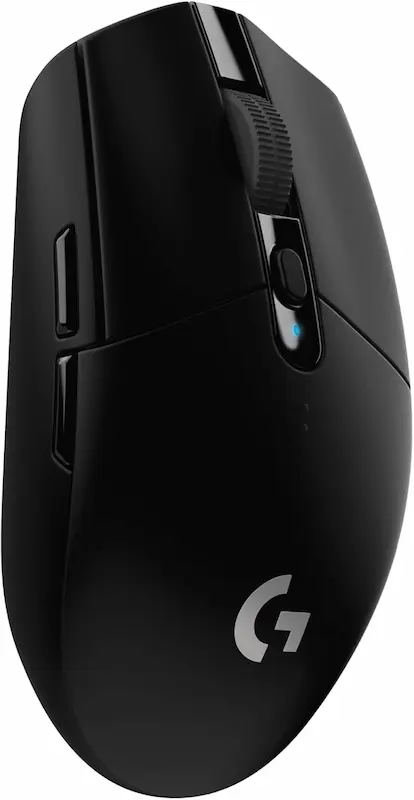
The Logitech G305 Lightspeed remains a staple baseline in budget gaming discussions. Its HERO sensor (12,000 DPI, 400 IPS, 40G) and proprietary Lightspeed 2.4GHz connection are known for stable wireless performance. Running on a single AA battery, it is rated for up to 250 hours in performance mode.
- 2
99g Rear-Biased Weight & 10M Omron Switches
At 99g with the AA cell installed, the G305 weighs roughly double any other mouse here. The mass sits over the rear battery compartment, increasing rotational inertia during fast flicks. Its mechanical switches are rated for only 10 million clicks, and double-click issues after extended use are a commonly reported complaint.
Pros & Cons: Logitech G305 Lightspeed
Pros
Dependable proprietary Lightspeed 2.4GHz protocol
Up to 250 hours of gameplay on a single standard AA battery
Accurate HERO optical sensor
Widely available, with a large aftermarket and mod community
Cons
Heavy 99g total weight adds stopping inertia
Rearward weight bias over the battery compartment
Omron mechanical switches rated for only 10M clicks, with double-click complaints
No USB-C port; relies on a disposable or rechargeable AA battery
Conclusion
The Logitech G305 offers dependable Lightspeed wireless and up to 250 hours of battery life from a single AA cell, but its 99g mass is an outdated handicap in 2026. The rear-shifted weight balance works against rapid target switching, and its 10M-rated mechanical switches are a known weak point. It serves as a durable office-gaming hybrid, but it cannot compete with modern 48-58g PAW3395 platforms in competitive lobbies.Verdict
The Verdict: Best Wireless Gaming Mouse Under $50 for CS2 & Valorant VXE Dragonfly R1 Pro Wireless
The VXE Dragonfly R1 Pro takes first place as the premier competitive wireless mouse under $50 for tactical FPS. Combining the flagship PixArt PAW3395 sensor, a Nordic nRF52840 MCU, Huano Ice Berry Pink Dot switches, and the lowest weight in the group (48g) with a pronounced rear hump, it has the best spec sheet for high-rank CS2 Premier and Valorant Competitive lobbies.
🎯 Best recommendations by grip style and hand dimension:
-
VXE Dragonfly R1 Pro — The competitive claw-grip benchmark. Its 48g frame, pronounced rear hump, and Nordic processing make it the strongest pick for aggressive claw and fingertip aimers holding narrow tactical angles.
-
Darmoshark M3 — The best full-size choice for large hands. At 129.5 mm in length and 58g with a 500mAh battery, it accommodates palm and relaxed-claw aimers with hands exceeding 18.5 cm who find modern compact mice uncomfortably cramped.
-
Attack Shark X3 — The accessible featherweight entry. Providing true PAW3395 tracking and a 49g symmetrical frame at the lowest price point in the group, it is an accessible option, provided you accept a budget MCU, a 1000Hz cap, and a shell that may benefit from grip tape.
-
Logitech G305 Lightspeed — The legacy durability fallback. While its 99g weight, rear-heavy balance, and 10M-rated Omron switches are outdated for top-tier tactical shooters, its 250-hour battery life on a single AA cell remains practical for mixed office and casual gaming use.
💡 Mechanical insight:
In CS2 and Valorant, consistent crosshair placement relies on rapid deceleration. Moving from a 90g+ legacy platform to a 48-58g PAW3395 chassis noticeably reduces the mass you have to stop, which helps micro-correction speed without exceeding your budget.
Frequently Asked Questions
The PixArt PAW3395 offers 650 IPS maximum tracking speed (roughly 16.5 meters per second), 50G acceleration, and up to 26,000 DPI. That is far more headroom than tactical shooters demand, even for fast low-sensitivity flicks, and it is well above entry-level sensors with lower IPS and acceleration ratings. Motion Sync is possible on PAW3395 mice when the firmware implements it, but it is a firmware feature rather than a sensor guarantee.
It matters, but less visibly. While the optical sensor records spatial displacement, the MCU manages wireless packet framing, debounce timing, and USB transmission. Nordic microcontrollers like the nRF52840 (found in the VXE R1 Pro) are a common choice for stable 1000Hz polling and good power efficiency. Budget chipsets like the BK3633 in the Attack Shark X3 are a cheaper alternative, and not every vendor publishes its MCU at all.
Lower shell weight (48g to 58g here) reduces physical inertia. When stopping your crosshair on a head-level angle during a rapid flick, lower mass requires less muscular counter-force, which helps prevent overshooting. This is especially useful for low-eDPI players (e.g. 600-800 eDPI in CS2, or roughly 190-250 eDPI in Valorant, where Valorant eDPI = CS2 eDPI / 3.18) who execute wide arm sweeps across large pads.
For serious ranked competition, no. While its HERO sensor and wireless connection remain stable, its 99g mass with a standard AA battery is roughly double that of modern ultralights. Its rear-heavy balance works against fast flicks, and its mechanical switches are rated for only 10 million clicks, with double-click reports being a common complaint.
No. A stable 1000Hz polling rate gives a 1.0 ms report interval, which is already shorter than a single frame on a 240Hz to 360Hz display (about 4.2 ms to 2.8 ms). Higher polling rates bring diminishing returns, increase CPU load, and can reduce battery life, which may hurt 1% low FPS on weaker systems. On top of that, the VXE R1 Pro needs a separate 4K receiver for 4000Hz, and the Attack Shark X3 and original Darmoshark M3 are limited to 1000Hz.
Smooth-shell mice can lose traction during intense sessions when hands sweat. Applying thin aftermarket textured grip tape (0.3mm to 0.5mm polyurethane) usually resolves this without adding noticeable weight (roughly 1-2g total). The VXE R1 Pro ships with a grip tape set in the box.
You May Also Like
- Best Ultra-Budget XXL Mousepads for CS2 & Valorant under $10: Akduss, Naukay, and JOCYRN
- Budget Keyboard Tuning: The $2 Tape Mod for a Premium Sound and Feel
- PMW3325 vs PAW3311: Sensor Spinout Limits in CS2 & Valorant
- 4000Hz vs 8000Hz Polling Rate in CS2 & Valorant: Does It Hurt 1% Low FPS?
- Mouse Grip Styles & Hand Size Guide for CS2 & Valorant