Hardware & Aim Guide
Mouse Grip Styles & Hand Size: How to Pick the Right Mouse Shape
A comfortable, well-fitted shape matters before sensors and switches do. This guide covers hand measurements, a length-by-grip rule of thumb, and how hump position and height affect control in CS2 and Valorant.
- 9 min read
How to Measure Your Hand and Pick a Mouse Length
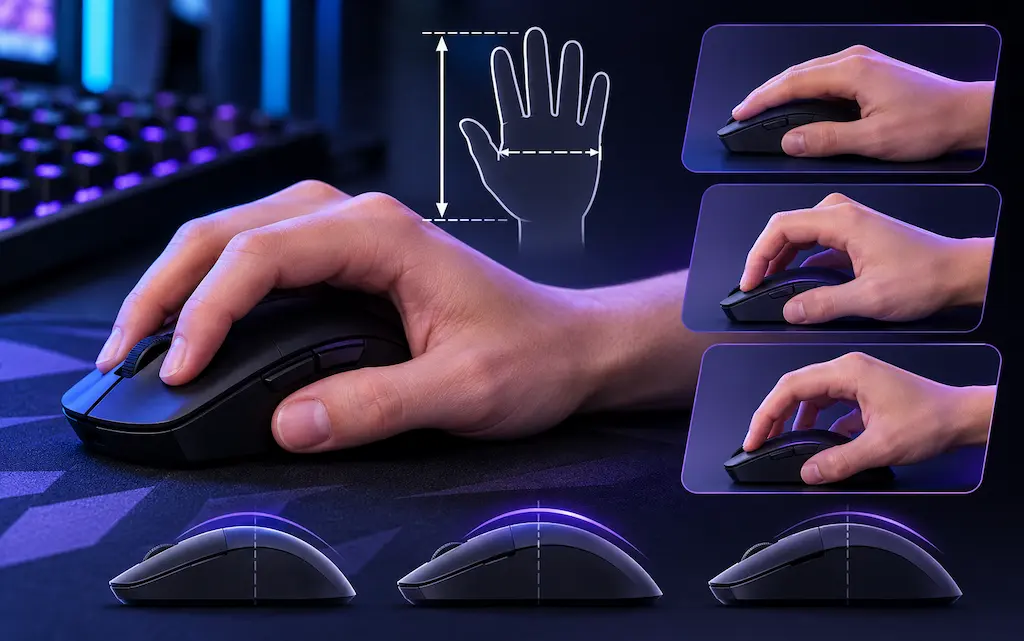
Before looking at mouse dimensions, get two numbers for your hand. Guessing by eye is how people end up with a mouse that is too big to micro-adjust or too small to hold comfortably during long sessions.
Measure with your hand flat on a table, in millimeters: 1. Length: from the base crease of your palm (where the wrist bends) to the tip of your middle finger. 2. Width: across the widest part of your palm at the knuckles, with the thumb not included.
Approximate working tiers (there is no official standard, and review sites draw the lines slightly differently): • Small: under about 170 mm length, under about 80 mm width • Medium: about 170 to 190 mm length, about 80 to 90 mm width • Large: over about 190 mm length, over about 90 mm width
Mouse length rule of thumb: Community fitting guides use mouse length as a share of hand length, and the share depends on your grip. Treat these as a starting range, not a law. Personal preference, finger length, and sensitivity all shift the result. • Fingertip: about 55% to 60% of hand length • Claw / relaxed claw: about 60% to 65% • Palm: about 65% to 70%
Target mouse length by hand length (reference table): • 170 mm hand: fingertip 94-102 mm, claw 102-111 mm, palm 111-119 mm • 180 mm hand: fingertip 99-108 mm, claw 108-117 mm, palm 117-126 mm • 190 mm hand: fingertip 105-114 mm, claw 114-124 mm, palm 124-133 mm • 200 mm hand: fingertip 110-120 mm, claw 120-130 mm, palm 130-140 mm
If your result falls near the edge of a range, let height and width break the tie. Most modern ambidextrous shells sit at 115 to 125 mm, which covers claw and fingertip for medium to large hands. Very small hands and very large hands have the fewest options, so check exact dimensions before buying.
Left-handed players should look at ambidextrous or symmetrical shells, since ergonomic right-hand shapes do not mirror.
The Three Main Grips: How They Work and What They Trade Off
Each grip trades stability for agility. In tactical shooters like CS2 and Valorant, first-bullet accuracy, crosshair placement, and short corrections decide most duels. Which parts of your hand touch the mouse determines which movements come easily. Many players sit between two styles (a hybrid grip, for example palm contact at the rear with arched fingers), so treat these as points on a spectrum rather than strict categories.
Claw Grip & Relaxed Claw
Widely Used in Tactical FPS
• Contact points: The base of the palm touches the rear of the shell and the fingers arch so the fingertips land on the main buttons. In a relaxed claw the arch is shallower and more of the finger pad contacts the buttons.
• Mechanics: The palm anchors the mouse for horizontal sweeps and the fingers handle small vertical and horizontal corrections.
• Trade-off: Needs a shell with enough rear support; very flat shells can feel unstable.
• Shell geometry that tends to work: a hump that sits mid-to-rear, a narrower waist for thumb and ring/pinky traction, medium height.
• Target mouse length: about 60% to 65% of hand length.
Shapes commonly chosen for claw grip:
- Endgame Gear OP1 8k v2 (118.2 x 60.5 x 37.2 mm, narrow centered hump)
- Vaxee NP-01S (about 119 x 63 x 37 mm, 57 mm grip width)
- Logitech G Pro X Superlight 2 (about 125 mm long, around 40 mm tall, neutral hump)
Fingertip Grip
Fast Small Corrections
• Contact points: Only the fingertips and thumb/ring/pinky contact the mouse. The palm does not touch the shell.
• Mechanics: Small movements come from finger joints, and larger sweeps still come from the wrist and forearm. Lifting the mouse is easy, and it is easy to make quick small corrections.
• Trade-off: Less contact means less stability on long, slow tracking movements, and your fingers do more work holding the mouse.
• Shell geometry that tends to work: low height (ideally under about 38 mm), a hump that does not press into the palm, short length, and flat or slightly tapered sides.
• Target mouse length: about 55% to 60% of hand length.
• Note: Very short shells (under about 105 mm) are rare, so small-handed fingertip users should check exact dimensions and read the review's grip-width figure.
Shapes commonly chosen for fingertip grip:
- Logitech G305 / G203 (about 116.6 x 62 x 38 mm, a fit for medium-to-large hands in fingertip)
- Vaxee NP-01S (about 119 x 63 x 37 mm)
- Endgame Gear OP1 8k v2 (118.2 x 60.5 x 37.2 mm)
Palm Grip
Comfort & Stable Crosshair
• Contact points: The whole palm and the full length of the fingers rest on the mouse.
• Mechanics: Wrist and forearm move the mouse as one unit, which tends to feel steady and comfortable. Fine corrections depend more on wrist and arm than on finger flexion.
• Trade-off: Quick small flicks are harder because the fingers are mostly flat on the buttons.
• Shell geometry that tends to work: a hump near the center-to-rear, taller profile (often 42 mm or more), and an ergonomic right-hand shape with a thumb rest.
• Target mouse length: about 65% to 70% of hand length.
Shapes commonly chosen for palm grip:
- Razer DeathAdder V3 (about 128 x 68 x 44 mm, ergonomic right-hand)
- Endgame Gear XM2 8k (about 122 x 66 mm, fuller rear than the OP1)
- Zowie EC series (EC1 large, EC2 medium, EC3-C small; match the size variant to your hand)
* As an Amazon Associate I earn from qualifying purchases.
Hump Position and Height: Why the Shell Profile Matters
Spec sheets list weight, sensor, and polling rate, but the top of the shell, meaning where the hump peaks and how tall it is, usually decides whether a mouse feels right.
1. Rear hump: When the highest point sits toward the back of the mouse, the shell fills the lower palm (the pad at the base of the hand). That gives the palm something to push against during fast horizontal swipes and keeps the mouse planted when you make small finger corrections. It is the most common recommendation for claw and relaxed claw.
2. Center hump: When the apex is near the middle (the Logitech Superlight family has a fairly neutral profile), palm contact is lighter and the shell works with more grips, including hybrid and fingertip. Pure claw users who want strong rear support sometimes find it less anchored.
3. Height: As a rough guide, a shell under about 38 mm leaves room between palm and shell, which suits fingertip and some relaxed claw users. Around 38 to 41 mm is the middle ground for claw. Above about 42 mm, such as the Razer DeathAdder V3 at roughly 44 mm, the shell fills the palm and fits palm grip best. Height is easy to overlook, and a mouse that is too tall or too low for your grip can feel wrong even when length and width are correct.
4. Grip width: The narrowest point of the shell (grip width) sets how your thumb and ring/pinky fingers hold it. Reviews from sites such as TechPowerUp and RTINGS often publish this number. Compare it across mice you already know you like.
CS2 vs. Valorant: Does Your Game Change the Best Shape?
Not much. Both games reward precise first-bullet placement, short bursts, and consistent crosshair height, so the same grip and fit rules apply. Two differences are worth knowing about:
• CS2 uses a learnable weapon spray pattern, so players practice pulling down on a rifle. A grip that gives you smooth vertical control (claw or hybrid, with a shell that does not block your fingers) helps. • Valorant leans more on tapping, short bursts, and stopping movement before shooting. Stable crosshair placement matters a lot, which suits claw and palm grips, but fingertip players use it too.
Sensitivity also interacts with grip. A lower sensitivity (big arm movements) tends to go with palm and claw. A higher sensitivity (small wrist and finger movements) tends to go with claw and fingertip. These are tendencies, not rules, so choose the grip you can aim with comfortably and adjust sensitivity after you settle.
Which Grip Do You Actually Use?
Most people use a hybrid. A quick way to check:
• Put your hand on your current mouse the way you normally do during a match, then look from the side. • If the whole palm touches the shell and your fingers lie flat: palm. • If the palm touches only at the back and your fingers arch: claw. • If the palm lifts off the shell and only fingers and the thumb/pinky hold it: fingertip.
Your grip can change when you change mouse shape, so a new mouse may feel different for the first one or two weeks. That is normal adaptation, not necessarily a bad fit.
Step-by-Step Mouse Fitting Workflow
1Measure Hand Length and Width
Use a rigid ruler with your hand flat. Measure from the base crease of the palm to the tip of the middle finger (length), then across the knuckles without the thumb (width). Record both in millimeters.
2Identify Your Grip and What Feels Wrong Today
Use the self-check above to find your grip. Then note what bothers you with your current mouse:
• If the mouse feels loose or your crosshair shifts when you hold an angle, look for a shell with more rear or palm support.
• If small corrections feel slow or your fingers hit a tall shell, look for a lower profile.
• If your hand cramps, check height, grip width, and how hard you squeeze the mouse before blaming the model.
3Calculate Your Length Range, Then Check Height and Width
Multiply your hand length by the grip percentages above. For example, a 180 mm hand gives about 99 to 108 mm for fingertip, 108 to 117 mm for claw, and 117 to 126 mm for palm. Then confirm that height fits your grip and that grip width lets your thumb and ring finger hold the sides without stretching.
Do not copy a mouse or grip just because a pro uses it. Hand size, finger length, and desk setup differ, and what works for them may not fit you. Fit the mouse to your hand.4Buy With a Return Window and Give It Time
Check the return policy before ordering. Use the new mouse for one to two weeks at your usual sensitivity before judging it, then decide whether to keep it. If two shapes come out close, pick the one whose height and grip width feel more natural.
Frequently Asked Questions
For most players, shape matters first, because a mouse that does not fit your hand is uncomfortable no matter how light it is. Weight is a personal preference, and many people adapt to a range of weights. Pick the shape first, then choose the lightest version of it that feels good to you.
None is best for everyone. Claw and relaxed claw are very common among tactical shooter players because they balance stability and finger control, but popularity does not mean a higher skill ceiling. Palm and fingertip grips are also used successfully. Choose the grip that feels natural and comfortable for your hand and sensitivity.
It is a poor match for most people. At around 128 mm long and 44 mm tall, it is designed for palm grip. Even for a 200 mm hand, 128 mm is about 64% of hand length, which sits in the claw-to-palm range rather than fingertip. If you prefer fingertip, look for a lower, shorter shell.
Common causes include a mouse that is too narrow or too tall for your grip, squeezing the mouse too hard, a desk or chair setup that strains your wrist, and long sessions without breaks. Try a shell with a different height or grip width, loosen your grip, and adjust your posture. Grip tape can improve traction so you squeeze less, but it is a small adjustment, not a fix for a poor fit. If pain, numbness, or tingling persists or gets worse, see a doctor.
No. Hand length gives a starting range, but grip style, finger length, hump position, height, and grip width all affect how a mouse feels. Use the length range to shortlist, then compare height and grip width from review measurements.
Many players need one to two weeks of regular use. Keep the same sensitivity, give your hand time to settle into the new shape, and judge the mouse after that adjustment period.
You May Also Like
- Mouse Tuning: Replacing Mouse Skates for Better Performance in CS2 & Valorant
- Mouse Grip Tape: Are Cheap Anti-Slip Stickers Worth It for CS2 & Valorant?
- PMW3325 vs PAW3311: Sensor Spinout Limits in CS2 & Valorant
- PixArt PAW3311 vs PAW3395 in CS2 & Valorant: Does 300 IPS Cause Spinouts on Low Sens?
- Best Ultra-Budget Gaming Mousepads Under $5 for CS2 & Valorant (2026)