peripherals
Best Ultra-Budget 240Hz Monitors Under $120 for CS2 & Valorant (2026)
Panel architectures, 4.17 ms frame cadence, published response-time specs, and engineering compromises in sub-$120 high-refresh displays.
- 7 min read
Competitive FPS demands clean motion feedback. At 240Hz, every refresh cycle lasts 4.17 ms (compared to 6.94 ms at 144Hz and 16.67 ms at 60Hz). During rapid counter-strafes and horizontal crosshair placement across Mirage mid or Ascent A main, sample-and-hold blur decreases noticeably. Sub-$120 240Hz panels are available in 2026, but aggressive price constraints introduce sharp hardware trade-offs. Manufacturers economize on panel grading, backlight uniformity, factory overdrive tuning, and stand ergonomics. Budget VA panels are generally slower on black-to-dark-gray transitions, which can show up as dark trailing behind fast-moving player models, while aggressive overdrive profiles on budget scalers can introduce overshoot and inverse-ghosting halos. This guide compares three ultra-budget 240Hz options: Dell SE2426HG, Sceptre C255B-FWT240, and Amzfast 240Hz. The analysis is based on manufacturer specifications, retailer listings, interface bandwidth limits, and general panel-technology behavior. We did not run hands-on measurements, so statements about motion performance describe what the specs and panel types suggest, not what we measured.
Info
FPS Hardware Checklist: Evaluating Sub-$120 240Hz Panels
Refresh rate and pixel response mechanics affect how sharp moving player models stay during aggressive peeks. At 240Hz, a new frame arrives every 4.17 ms (1000 ms / 240). If a panel's gray-to-gray (GtG) transitions are slower than that, pixels don't finish changing before the next refresh and motion smears. Many budget monitors advertise '1ms MPRT', which is not a GtG figure and often relies on backlight blur reduction that can dim the image. Sceptre and Amzfast publish only MPRT, so their real GtG response can't be read from the specs. Dell publishes GtG, but its 0.5 ms figure applies only in Extreme mode; Fast mode is rated at 5 ms GtG.
23.8-inch vs 24.5-inch vs 27-inch: Pixel density and target sizing at 1080p At 1920x1080, screen diagonal dictates pixel density. The Dell's 23.8-inch panel delivers 92.56 PPI, the 24.5-inch Sceptre 89.91 PPI, and the 27-inch Amzfast only 81.59 PPI. Target geometry spans the same pixel count, but each pixel is physically larger on the 27-inch panel, which can make distant sightlines look softer at typical 50–60 cm viewing distances.
Primary compromises in the ultra-budget 240Hz segment:
- Dark transition latency on budget VA matrices - Entry-level VA panels deliver high static contrast (3000:1 to 4000:1 on paper), but liquid crystals typically switch more slowly from black to dark gray. This can show up as dark trailing (black smearing) when checking shaded corners on maps like Inferno or Bind.
- Overdrive overshoot and inverse ghosting - Aggressive overdrive settings marketed as '0.5ms' or '1ms' push extra voltage to pixels. When tuned poorly, colors overshoot their target values and leave bright halos around moving silhouettes. Whether a given unit does this depends on its tuning, so test each mode yourself.
- Curved screens in competitive shooters - Both VA models here use 1500R curvature. Some players find a curve distorts straight lines and crosshair-to-wall geometry compared with a flat screen; others adapt quickly. If you play on a flat panel today, expect an adjustment period.
- Video port generation and VRR limits - Achieving 240Hz at 1080p requires DisplayPort 1.4 or HDMI 2.0+. DisplayPort is the safest route to stable Adaptive-Sync / G-Sync Compatible behavior on desktop GPUs, though HDMI VRR works on many setups.
- Rigid, basic stands - Stands in this price bracket are basic: the Dell offers tilt only (-5° to +21°) with no height, swivel, or pivot adjustment. A standard 75x75 mm or 100x100 mm VESA arm is the easiest way to get the panel to eye level without makeshift desk risers.
Pre-purchase checklist for budget 240Hz monitors:
- Choose the panel type by priority: Fast IPS (Dell) generally keeps response more even across dark and light transitions; VA (Sceptre, Amzfast) offers deeper blacks but is typically slower on dark transitions.
- Connect via DisplayPort: it is the most reliable path to 240Hz with FreeSync / G-Sync Compatible on desktop GPUs.
- Test overdrive modes, don't just max them: on the Dell, 0.5 ms GtG is rated only for Extreme mode. Run a motion test such as UFO Test, and drop one level if you see bright halos behind moving objects.
- Configure 240Hz in Windows: newly attached displays can default to 60Hz until you change it in Windows Advanced Display settings.
Best Ultra-Budget 240Hz Monitors: Key Specifications Compared
Dell 24-Inch Gaming Monitor 240Hz Fast IPS FHD (SE2426HG) Best pick | 23.8 inches | 240Hz | 0.5ms GtG (Extreme mode only, Dell spec); 5ms GtG in Fast mode | Fast IPS | 300 cd/m² | 1000:1 | 1 x DisplayPort 1.4, 2 x HDMI (1080p240 and VRR capable), 1 x Audio Out | Check price on Amazon |
Sceptre 24.5-Inch Curved Gaming Monitor 240Hz FHD (C255B-FWT240) High contrast | 24.5 inches | 240Hz | 1ms (Blur Reduction / MPRT; GtG not published) | VA (1500R Curved) | 280 cd/m² | 3000:1 | 2 x DisplayPort 1.4, 2 x HDMI 2.0, 1 x 3.5mm Audio Out, built-in speakers | Check price on Amazon |
Amzfast 27-Inch Curved Gaming Monitor 240Hz FHD 1080P (AMZG27C1 Pro) | 27 inches | 240Hz | 1ms (MPRT, listing spec; GtG not published) | VA (1500R Curved) | 300 cd/m² | 4000:1 | 1 x DisplayPort 1.4, 2 x HDMI 2.0, 1 x Audio Out, built-in speakers | Check price on Amazon |
Dell 24-Inch Gaming Monitor 240Hz Fast IPS FHD (SE2426HG) Best pick
23.8 inches1920 x 1080 (FHD)Fast IPS240Hz1000:11 x DisplayPort 1.4, 2 x HDMI (1080p240 and VRR capable), 1 x Audio OutSceptre 24.5-Inch Curved Gaming Monitor 240Hz FHD (C255B-FWT240) High contrast
24.5 inches1920 x 1080 (FHD)VA (1500R Curved)240Hz3000:12 x DisplayPort 1.4, 2 x HDMI 2.0, 1 x 3.5mm Audio Out, built-in speakersAmzfast 27-Inch Curved Gaming Monitor 240Hz FHD 1080P (AMZG27C1 Pro)
27 inches1920 x 1080 (FHD)VA (1500R Curved)240Hz4000:11 x DisplayPort 1.4, 2 x HDMI 2.0, 1 x Audio Out, built-in speakers
* As an Amazon Associate I earn from qualifying purchases.
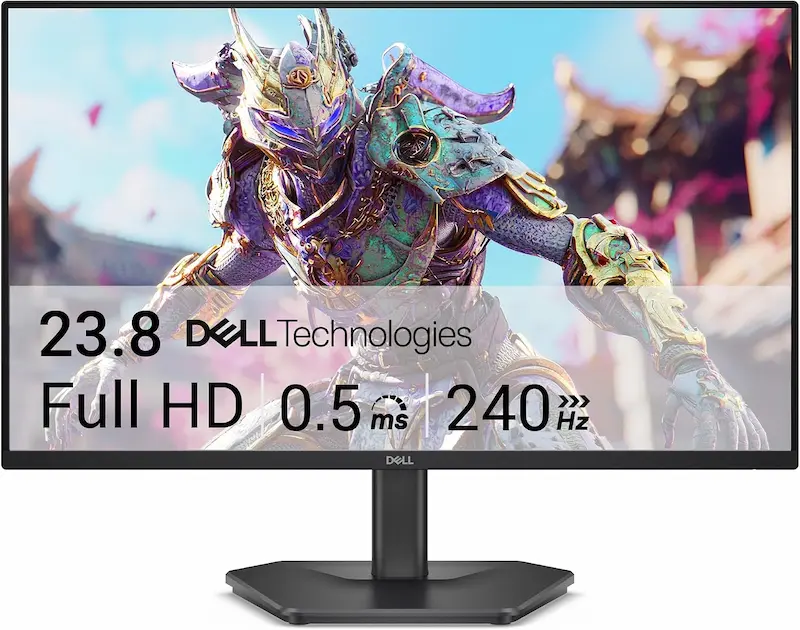
Dell SE2426HG: Fast IPS panel, 99% sRGB, DisplayPort 1.4, and the sharpest pixel density here
* As an Amazon Associate I earn from qualifying purchases.
- 1
Fast IPS matrix with published GtG specs
The SE2426HG uses a 23.8-inch Fast IPS panel. IPS panels generally switch more evenly across dark and bright shades than budget VA, which should limit dark smearing. Dell rates 0.5 ms GtG in Extreme mode and 5 ms GtG in Fast mode, so the mode you pick matters at a 4.17 ms frame time.
- 2
DisplayPort 1.4 and dual HDMI connectivity
With one DisplayPort 1.4 port and two HDMI inputs, the monitor supports 1080p at 240Hz and AMD FreeSync Premium.
- 3
Tilt-only stand: plan for a VESA arm
Dell lists the stock stand as tilt-only (-5° to +21°), with no height or swivel adjustment. A 100x100 mm VESA arm is the practical way to set the screen at eye level.
Strengths and Compromises: Dell SE2426HG
Pros
Fast IPS panel; IPS typically avoids the dark smearing seen on budget VA
92.56 PPI, the sharpest pixel density in this comparison
DisplayPort 1.4 and AMD FreeSync Premium support
99% sRGB coverage
Flat screen with no curvature to adapt to
Cons
Tilt-only stand (-5° to +21°) with no height or swivel adjustment
0.5 ms GtG is rated only for Extreme mode; Fast mode is rated at 5 ms GtG
1000:1 contrast means grayer blacks than the VA models
Warranty is 1 year in the US and Canada (3 years in most other regions)
Conclusion
On paper, the Dell SE2426HG is the strongest all-round pick here: a Fast IPS panel, DisplayPort 1.4 with FreeSync Premium, and the highest pixel density of the three at 92.56 PPI. Its 0.5 ms GtG rating applies only in Extreme mode, and the stand is tilt-only.Sceptre C255B-FWT240: 3000:1 contrast and four video inputs, with VA and curvature trade-offs
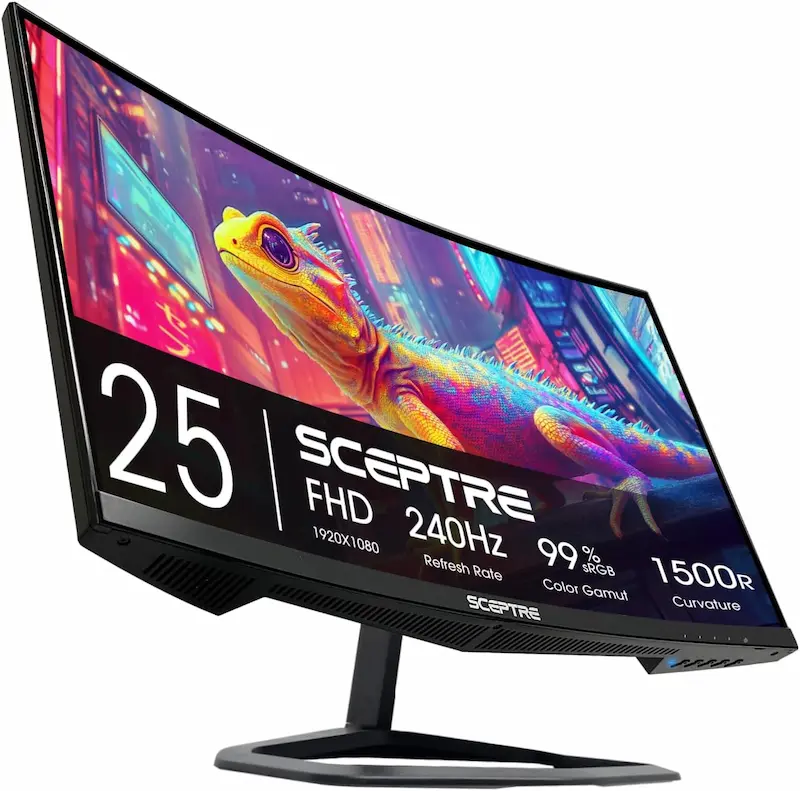
* As an Amazon Associate I earn from qualifying purchases.
- 1
High static contrast with 1500R curvature
The 24.5-inch VA panel is rated at 3000:1 static contrast and 280 cd/m². Budget VA panels are typically slower on black-to-gray transitions, so dark trailing on fast horizontal swipes is a risk. Sceptre publishes only a 1ms blur-reduction (MPRT-style) figure, not GtG.
- 2
Generous input selection: 2x DisplayPort 1.4 and 2x HDMI 2.0
Two DisplayPort 1.4 ports and two HDMI 2.0 ports let you connect a PC and a console at once, with a 3.5mm audio output on the back.
- 3
Built-in speakers and a basic stand
The monitor includes built-in speakers, which are fine for casual use but no replacement for a headset in tactical shooters. The stock stand is basic, so a 75x75 mm VESA arm is the better route to proper positioning.
Strengths and Compromises: Sceptre C255B-FWT240
Pros
3000:1 static contrast for deeper blacks
280 cd/m² brightness for typical indoor lighting
Extensive port array: 2x DisplayPort 1.4 and 2x HDMI 2.0
Built-in speakers for casual use
Cons
VA panels are typically slower on dark transitions, and no GtG figure is published
1500R curvature may take time to adjust to for competitive aiming
Basic stock stand; a VESA arm is recommended for eye-level positioning
1-year warranty
Conclusion
The Sceptre C255B-FWT240 offers 3000:1 contrast, 280 cd/m² brightness, and four inputs (2x DP 1.4, 2x HDMI 2.0) plus built-in speakers. As a curved VA panel with no published GtG figure, it carries the usual risk of slower dark transitions.Amzfast 240Hz: largest panel in the group, with budget OEM compromises
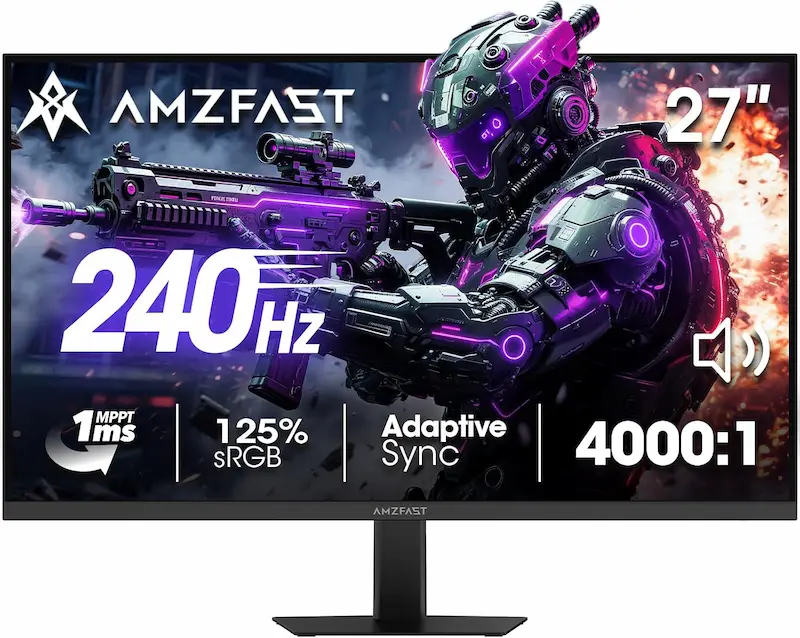
* As an Amazon Associate I earn from qualifying purchases.
- 1
Big curved VA panel with a 240Hz refresh rate
The AMZG27C1 Pro pairs a 27-inch 1500R VA panel with 240Hz over DisplayPort and built-in speakers. It is the largest screen here, which suits players who want a bigger, more immersive image over maximum sharpness.
- 2
VA response unknown and low pixel density at 27 inches
At 1080p the 27-inch panel works out to 81.59 PPI, below the 89.91 PPI of the 24.5-inch Sceptre and 92.56 PPI of the 23.8-inch Dell. Amzfast publishes only a 1ms MPRT figure, so how it handles dark transitions can't be read from the specs; budget VA panels commonly trail on them.
- 3
Lesser-known brand and basic OSD tuning
Amzfast is a lesser-known brand with a shorter track record than Dell or Sceptre. Some buyers report backlight bleed or pixel defects on budget panels like this, and the factory color profile may need manual adjustment in the OSD.
Strengths and Compromises: Amzfast 240Hz
Pros
Largest screen in the group at 27 inches
High VA static contrast (4000:1, listing spec)
Adaptive-Sync support over DisplayPort
Standard 100x100 mm VESA mounting compatibility
Cons
27-inch 1080p panel yields 81.59 PPI, softer than the 23.8-inch and 24.5-inch competitors
No published GtG figure; budget VA is commonly slow on dark transitions
1500R curvature may take time to adjust to for competitive aiming
Lesser-known brand; some buyers report panel uniformity or pixel defects
Conclusion
The Amzfast 240Hz offers 240Hz on the largest panel in this group, with deep VA contrast and built-in speakers. At 27 inches and 1080p it has the lowest pixel density here, and with no published GtG figure its dark-transition behavior is unknown.Verdict
Final Verdict: Choosing the Right 240Hz Panel Under $120 Dell SE2426HG
The Dell SE2426HG is the strongest pick on paper for competitive play. It combines a 240Hz Fast IPS panel (IPS typically transitions more evenly than budget VA), a flat screen, DisplayPort 1.4, AMD FreeSync Premium, and the highest pixel density of the three at 92.56 PPI. Keep in mind that Dell's 0.5 ms GtG rating applies only in Extreme mode, the stand is tilt-only, and the warranty is 1 year in the US and Canada. All three monitors sit within about $20 of each other, so price is unlikely to decide the choice.
Breakdown of the alternatives:
-
Sceptre C255B-FWT240 suits players who value static contrast (3000:1) and connectivity. Its four video inputs (2x DP 1.4, 2x HDMI 2.0) are uncommon at this price, and it includes built-in speakers. The trade-offs are a curved VA panel with no published GtG figure, which carries the usual risk of slower dark transitions.
-
Amzfast 240Hz (AMZG27C1 Pro) is the pick for anyone who wants the biggest screen in the group. Its 27-inch 1080p panel drops pixel density to 81.59 PPI, so distant sightlines will look softer than on the 23.8-inch and 24.5-inch competitors. It is also a curved VA panel with no published GtG figure and comes from a lesser-known brand.
Frequently Asked Questions
At 240Hz, each frame lasts only 4.17 ms. Fast IPS panels like the Dell SE2426HG generally switch more evenly across bright and dark shades. Budget VA panels are typically slower on black-to-dark-gray transitions, which can leave dark smear trails behind moving player models in shadowed areas. Actual results vary by unit and overdrive setting.
Frame time drops from 6.94 ms at 144Hz to 4.17 ms at 240Hz, a 40% reduction in sample-and-hold blur. That can sharpen target outlines during counter-strafes and fast peeks, provided your GPU delivers matching frame rates and the panel's pixel transitions keep up.
Presets marketed as 'Extreme' or '0.5ms' apply the most voltage to the liquid crystals, which can cause pixels to overshoot their target and leave bright inverse halos around moving objects. Results depend on the individual monitor's tuning. On the Dell SE2426HG, 0.5 ms GtG is rated only for Extreme mode, so test the modes with a motion test and pick the highest one that stays clean.
DisplayPort 1.4 is the most dependable choice for 1080p at 240Hz with variable refresh rate (Adaptive-Sync / FreeSync / G-Sync Compatible). HDMI 2.0 can also carry 1080p240, and many setups support VRR over HDMI, but DisplayPort avoids most compatibility edge cases. Current desktop GPUs typically offer three DisplayPort outputs and one HDMI output.
No. Small integrated speakers lack low-frequency depth and precise stereo imaging, so cues like defuse taps, footsteps, and reloads are hard to pinpoint. A dedicated headset or in-ear monitors (IEMs) remain the better option.
Windows can default new monitors to 60Hz. Open Windows Settings > System > Display > Advanced display, select your monitor, and choose 240Hz under 'Choose a refresh rate'. Make sure the cable is plugged into your graphics card rather than the motherboard video port.
Yes. Dell and Amzfast use a 100x100 mm VESA pattern, while Sceptre uses 75x75 mm. An aftermarket arm is recommended because stock stands at this price are basic and offer little or no height adjustment.
It's a matter of preference. At 1500R, the Sceptre and Amzfast curves are fairly strong. Some players find they distort straight lines and make crosshair placement feel different from a flat screen; others get used to it within days. If you want to avoid the adjustment, a flat panel like the Dell is the safer choice.
You May Also Like
- Best Ultra-Budget 144Hz Monitors Under $80 for CS2 & Valorant (2026)
- Best Ultra‑Budget Gaming Chair under $100: Kslysuty vs GTPLAYER vs N‑GEN GAMING
- Best Ultra-Budget CPU Coolers Under $20 in 2026: Thermalright AX120 SE vs ID-COOLING SE-214-XT V2 vs Ocypus
- How to Overclock Your Monitor from 60 Hz to 75+ Hz Using CRU
- How to Set Up 4:3 Stretched in CS2: No Black Bars + FPS Boost (NVIDIA, AMD & Intel)