peripherals
PixArt PAW3311 vs PAW3395 in CS2 & Valorant: Tracking Speed, Lift-Off Distance, and Sensor Limits
A spec breakdown of PixArt PAW3311 (300 IPS) versus PAW3395 (650 IPS), swipe-speed math for low eDPI, lift-off distance differences, and wireless mice compared.
- 8 min read
The budget wireless mouse market is currently split between two optical sensors: the budget PixArt PAW3311 and the flagship PixArt PAW3395. Competitive players in low-sensitivity tactical shooters frequently question whether opting for a PAW3311 mouse risks sensor spinouts during high-velocity 180-degree flicks. Tracking limits can be estimated with simple physics rather than marketing claims. The PAW3311 is rated for 300 IPS (7.62 m/s) tracking speed and 35G acceleration, whereas the PAW3395 is rated for 650 IPS (16.51 m/s) and 50G. However, max tracking velocity is only part of the picture. Lift-off distance (LOD), surface tolerance, and the wireless microcontroller (MCU) paired with the sensor all affect how a mouse behaves in CS2 and Valorant. This article is a spec-and-physics analysis, not a lab test: we compare the published sensor ratings, model arm-swipe speeds at several sensitivities, and review four representative wireless models — VXE Dragonfly R1 Pro, ATTACK SHARK X3, ATTACK SHARK X11, and ATTACK SHARK R1 — to show where PAW3311 is enough and where PAW3395 gives a meaningful margin.
Info
Sensor Mechanics: Speed (IPS), Acceleration (G), and Lift-Off Distance
Pure tracking speed (IPS) is rarely the limiting factor for a modern sensor on a flat cloth mousepad. For low-sens players, the more practical differences are lift-off distance and how forgiving the sensor is on different surfaces; raw speed only becomes a concern for extremely fast swipes at very low sensitivity.
Linear Speed vs Lift-Off Behavior Linear tracking speed on both sensors exceeds typical human flick speed; PAW3311 headroom only gets thin at very low sensitivity combined with extremely fast swipes. The more practical dividing line is lift-off distance: low-sens players who lift and reposition often benefit from the PAW3395's lower LOD and larger speed margin.
Four technical factors that separate PAW3311 from PAW3395:
- Tracking Speed, Acceleration, and Surface Tolerance - PAW3395 is rated for 650 IPS and 50G versus 300 IPS and 35G for PAW3311 (some vendors list 30G). Reviewers also report that PAW3311 is more sensitive to surface type and to tilted landings after a lift. PixArt publishes no angle thresholds, so treat that last point as anecdotal.
- Lift-Off Distance (LOD) - PAW3311 sits higher (reported ~1.5-2.0 mm; no official figure). PAW3395 reaches about 1.0 mm, and many mice let you choose between 1 mm and 2 mm in the driver, so tracking cuts off sooner during resets. Learn the electrical tape mod to reduce high budget mouse LOD
- Motion Sync and Polling (Firmware) - Motion Sync and high polling rates are firmware and MCU features of each mouse, not something the sensor guarantees by itself. Check the specific model: the VXE R1 Pro supports up to 4,000 Hz with an optional 4K receiver, while the Attack Shark mice here list 1,000 Hz.
- Microcontroller (MCU) Pairing - Nordic nRF52840 is generally regarded as more consistent for wireless latency than Beken BK3633, but brands publish no jitter figures and we have not measured it ourselves. Note that Beken is used in the X3, X11, and R1 alike, so among the Attack Shark picks the MCU does not separate PAW3311 from PAW3395.
Three rules for getting the most from a budget optical sensor:
- Use a dark, evenly woven cloth mousepad; patterned or glossy surfaces are more likely to cause tracking errors on a budget sensor like PAW3311.
- Keep the 2.4GHz receiver close to the mousepad, in line of sight (a short extension cable on the desk helps), to avoid wireless dropouts.
- If your driver exposes LOD, use the lowest setting that does not cause tracking dropouts on your pad (1.0 mm on PAW3395).
PixArt PAW3311 vs PAW3395 Mouse Specs & Performance
ATTACK SHARK R1 Wireless Ergonomic Gaming Mouse Budget Ergonomic (PAW3311) | PixArt PAW3311 300 IPS / 35G | Beken BK3633 | ~1.5 - 2.0 mm (reported) | 59 g | Check price on Amazon |
VXE Dragonfly R1 Pro Ultra-Lightweight Wireless Mouse Best Esports Tracking (PAW3395) | PixArt PAW3395 650 IPS / 50G | Nordic nRF52840 | 1.0 mm minimum (PAW3395) | 48 g | Check price on Amazon |
ATTACK SHARK X3 Superlight Wireless Gaming Mouse Budget 3395 Alternative | PixArt PAW3395 650 IPS / 50G | Beken BK3633 | 1.0 mm / 2.0 mm (Driver Selectable) | 49 g | Check price on Amazon |
ATTACK SHARK X11 Wireless Gaming Mouse with RGB Charging Dock Symmetric PAW3311 + Dock | PixArt PAW3311 300 IPS / 35G | Beken BK3633 | ~1.5 - 2.0 mm (reported) | 63 g | Check price on Amazon |
ATTACK SHARK R1 Wireless Ergonomic Gaming Mouse Budget Ergonomic (PAW3311)
PixArt PAW3311300 IPS59 gBeken BK3633VXE Dragonfly R1 Pro Ultra-Lightweight Wireless Mouse Best Esports Tracking (PAW3395)
PixArt PAW3395650 IPS48 gNordic nRF52840ATTACK SHARK X3 Superlight Wireless Gaming Mouse Budget 3395 Alternative
PixArt PAW3395650 IPS49 gBeken BK3633ATTACK SHARK X11 Wireless Gaming Mouse with RGB Charging Dock Symmetric PAW3311 + Dock
PixArt PAW3311300 IPS63 gBeken BK3633
* As an Amazon Associate I earn from qualifying purchases.
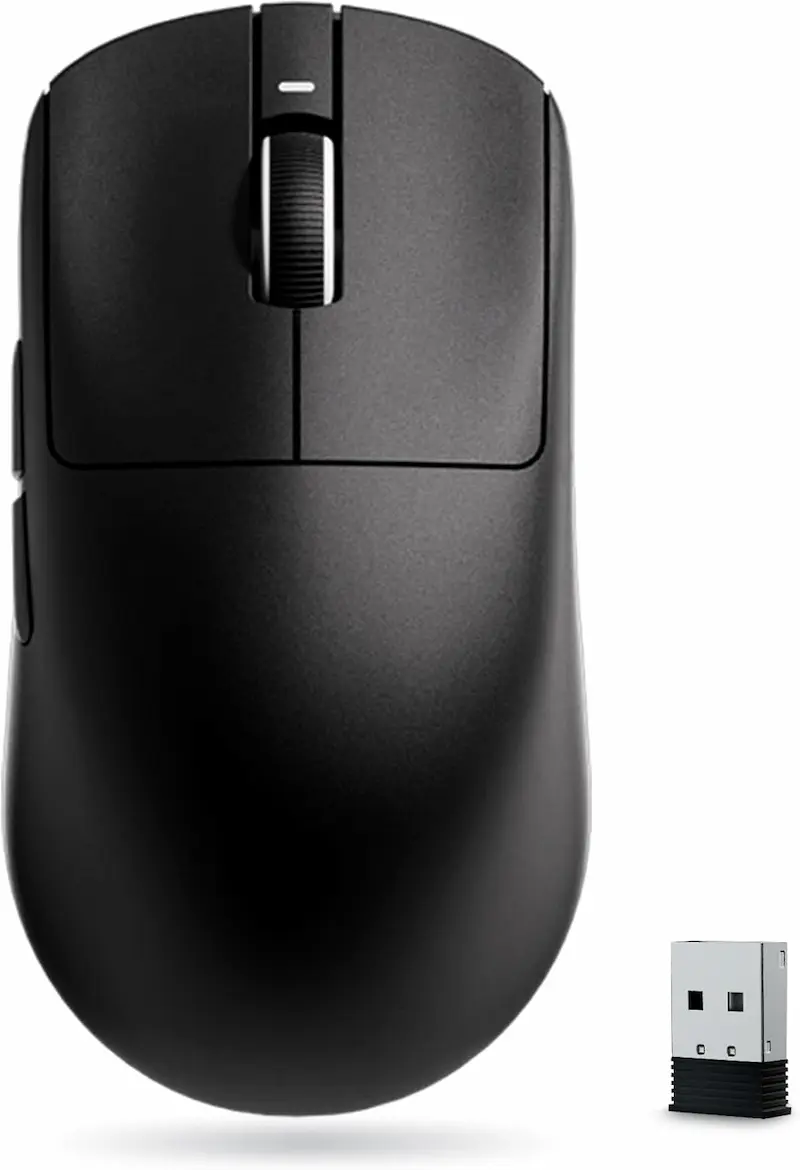
VXE Dragonfly R1 Pro: The Low-Sens Competitive Standard
* As an Amazon Associate I earn from qualifying purchases.
- 1
Flagship Nordic nRF52840 Architecture
Nordic-based wireless is generally considered more consistent than Beken-based designs, though we have not measured jitter ourselves. The mouse ships at 1000 Hz and supports up to 4000 Hz via an optional 4K dongle.
- 2
48-Gram Symmetrical Shell & Huano Ice Berry Switches
Sub-50g weight keeps arm fatigue minimal on low eDPI. The optical PAW3395 tracking cuts off cleanly at ~1.0 mm LOD, preventing crosshair displacement during aggressive vertical resets.
VXE Dragonfly R1 Pro Evaluation
Pros
PAW3395 with a Nordic nRF52840 MCU, generally regarded as the more consistent wireless platform
Ultralight 48 g weight with crispy 80M Huano Ice Berry Pink Dot switches
Low ~1.0 mm LOD prevents cursor twitch when lifting to recenter
Hardware supports up to 4000 Hz polling rate (requires separate 4K dongle)
Cons
Small 250mAh battery requires charging every few days (rated ~75h at 1000 Hz, less at 4K)
No Bluetooth — 2.4 GHz wireless and USB-C cable only
Conclusion
The strongest spec sheet in this group: PAW3395 (650 IPS, 50G), a Nordic nRF52840 MCU, up to 4,000 Hz polling with an optional receiver, and 48 grams. We have not measured its wireless jitter ourselves.ATTACK SHARK X3: Compact PAW3395 on a Budget MCU
* As an Amazon Associate I earn from qualifying purchases.
- 1
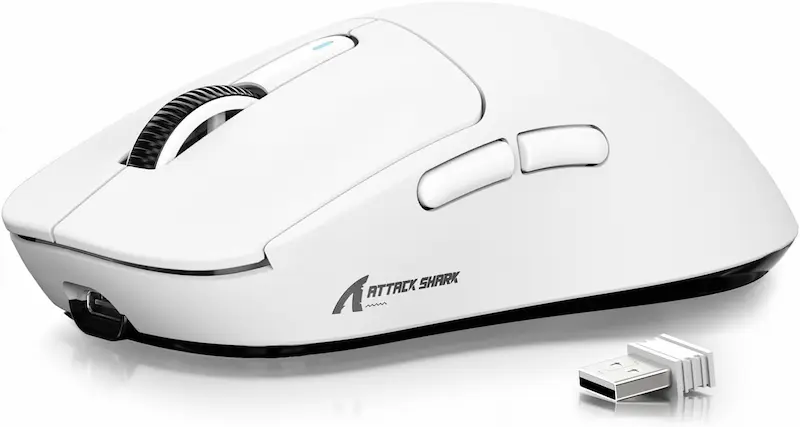
PAW3395 Tracking with Driver LOD Control
Offers full 650 IPS speed headroom and a driver-switchable 1.0 mm LOD at 49 grams.
- 2
Beken BK3633 Wireless Platform
Uses a Beken controller delivering 1000 Hz. Communities report more variable polling intervals compared to dedicated Nordic platforms. Tri-mode connectivity (2.4GHz / Bluetooth 5.2 / USB-C) adds versatile office utility.
ATTACK SHARK X3 Evaluation
Pros
High-spec 650 IPS / 50G PAW3395 sensor in a lightweight package
Very light 49 g symmetrical frame with driver-switchable LOD (1 mm / 2 mm)
Tri-mode connectivity: 2.4 GHz, Bluetooth 5.2, and wired USB-C
Cons
Beken BK3633 MCU is generally rated below Nordic for wireless consistency (not measured by us)
Compact 118.5 mm shell feels small for palm grip and large hands
Conclusion
Brings PAW3395 optical tracking into an accessible price bracket. Its Beken BK3633 MCU is generally rated below Nordic for wireless consistency, though we have not measured it.ATTACK SHARK X11: Symmetrical PAW3311 with Magnetic Dock
* As an Amazon Associate I earn from qualifying purchases.
- 1
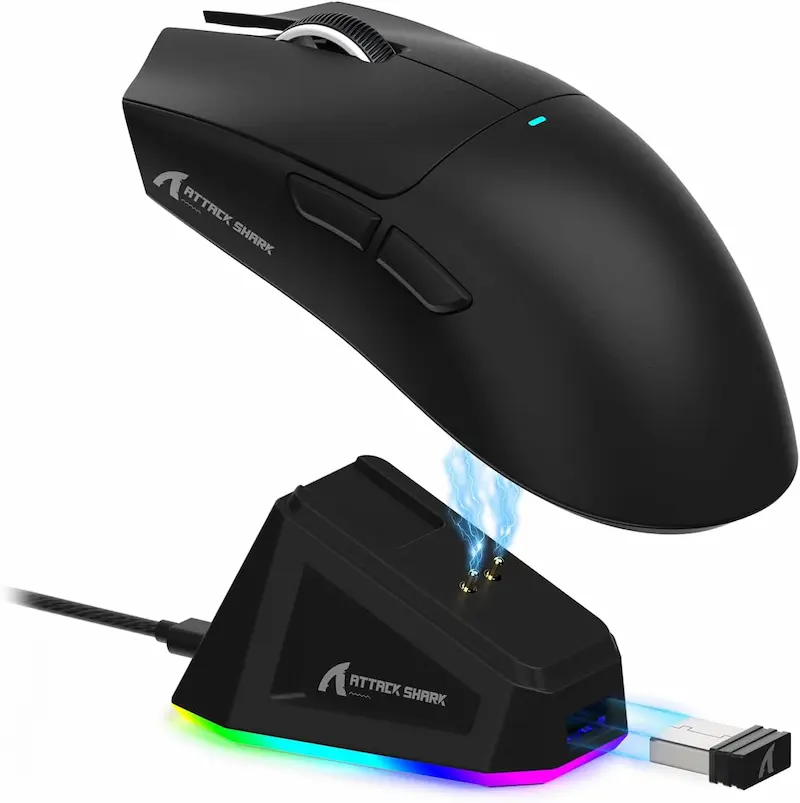
Magnetic RGB Desktop Charging Stand
Drop the mouse onto the magnetic dock between rounds to stay topped up without plugging cables in.
- 2
Higher Weight & Higher LOD Profile
At 63 g (±3 g) and 128 mm length, it is noticeably heavier and longer than the X3. The PAW3311 sensor handles flat swipes reliably, but the higher ~1.5–2.0 mm LOD requires cleaner lifting habits.
ATTACK SHARK X11 Evaluation
Pros
Includes a magnetic RGB desktop charging dock in the box
Comfortable 128 mm symmetrical shape for medium-to-large hands
300 IPS tracking is sufficient for linear swipes at normal sensitivities
Cons
Heavier 63 g chassis compared to sub-50 g competitors
Reported ~1.5–2.0 mm LOD can register small crosshair twitches during rapid resets
Conclusion
Shares the R1's PAW3311 tracking envelope (300 IPS) in a symmetrical 63 g shell with a magnetic charging dock. LOD is higher than on PAW3395 (reported ~1.5-2.0 mm).ATTACK SHARK R1: Ergonomic Palm Shape with PAW3311
* As an Amazon Associate I earn from qualifying purchases.
- 1
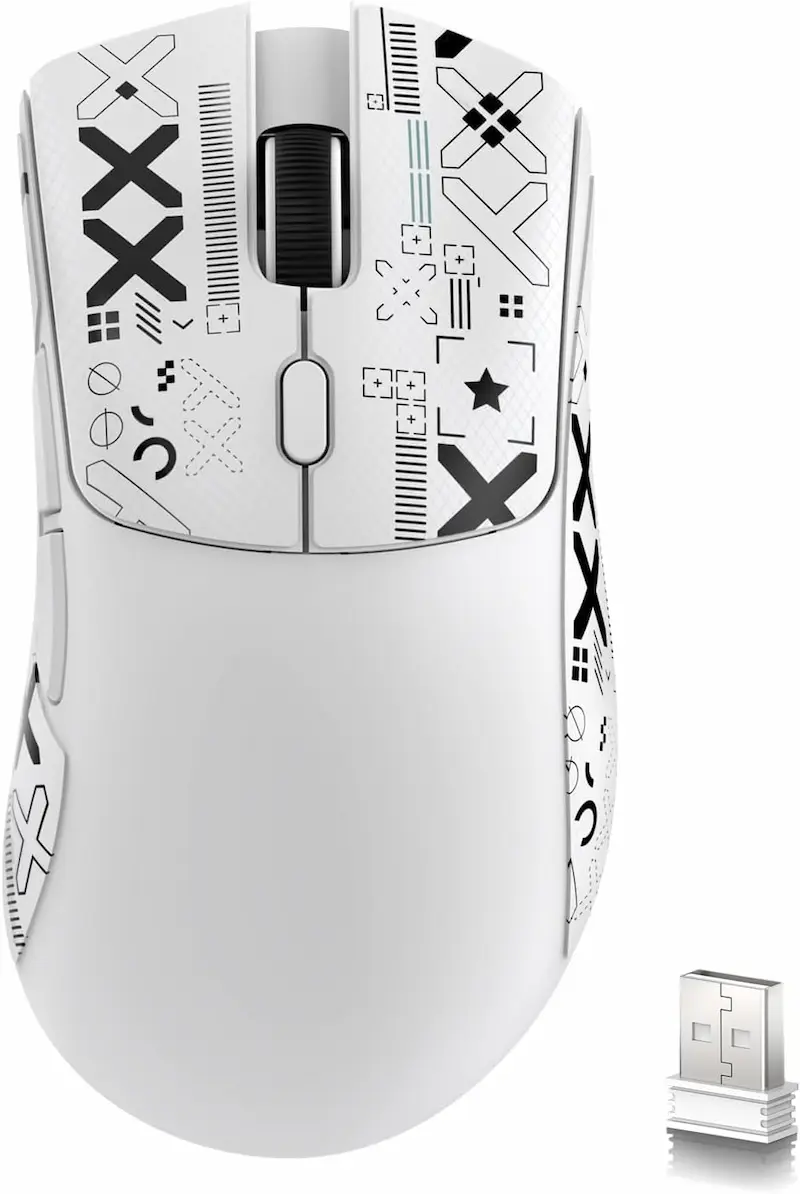
Ergonomic Right-Handed Contour
At 59 grams, it gives palm and relaxed claw grip users more hand support than symmetrical shells typically offer.
- 2
300 IPS Envelope for Medium & High Sens
The PAW3311 handles flat linear tracking without issue at standard sensitivities (≥800 eDPI). However, higher LOD and smaller speed margins make it less forgiving for low-sens arm aimers who reset constantly.
ATTACK SHARK R1 Evaluation
Pros
Comfortable ergonomic shape for palm and relaxed claw grips
Light 59 g weight for an ergonomic shell with 300mAh battery
Solid flat tracking performance for players running 800+ CS2 eDPI
Cons
Higher LOD (reported ~1.5–2.0 mm) makes frequent lifting on low sens prone to drift
Beken BK3633 MCU, same as the X3 and X11
Conclusion
Shows that PAW3311 handles typical flat swipes. The trade-offs are a higher LOD and less margin for lift-heavy, very-low-sens play.Verdict
Verdict: PAW3311 vs PAW3395 — Tracking Limits & Real-World Buying Advice VXE Dragonfly R1 Pro (PixArt PAW3395 + Nordic nRF52840)
VXE Dragonfly R1 Pro is our pick for competitive CS2 and Valorant. At 48 grams, it pairs the PixArt PAW3395 (650 IPS, 50G, about 1.0 mm minimum LOD) with a Nordic nRF52840 MCU, giving the largest tracking margin and the lowest lift-off distance of the four. This verdict is based on published specs and the swipe-speed model above; we did not run lab tests.
Mechanical Breakdown & Recommendations:
-
VXE Dragonfly R1 Pro — The competitive benchmark. Best fit for low-sensitivity arm aimers (<800 CS2 eDPI / <251.4 Valorant eDPI) who lift and reposition the mouse often during fast 180-degree turns.
-
ATTACK SHARK X3 — Compact PAW3395 option. Full 650 IPS tracking and a driver-selectable 1.0 mm LOD, with a Beken BK3633 controller that is generally rated below Nordic for wireless consistency.
-
ATTACK SHARK X11 — Symmetrical PAW3311 with charging dock. A symmetrical option for claw grip users with the same PAW3311 envelope (300 IPS, higher LOD). The included magnetic dock is convenient, though the 63 g chassis is heavier than sub-50 g alternatives.
-
ATTACK SHARK R1 — The ergonomic PAW3311 pick. A good fit for medium-to-high sensitivity players (≥800 CS2 eDPI / ≥251.4 Valorant eDPI) who keep swipes mostly flat. The 300 IPS ceiling leaves comfortable headroom at those sensitivities, but its higher LOD and smaller margin make it a weaker choice for very-low-sens, lift-heavy play.
Frequently Asked Questions
Not in our model, for flat horizontal flicks at typical sensitivities. The PAW3311's 300 IPS (7.62 m/s) rating sits above our estimated peaks of about 160-255 IPS for fast 180-degree turns at 600-1200 CS2 eDPI. The margin shrinks at very low sensitivity: about 15% at 600 eDPI with a 100 ms flick, and it is exceeded in an extreme 80 ms stress case. Tracking errors can also come from the surface or from landing the mouse tilted after a lift; those effects are reported anecdotally rather than backed by published sensor figures.
Speed and lift-off behavior. PAW3395 is rated for 650 IPS and 50G versus 300 IPS and 35G, and it can reach a lift-off distance of about 1.0 mm versus a reported ~1.5-2.0 mm for PAW3311. Motion Sync and polling-rate options depend on each mouse's firmware, not on the sensor alone.
The sensor captures optical frames, but the microcontroller (MCU) packages and transmits those coordinates over 2.4GHz wireless to your PC. Nordic nRF52840 designs are generally regarded as more consistent than Beken BK3633 designs. Manufacturers do not publish jitter figures, and we have not measured them, so treat this as a community consensus rather than a tested result.
For most players, yes, especially above about 250 Valorant eDPI (for example 800 DPI at 0.32 in-game sens, which is 256 eDPI) with limited mouse lifting. At that sensitivity a 180-degree turn is roughly 25 cm of mouse travel, which keeps the mouse mostly flat on the pad. Below that, or if you lift often, PAW3395 offers more margin.
Yes. Budget sensors like the PAW3311 generally work best on dark, evenly woven cloth pads, and reviewers report more tracking errors on glass, glossy, or heavily patterned surfaces. PAW3395 is generally regarded as more forgiving across surfaces.
Vendors set the DPI ceiling in firmware: the Attack Shark R1 lists 18,000 and the X11 lists 22,000, while several retailers cite 12,000 as the PAW3311's rating. Values that high are rarely useful; most low-sens players run 400-1600 DPI.
You May Also Like
- DIY Mousepad Deep Clean: Revive Your Muddy Pad for Perfect Glide
- How to Reduce Input Lag in CS2 & Valorant: Complete Guide
- Valorant Mouse Settings Guide 2026: DPI, eDPI & Sensitivity Explained
- Best Ultra-Budget Gaming Mousepads Under $5 for CS2 & Valorant (2026)
- High LOD Tape Trick: How to Lower Sensor Lift-Off Distance for CS2 & Valorant