hardware
Best Ultra-Budget CPU Coolers Under $20: High-Efficiency Heat Dissipation on a Shoestring Budget
Stock coolers leave your CPU hot and noisy. We compare three sub-$20 single-tower coolers to see which one delivers the lowest temps, best RAM clearance, and quietest operation.
- 6 min read
Stock Intel and AMD box coolers are barely enough to keep modern gaming processors from thermal throttling under sustained loads. When gaming in CPU-intensive titles like CS2, Valorant, Fortnite, or Warzone, rising junction temperatures force clock speeds to drop—causing jarring 1% low frame drops and micro-stutters. For under $20, modern aftermarket single-tower air coolers deliver high-efficiency heat dissipation even on a shoestring budget. Equipped with 4 copper heat pipes (featuring AGHP and direct-touch designs) and efficient 100mm–120mm PWM fans, they drop gaming temperatures by 15°C–25°C while running whisper-quiet. In this 2026 comparison, we compare the best ultra-budget CPU air coolers under $20—evaluating the Thermalright Assassin X 120 Refined SE (AX120), ID-COOLING SE-214-XT V2 ARGB, and ultra-compact Ocypus Gamma A40 ARGB on thermals, noise levels, and RAM clearance to find the undisputed price-to-performance champion.
Info
CPU Cooler Buying Guide for Budget Gaming PCs
Heat pipe technology & clearance matter much more than raw brand names when picking a budget cooler. A well-designed 4-heatpipe tower with an S-FDB fan will outlast and outperform clunky stock coolers while eliminating thermal throttling.
A 120mm tower with 4 copper heat pipes is all you need for 65W–125W CPUs For popular budget CPUs like the AMD Ryzen 5 5600 / 5500 / 3600 / 7500F and Intel Core i3-12100F / i5-12400F, spending more on high-end coolers offers almost zero in-game performance gains. A 4-heatpipe single tower keeps peak temps under 65°C and eliminates clock throttling entirely.
Key factors to check before buying a budget cooler:
- Heatsink Height & Case Clearance - Standard 120mm towers measure between 148mm and 155mm tall. Ensure your PC case supports your cooler's exact height. If you have an ultra-narrow compact case, a 133mm cooler like the Ocypus Gamma A40 prevents side-panel collisions.
- AGHP vs Direct Touch Heat Pipes - Standard heat pipes rely on gravity and lose efficiency in vertical motherboard layouts. Thermalright's AGHP (Anti-Gravity Heat Pipe) technology uses an advanced capillary structure that maintains high thermal transfer efficiency regardless of mounting orientation.
- Fan Bearing Longevity (S-FDB vs Hydraulic vs Sleeve) - Budget sleeve-bearing fans develop buzzing rattles after 6–12 months. S-FDB (Fluid Dynamic Bearings) and quality Hydraulic bearings run significantly quieter and last 40,000+ hours.
- RAM & PCIe Clearance - Offset heatsink designs (such as ID-COOLING SE-214-XT V2) push the fin stack slightly away from the memory slots, guaranteeing zero obstruction even with tall RGB DDR4/DDR5 heatspreaders.
Three quick tips for installing a budget CPU cooler:
- Always peel off the transparent plastic protective sticker on the cooler's copper base before installation.
- Use a pea-sized dot or cross pattern of thermal paste in the center of the CPU IHS—do not overspread.
- Tighten mounting screws evenly in a criss-cross pattern, turning each screw two rotations at a time until hand-tight.
Watch: How to correctly mount a budget single-tower cooler:
Step-by-step mounting guide covering bracket placement, paste application, and fan clip installation.
CPU Cooler Installation GuideCPU Cooler Comparison: Key Specs & Thermals
| Height | Heatpipes | Airflow (CFM) | Max Noise | Sockets | ||
|---|---|---|---|---|---|---|
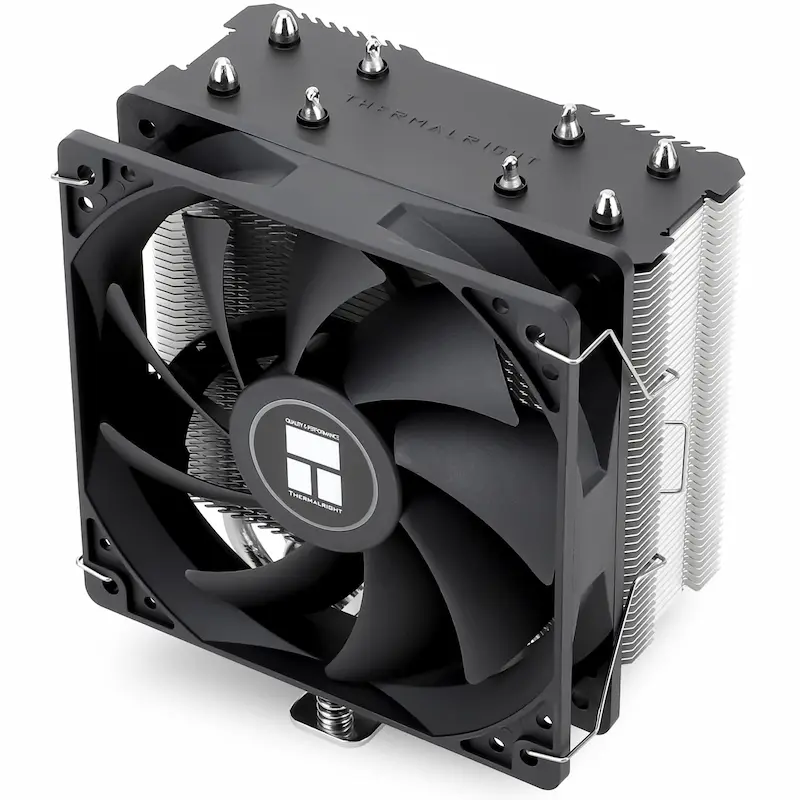
Thermalright Assassin X 120 Refined SE Best pick | 148 mm | 4 x 6mm AGHP Heat Pipes | 66.17 CFM | ≤ 25.6 dBA | Intel LGA1700/1851/1200/115X, AMD AM4/AM5 | Check price on Amazon |
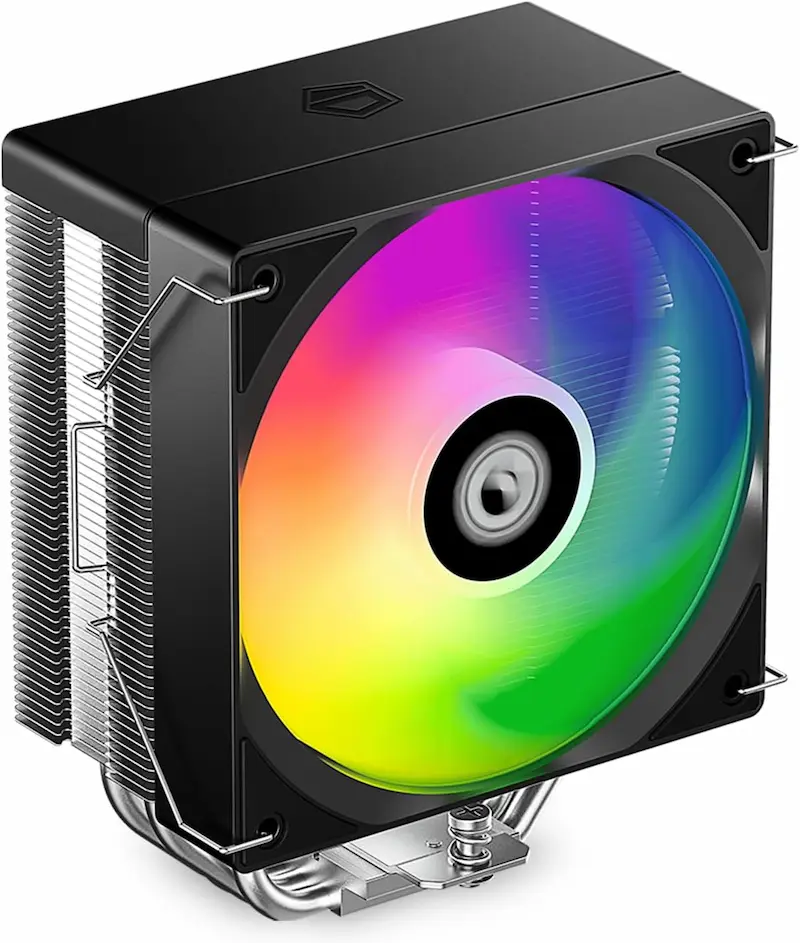
ID-COOLING SE-214-XT V2 ARGB | 150 mm | 4 x 6mm Direct-Contact Copper Heat Pipes | 64.8 CFM | 13.8 - 26.6 dBA | Intel LGA1851/1700/1200/115X, AMD AM5/AM4 | Check price on Amazon |
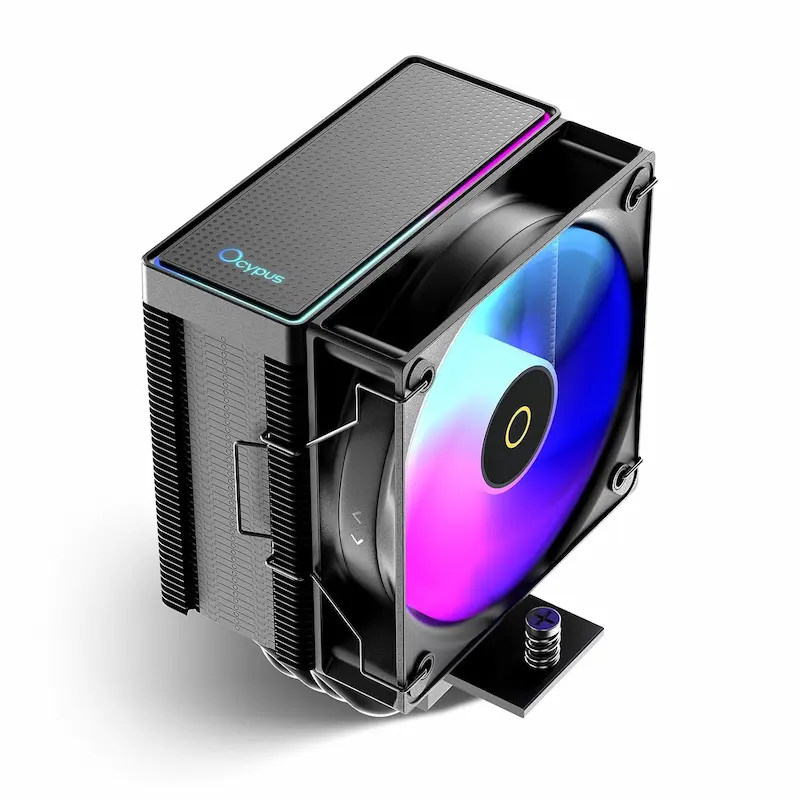
Ocypus Gamma A40 ARGB | 133 mm | 4 x 6mm Direct Touch Copper Heat Pipes | 41 CFM | ≤ 29.5 dBA | Intel LGA1851/1700/1200/115X, AMD AM5/AM4 | Check price on Amazon |
Thermalright Assassin X 120 Refined SE Best pick
148 mm Height4 x 6mm AGHP Heat Pipes66.17 CFM≤ 25.6 dBAID-COOLING SE-214-XT V2 ARGB
150 mm Height4 x 6mm Direct-Contact Copper Heat Pipes64.8 CFM13.8 - 26.6 dBAOcypus Gamma A40 ARGB
133 mm Height4 x 6mm Direct Touch Copper Heat Pipes41 CFM≤ 29.5 dBA
* As an Amazon Associate I earn from qualifying purchases.
Thermalright Assassin X 120 Refined SE: The Undisputed Sub-$20 King
* As an Amazon Associate I earn from qualifying purchases.
- 1
Unmatched thermal efficiency with AGHP technology
Equipped with 4 AGHP heat pipes and the acclaimed TL-C12C S-FDB fan pushing 66.17 CFM, the AX120 Refined SE delivers the lowest load temperatures in the sub-$20 category, keeping budget gaming CPUs well under thermal limits.
- 2
Whisper-quiet S-FDB fan at just 25.6 dBA
User reviews consistently praise the smooth acoustic profile of the S-FDB bearing, which avoids the harsh motor hum and high-RPM whine found on stock coolers.
Pros and Cons: Thermalright Assassin X 120 Refined SE
Pros
Best thermal performance in the sub-$20 category
AGHP heat pipes maintain peak efficiency regardless of mounting orientation
Quiet, high-airflow TL-C12C fan with durable S-FDB bearing
Most affordable price in the lineup
Cons
No RGB lighting (pure utilitarian stealth look)
Wire fan clips can feel thin and finicky to hook during installation
Mounting bracket springs require firm downward pressure to catch threads
Conclusion
The Thermalright AX120 Refined SE is the overall performance leader: 4 AGHP heat pipes, 66.17 CFM airflow, and whisper-quiet 25.6 dBA noise level while being the most affordable option in the lineup.ID-COOLING SE-214-XT V2 ARGB: Best RAM Clearance & Offset Tower Design
* As an Amazon Associate I earn from qualifying purchases.
- 1
Asymmetric offset heatsink guarantees 100% RAM clearance
ID-COOLING intelligently engineered the SE-214-XT V2 with a backward-tilted fin stack. Builders frequently praise this layout for guaranteeing zero interference with all 4 DIMM slots on compact Micro-ATX motherboards.
- 2
Solid direct-touch copper performance with ARGB
4 direct-contact 6mm copper heatpipes and a wide 120mm ARGB hydraulic fan provide reliable 180W TDP dissipation, easily handling Ryzen 5 and Core i5 gaming loads while syncing with your motherboard lighting.
Pros and Cons: ID-COOLING SE-214-XT V2 ARGB
Pros
Asymmetric offset tower guarantees 100% zero RAM slot interference
Integrated Addressable RGB lighting with 5V motherboard sync
Beginner-friendly mounting with clearly color-coded AMD/Intel spacers
Cons
Fan noise becomes noticeably audible above 50–60% RPM
Tallest heatsink in the group (150mm height)
Conclusion
The ID-COOLING SE-214-XT V2 ARGB offers the best memory clearance with an offset tower design that leaves all 4 RAM slots 100% unobstructed, paired with customizable Addressable RGB lighting.Ocypus Gamma A40 ARGB: Best Ultra-Compact Pick for Tight Cases
* As an Amazon Associate I earn from qualifying purchases.
- 1
Ultra-compact 133mm height fits almost any budget chassis
While most 120mm towers require 150mm+ clearance, the Gamma A40 stands at just 133mm tall. Builder feedback highlights it as a lifesaver for narrow OEM prebuilts, slim budget cases, and compact mATX builds where standard coolers hit the side panel.
- 2
High-pressure 100mm ARGB fan
Despite its smaller footprint, its 4-heatpipe direct-touch design and high-pressure 2.2 mmH2O ARGB fan deliver capable 200W TDP dissipation with vibrant lighting effects.
Pros and Cons: Ocypus Gamma A40 ARGB
Pros
Ultra-compact 133mm height fits slim, SFF, and narrow prebuilt cases
Built-in 5V 3-pin Addressable RGB lighting
Decorative matrix-dot top plate cleanly conceals heat pipe ends
Cons
100mm fan becomes audible when running at full 2400 RPM
Included thermal paste is basic (aftermarket paste recommended)
Lower airflow (41 CFM) limits higher-TDP processor headroom
Conclusion
The Ocypus Gamma A40 ARGB is the compact king: standing at just 133mm tall with full ARGB lighting, it fits tight cases where standard 120mm towers won't, offering great value for compact builds.Verdict
Final Verdict: The Best Sub-$20 CPU Cooler Thermalright Assassin X 120 Refined SE
The Thermalright Assassin X 120 Refined SE is the undisputed winner of the sub-$20 cooler category. With 4 AGHP heat pipes, a class-leading 66.17 CFM S-FDB fan, and a compact 148mm height, it easily beats competitors costing significantly more. It drops gaming load temps to the low 60s, runs whisper quiet, and stands as the most affordable cooler in the group.
The ID-COOLING SE-214-XT V2 ARGB earns our highest recommendation for builders using tall RGB memory modules who want customizable lighting, thanks to its smart offset fin stack that guarantees zero RAM interference.
The Ocypus Gamma A40 ARGB is the ultimate problem solver for compact and narrow budget cases, packing 200W TDP thermal dissipation and addressable RGB into a low-profile 133mm frame.
Frequently Asked Questions
Stock box coolers are noisy and allow CPU temperatures to reach 80°C–90°C under gaming load. Once the CPU gets that hot, it downclocks automatically to prevent overheating, which causes sudden 1% low FPS dips and micro-stutters. A sub-$20 single-tower cooler drops temperatures by 15°C–25°C and runs whisper quiet.
Yes. All three coolers in this guide include full mounting hardware out of the box for AMD AM4/AM5 as well as Intel LGA 1700, 1851, 1200, and 115X sockets.
The Thermalright Assassin X 120 Refined SE is the undisputed champion. Its AGHP heat pipe technology and S-FDB fan provide the lowest temperatures and quietest acoustics while remaining the most affordable option in our comparison.
Choose the ID-COOLING SE-214-XT V2 ARGB if you have tall RGB RAM sticks on a compact Micro-ATX motherboard and want Addressable RGB fan lighting. Its asymmetrical offset heatsink is tilted backwards, leaving 100% of your RAM slots completely clear.
Choose the Ocypus Gamma A40 if you have a narrow budget PC case with less than 145mm of cooler clearance where standard 120mm towers won't fit, while still wanting addressable RGB lighting in an ultra-compact package.
No. All three coolers include thermal paste in the box (either pre-applied or in a small syringe), so you have everything needed for installation from day one.
You May Also Like
- Best Ultra‑Budget Gaming Chair under $100: Kslysuty vs GTPLAYER vs N‑GEN GAMING
- Best Ultra-Budget CPU for CS2 & Valorant 2026: Ryzen 5 5600 vs i3-12100F vs Ryzen 5 5500 vs i5-12400F
- Best Ultra-Budget 240Hz Monitors Under $120 for CS2 & Valorant (2026)
- Best Ultra-Budget 144Hz Monitors Under $80 for CS2 & Valorant (2026)
- How to Overclock Your Monitor from 60 Hz to 75+ Hz Using CRU