hardware
Best Ultra-Budget Routers with SQM (OpenWrt): Eliminating Bufferbloat in CS2 & Valorant
Physical CPU ceilings, per-packet software processing, and Cake SQM mathematics. Comparing entry-level hardware running OpenWrt to keep added latency under load in single-digit milliseconds.
- 9 min read
In Counter-Strike 2 and Valorant, unmanaged network latency can hurt round outcomes as much as low frame rates. A player running a 240Hz monitor on a 25 ms baseline ping can see latency spikes of 120 to 180 ms the moment another device on the local network starts a Steam download, watches a 4K YouTube stream, or backs up photos to cloud storage. This latency inflation is called Bufferbloat. It occurs because standard consumer routers and ISP modems use large First-In, First-Out (FIFO) packet buffers. When bandwidth demand peaks, the hardware queues huge 1500-byte bulk TCP data chunks rather than dropping them. Tiny 64- to 128-byte gaming packets (CS2 sub-tick input timestamps, Valorant tick updates) get stuck behind this queue. The result is delayed packet delivery, late hit registration, and rubber-banding. Commercial 'gaming routers' attempt to solve this with brand marketing and static priority QoS at premium prices. The pragmatic engineering solution is Smart Queue Management (SQM), specifically the CAKE (Common Applications Kept Enhanced) algorithm available in OpenWrt. This article compares ultra-budget routers that can run Cake SQM, explains the math of bandwidth throttling, and gives a practical guide for sourcing the correct hardware revisions on Amazon for eliminating bufferbloat in 2026.
Info
SQM Mechanics: Why Cake Solves Sub-Tick Jitter
Active Queue Management (CAKE) replaces dumb FIFO queues with flow-isolated, deficit round-robin scheduling. Instead of merging all outgoing and incoming packets into one massive memory queue, CAKE hashes network traffic into separate sub-queues by flow (source/destination IP, port, and protocol). Massive file transfers cannot monopolize the connection; lightweight, time-sensitive UDP gaming packets are sent without waiting for multi-megabyte TCP bursts to flush.
The Throttling Trade-Off To eliminate bufferbloat, configure Cake SQM to shape WAN throughput to 90–95% of your measured line speed (start at 92% and tune). Giving up 5–10% of your maximum download speed moves the bottleneck from the ISP's buffers (CMTS / OLT) into your router, where Cake controls the queue.
Three hardware limitations in ultra-budget SQM routers:
- Per-Packet Software Overhead (CPU Bottleneck) - Standard router throughput relies on hardware or software flow offloading, routing 1 Gbps with near-zero CPU usage. SQM (Cake / fq_codel) cannot run in fixed-function offload silicon; every packet has to be processed by the router's CPU cores, and flow offloading must be turned off for SQM to work. Consequently, a router capable of 900 Mbps plain routing drops to roughly 250–300 Mbps once Cake SQM is enabled.
- RAM Constraints and Flow Table Sizing - Budget routers with only 64MB of RAM can run out of memory when handling heavy torrenting or dozens of concurrent connections alongside Cake SQM. 128MB is a comfortable baseline for stable routing under load.
- Silent Manufacturer Revision Swaps - Vendors frequently sell different internal hardware under the same retail name. The TP-Link Archer A6 is a good example: v2 uses a Qualcomm QCA9563 (OpenWrt works, but it is a slower CPU), v3 uses the MediaTek MT7621 (the one this guide recommends), and v4 uses a MediaTek chip that OpenWrt does not support. Cudy has the same issue: WR1300 v1–v3 are supported, but sibling models such as the WR1300E and WR1300S are different hardware. Always verify the hardware version on the box label and in the OpenWrt Table of Hardware.
Four steps to source and configure a budget SQM setup:
- Put your ISP modem into Bridge Mode (or IP Passthrough) if possible. This avoids double NAT and port-forwarding problems. If bridge mode is unavailable, SQM still works as long as all your gaming devices connect through the SQM router and its WAN speed is shaped below your real line rate.
- Calculate shaping rates: run a clean wired speed measurement 3 times, take the lowest download and upload values, and enter about 92% of those numbers into the OpenWrt SQM interface. Raise or lower in small steps while watching loaded ping and jitter.
- Select 'cake' as Queueing Discipline and 'piece_of_cake.qos' as the Queue Setup Script. Set Link Layer Adaptation to match your connection (Ethernet with an overhead of roughly 18–22 bytes is a common starting point for cable and fiber; see the OpenWrt SQM documentation).
- Disable software and hardware flow offloading under Network > Firewall. With offloading enabled, traffic bypasses the queueing layer and SQM does not shape it correctly.
Best Budget SQM Routers: Hardware Specs & Bufferbloat Ceilings
| CPU / Architecture | Cake SQM Throughput | Ports | OpenWrt Status | Loaded Jitter | ||
|---|---|---|---|---|---|---|
GL.iNet GL-SFT1200 (Opal) Gigabit Wireless Router Best Out-of-the-Box SQM Pick | Siflower SF19A28 (Dual-Core 1GHz) | ~180–220 Mbps (Cake SQM) | 3 × Gigabit (1 WAN, 2 LAN) | Pre-installed (OpenWrt base) | Grade A+ (<5 ms) | Check price on Amazon |
Cudy WR1300 AC1200 Gigabit Dual-Band Wi-Fi Router Best High-Throughput Pick | MediaTek MT7621 (Dual-Core 880MHz, 4 Threads) | ~250–300 Mbps (Cake SQM) | 5 × Gigabit (1 WAN, 4 LAN) | Official OpenWrt (v1–v3) | Grade A+ (<5 ms) | Check price on Amazon |
GL.iNet GL-MT300N-V2 (Mango) Portable Mini Router Lowest Spend SQM Bridge | MediaTek MT7628NN (Single-Core 580MHz MIPS) | ~45–60 Mbps (Cake SQM) | 2 × 100M Fast Ethernet | Pre-installed (OpenWrt base) | Grade A+ (<5 ms) | Check price on Amazon |
TP-Link Archer A6 (v3) AC1200 Gigabit Wireless Router Common Desktop Alternative | MediaTek MT7621DAT (Dual-Core 880MHz, 4 Threads) | ~250–300 Mbps (Cake SQM) | 5 × Gigabit (1 WAN, 4 LAN) | Official OpenWrt (v3 only) | Grade A+ (<5 ms) | Check price on Amazon |
GL.iNet GL-SFT1200 (Opal) Gigabit Wireless Router Best Out-of-the-Box SQM Pick
Siflower SF19A28 (Dual-Core 1GHz)~180–220 Mbps (Cake SQM)3 × Gigabit (1 WAN, 2 LAN)Pre-installed (OpenWrt base)Cudy WR1300 AC1200 Gigabit Dual-Band Wi-Fi Router Best High-Throughput Pick
MediaTek MT7621 (Dual-Core 880MHz, 4 Threads)~250–300 Mbps (Cake SQM)5 × Gigabit (1 WAN, 4 LAN)Official OpenWrt (v1–v3)GL.iNet GL-MT300N-V2 (Mango) Portable Mini Router Lowest Spend SQM Bridge
MediaTek MT7628NN (Single-Core 580MHz MIPS)~45–60 Mbps (Cake SQM)2 × 100M Fast EthernetPre-installed (OpenWrt base)TP-Link Archer A6 (v3) AC1200 Gigabit Wireless Router Common Desktop Alternative
MediaTek MT7621DAT (Dual-Core 880MHz, 4 Threads)~250–300 Mbps (Cake SQM)5 × Gigabit (1 WAN, 4 LAN)Official OpenWrt (v3 only)
* As an Amazon Associate I earn from qualifying purchases.
Router Decision Engine: Comparing Budget SQM Hardware
What is your subscribed internet connection speed?
Router CPU capacity dictates maximum throughput when processing per-packet Cake SQM
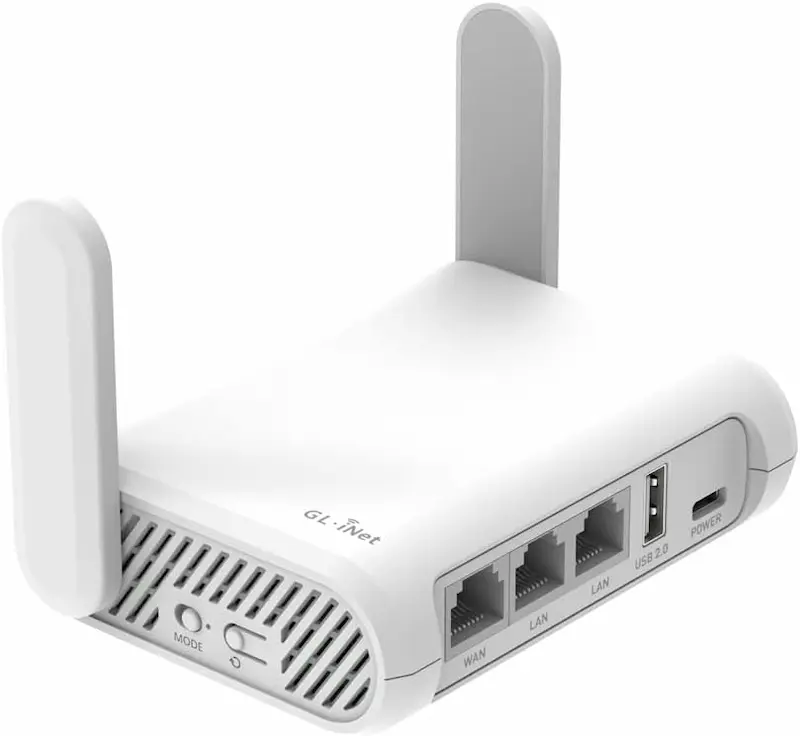
GL.iNet GL-SFT1200 Opal: The Zero-Friction OpenWrt Gateway
* As an Amazon Associate I earn from qualifying purchases.
- 1
OpenWrt-Based Firmware with LuCI Access
No manual flashing needed to get started. SQM is added as a package from the router's software interface.
- 2
Siflower 1GHz Dual-Core (~180–220 Mbps SQM)
Comfortably handles standard 100M and 150M home internet plans with Cake SQM enabled, keeping added latency under load in single-digit milliseconds.
GL.iNet GL-SFT1200 (Opal) Evaluation
Pros
OpenWrt-based firmware pre-installed; no flashing needed to start
Dual-Core 1GHz CPU handles Cake SQM up to roughly 200 Mbps
Gigabit Ethernet ports eliminate 100M local network bottlenecks
Extremely compact form factor with USB Type-C power input
Cons
Only 2 LAN ports; multi-device wired setups need an external switch
Siflower chipset relies on proprietary Wi-Fi driver binaries
Conclusion
The GL.iNet GL-SFT1200 Opal is the most accessible SQM router in this comparison because it requires no firmware flashing. It ships with GL.iNet's own firmware built on OpenWrt, with access to advanced LuCI settings (you may need to enable LuCI first, and SQM is added as an extra package). Its Siflower dual-core 1GHz processor handles Cake SQM shaping up to roughly 180–220 Mbps (estimate). With 3 Gigabit ports (1 WAN, 2 LAN) and 128MB RAM, it works as a plug-and-play bufferbloat fix between your ISP gateway and gaming PC.Cudy WR1300: Top-Tier Processing Power
* As an Amazon Associate I earn from qualifying purchases.
- 1
MediaTek MT7621 Dual-Core 880MHz (4 Threads)
Top SQM compute throughput in this comparison class (shared with the Archer A6 v3), shaping traffic up to roughly 300 Mbps.
- 2
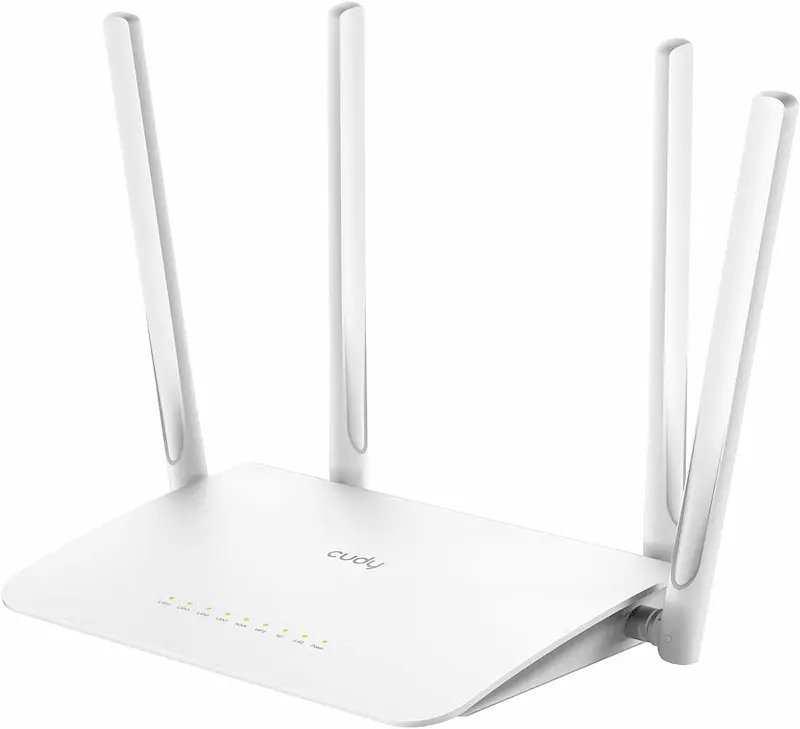
Full 5-Port Gigabit Switch & 4 External Antennas
Provides 4 dedicated LAN ports for desktop setups, consoles, and smart devices without needing an auxiliary network switch.
Cudy WR1300 Evaluation
Pros
MediaTek MT7621 dual-core CPU offers top-tier SQM bandwidth (roughly 250–300 Mbps)
Official OpenWrt support for v1–v3, installed through the vendor web UI
5 full Gigabit Ethernet ports (1 WAN + 4 LAN) for complete home coverage
Open-source mt76 Wi-Fi driver support in OpenWrt
Cons
Requires a two-step firmware flash (Cudy intermediate image, then OpenWrt) before SQM is available
Hardware versions and sibling models (WR1300E, WR1300S) differ; confirm the version before flashing
Chassis is larger than travel routers and requires dedicated 12V DC power
Conclusion
The Cudy WR1300 uses the MediaTek MT7621 dual-core processor (4 hardware threads) with 128MB DDR3 RAM. Official OpenWrt supports WR1300 hardware versions v1–v3; installation goes through the web GUI in two steps, first with Cudy's signed intermediate OpenWrt image and then with the official OpenWrt image. The MT7621 handles Cake SQM up to roughly 250–300 Mbps (estimate). With 5 Gigabit Ethernet ports and 4 external antennas, it can serve as a complete home router replacement. Check the hardware version on the label first: the WR1300E and WR1300S are different models.GL.iNet GL-MT300N-V2 Mango: Dedicated Low-Cost SQM Purifier
* As an Amazon Associate I earn from qualifying purchases.
- 1
Lowest-Cost Option with OpenWrt-Based Firmware
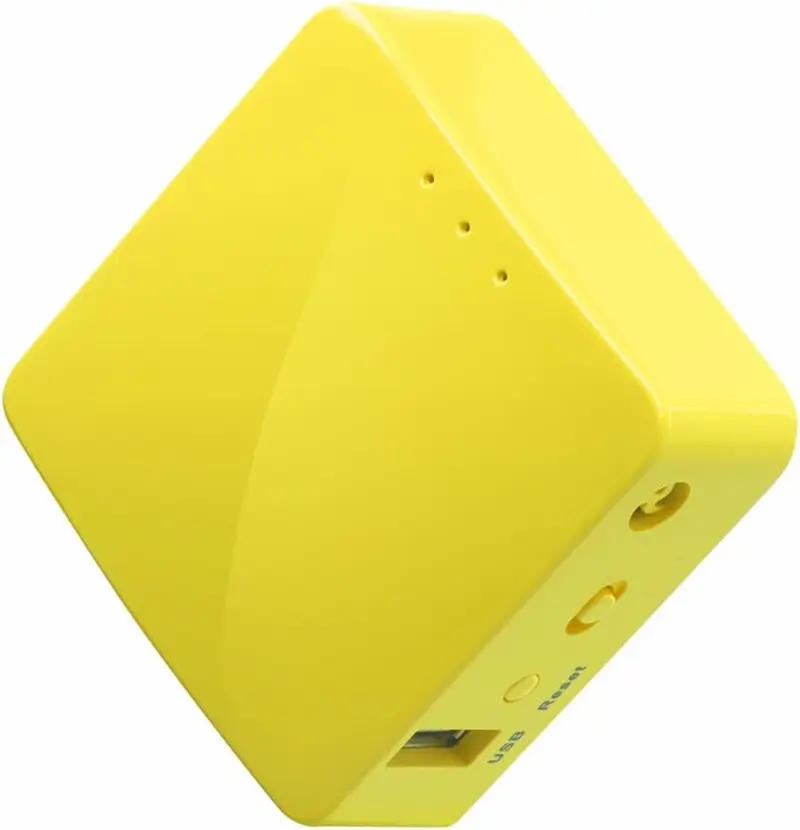
A significantly cheaper way to run genuine Cake SQM. Plugs into USB power directly from your PC or desk charger.
- 2
Hard Limit: 100M Ports, One LAN Port & ~50 Mbps SQM Ceiling
The single-core 580MHz CPU cannot shape connections above 60 Mbps. Strictly recommended for low-speed connections with one wired device.
GL.iNet GL-MT300N-V2 (Mango) Evaluation
Pros
Lowest-cost hardware option for real Cake SQM capability
OpenWrt-based firmware pre-installed with an accessible package manager
Very low power draw, powered via standard Micro-USB
Cons
Fast Ethernet ports cap physical link speed at 100 Mbps
Only one LAN port
Single-core 580MHz CPU saturates at roughly 50–60 Mbps under Cake SQM load
Single-band 2.4GHz Wi-Fi only (unsuitable for high-speed wireless)
Conclusion
The GL.iNet Mango is an ultra-compact pocket unit with OpenWrt-based firmware. Powered by a single-core MediaTek MT7628NN (580MHz) with 100M Fast Ethernet ports, its CPU caps Cake SQM throughput at approximately 45–60 Mbps (estimate). For players with a modest 30–50 Mbps connection and a single wired device (it has only one LAN port), using the Mango as a dedicated inline gaming bridge removes bufferbloat at the lowest hardware cost.TP-Link Archer A6 v3: Proven Platform with Sourcing Cautions
* As an Amazon Associate I earn from qualifying purchases.
- 1
MT7621 Architecture on Gigabit Ports
Roughly 250–300 Mbps of Cake SQM performance once flashed with OpenWrt (estimate).
- 2
Amazon Revision Lottery
Check the label on the box for Version 3 (MT7621). Version 2 runs OpenWrt but is much slower, and version 4 cannot run OpenWrt.
TP-Link Archer A6 (v3) Evaluation
Pros
Widely available on Amazon with established third-party OpenWrt support
MediaTek MT7621DAT delivers roughly 250–300 Mbps of Cake SQM throughput
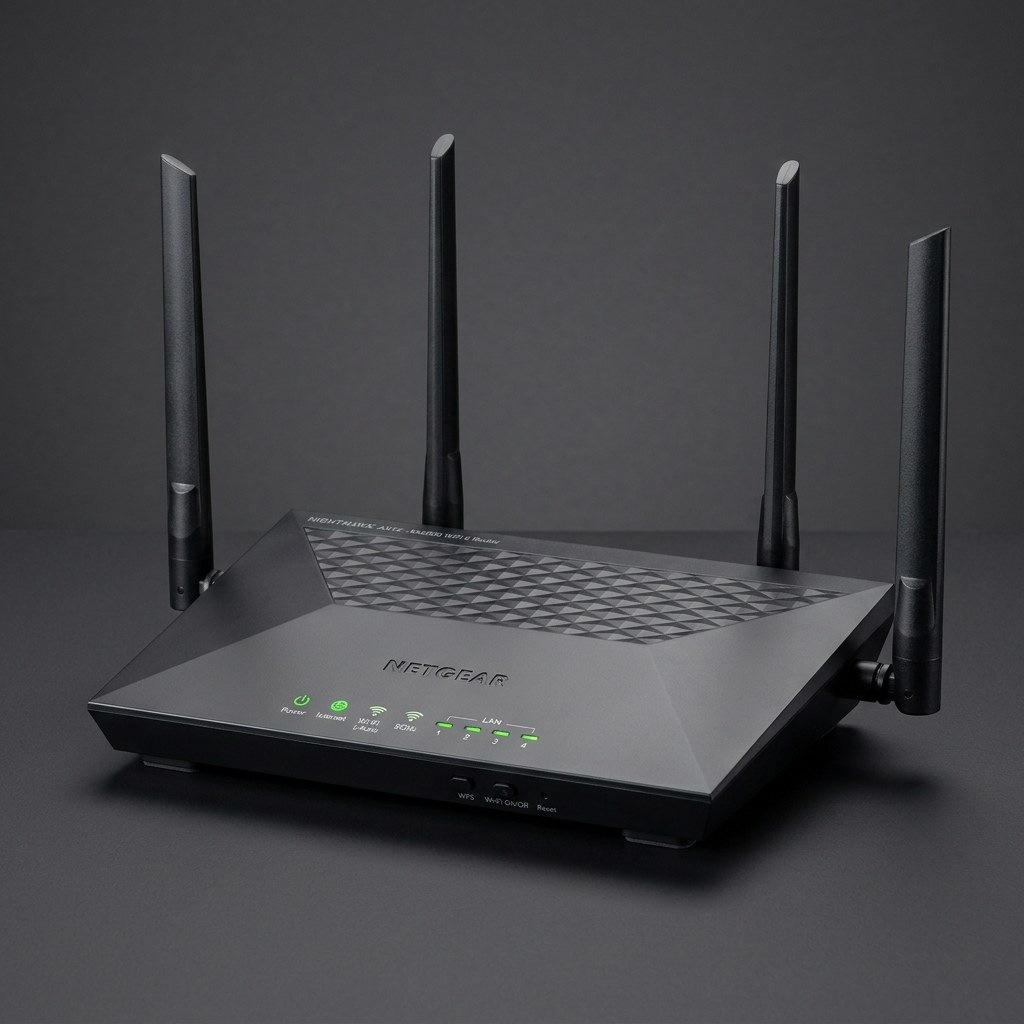
5 Gigabit ports and four external antennas provide broad Wi-Fi coverage
Cons
Higher cost in this comparison without providing higher SQM compute throughput than the Cudy WR1300
Amazon may ship v2 (slower Qualcomm CPU) or v4 (unsupported by OpenWrt) under similar listings
Flashing OpenWrt requires matching the stock firmware and regional image to the exact revision
Conclusion
The TP-Link Archer A6 (specifically hardware version 3) uses the MediaTek MT7621DAT chipset with 128MB RAM and 5 Gigabit ports. Once flashed to OpenWrt, its Cake SQM processing reaches roughly 250–300 Mbps (estimate), the same class as the Cudy WR1300. Buyers must be careful on Amazon: the same listing can ship different hardware revisions. v2 uses a slower Qualcomm CPU (OpenWrt works, but it will not shape 200+ Mbps), and v4 is not supported by OpenWrt at all.Verdict
The Verdict: Best Ultra-Budget SQM Router for CS2 & Valorant — GL.iNet GL-SFT1200 (Opal)
GL.iNet GL-SFT1200 (Opal) is our top recommendation for competitive CS2 and Valorant players looking to eliminate bufferbloat on a strict budget. Because it ships with OpenWrt-based firmware pre-installed, it completely removes the complexity and risk of manual flashing. Its 1GHz dual-core processor delivers up to ~200 Mbps of Cake SQM shaping across Gigabit Ethernet ports, keeping added latency under load within single-digit milliseconds.
🎯 Breakdown of the alternatives:
-
Cudy WR1300 — highest SQM bandwidth ceiling. MediaTek MT7621 compute and 5 Gigabit ports give it the highest headroom in this comparison (up to ~300 Mbps Cake SQM) for multi-device households. Requires a simple two-step firmware upload via web GUI.
-
GL.iNet GL-MT300N-V2 Mango — lowest-cost dedicated SQM bridge. An ultra-compact USB-powered pocket unit with native OpenWrt. Ideal as an inline queue purifier for players on 30–50 Mbps connections with a single wired gaming PC.
-
TP-Link Archer A6 (v3) — traditional desktop form factor. Delivers the same MT7621 processing throughput as the Cudy WR1300 with 5 Gigabit ports and 4 antennas, but costs more in this comparison and strictly requires verifying hardware version v3 before flashing OpenWrt.
Frequently Asked Questions
Mainstream router manufacturers do not advertise 'OpenWrt' or 'SQM' on Amazon. To find compatible hardware: (1) Search directly for open-source friendly brands like 'GL.iNet' or 'Cudy'. (2) When searching general brands (TP-Link, Netgear), search for the chipset, for example 'MT7621 Gigabit Router'. (3) Check the hardware version on the box label before opening or flashing it (for example Archer A6 v3, not v2 or v4; Cudy WR1300 v1–v3, not WR1300E or WR1300S) and cross-reference it in the OpenWrt Table of Hardware (openwrt.org/toh). If the revision does not match, return it through Amazon's return policy. Note that v2 of the Archer A6 does run OpenWrt, but its Qualcomm CPU is too slow for 200+ Mbps SQM.
Standard QoS on commercial routers uses static priority queues (placing 'gaming' ahead of 'downloads') or simple bandwidth limiters. Bursty data can still fill the queue before the priority scheduler reacts, and stock QoS does nothing about queues at your ISP's equipment. Cake SQM shapes the connection slightly below the real line rate and schedules packets per flow, so the queue stays short and gaming packets are not stuck behind bulk transfers.
Run a baseline speed measurement (for example using the Waveform bufferbloat analyzer) over wired Ethernet with no background traffic, three times. Take the lowest download and upload speeds. In the OpenWrt SQM menu, set Download and Upload to about 92% of those figures (the working range is 90–95%). For example, on a 100 Mbps download / 20 Mbps upload connection, start with 92 Mbps down and 18.4 Mbps up. This intentional 5–10% sacrifice moves the bottleneck into your router's Cake engine instead of the ISP's unmanaged buffer. Also make sure flow offloading is disabled and the link layer overhead matches your connection type.
Yes. If your ISP device cannot be removed (for example an integrated fiber ONT or cable gateway), enable 'Bridge Mode' or 'IP Passthrough' if available, which avoids double NAT. If bridge mode is not available, you can place your SQM router in the ISP device's DMZ and disable its Wi-Fi. SQM still works behind an ISP router as long as the SQM router's WAN is shaped below the real line speed. All gaming devices must connect through the SQM router for shaping to apply to them.
Buy the GL.iNet GL-SFT1200 (Opal). It comes with OpenWrt-based firmware pre-installed. Plug it in, open the web interface, install the 'luci-app-sqm' package (through LuCI's software page or the package manager; on GL.iNet firmware you may need to enable LuCI first), enter your shaping rates, and you are done without touching a command-line terminal.
Cake SQM is processed by the router's CPU, so the entry-level routers in this comparison top out around 300 Mbps. On a faster line you can either shape to the CPU's limit and accept the lower speed, or use a faster OpenWrt-capable device (check the OpenWrt Table of Hardware for current options).
You May Also Like
- Best Ultra-Budget Rapid Trigger Keyboards Under $40 for CS2 & Valorant (2026)
- Best Ultra-Budget USB-C to 3.5mm Audio Adapters Under $10 for CS2 & Valorant: UGREEN vs JXMOX vs JSAUX
- Best Ultra‑Budget PSU 2026: MSI MAG A550BN vs Thermaltake Smart 600W vs Apevia SP700 — Are Extra Watts a Lie?
- Bufferbloat Fix & Network Tuning for CS2 & Valorant: Complete Guide
- Fast IPS vs VA Under $100: Why Cheap VA Panels Often Hurt Motion Clarity in CS2 & Valorant