hardware
Best Ultra-Budget AM5 Motherboards Under $80: CS2 & Valorant
We compare entry AM5 hardware realities: 88W PPT power delivery, DDR5 EXPO memory tuning, BIOS Flashback essentials, and why B650 offers the best long-term upgrade value.
- 8 min read
Stepping onto AMD's AM5 platform in 2026 is the most future-proof move for budget competitive gamers. Pairing a sub-$150 chip like the Ryzen 5 7500F, Ryzen 5 7600, or Ryzen 5 8400F with fast DDR5 memory delivers blistering frame rates in CS2 and Valorant while guaranteeing a drop-in upgrade path through at least 2027. However, entry-level AM5 motherboards present distinct technical trade-offs between the A620 and B650 chipsets. While A620 boards keep upfront costs strictly minimal, they lock CPU multiplier tuning and limit secondary bus bandwidth. Meanwhile, entry B650 boards unlock Precision Boost Overdrive, Curve Optimizer undervolting, and next-generation PCIe Gen5 storage without requiring high-end motherboard budgets. In this breakdown, we compare three of the most accessible sub-$80 entry-tier AM5 motherboards on the market: the ASRock B650M-H/M.2+, GIGABYTE A620M S2H, and A620AM-X. We examine power delivery behavior under 88W PPT loads, DDR5 EXPO memory training, BIOS Flashback convenience, and real-world esports value.
Info
AM5 Hardware Guide for Competitive CS2 & Valorant
DDR5 memory latency and sustained single-core boost dictate frame delivery in CPU-bound competitive shooters. On AM5, choosing the right entry board ensures stable 6000MHz EXPO profiles and seamless CPU upgrade headroom.
A 65W AM5 chip draws only ~50W–65W during competitive gaming matches AMD's 65W TDP processors (Ryzen 5 7500F, 7600, 8400F, 8700F) operate within a strict 88W Package Power Tracking (PPT) ceiling. In games like CS2 and Valorant, actual CPU power draw hovers between 45W and 65W. Entry-level VRMs handle these workloads cleanly without thermal throttling, freeing up budget for DDR5-6000 CL30 memory or a higher-tier GPU.
Four technical realities budget AM5 builders need to know:
- A620 vs B650: Power Delivery & Overclocking Nuances - A620 motherboards lock manual CPU multiplier overclocking and fully disable PBO and Curve Optimizer, though memory EXPO remains fully supported. B650 motherboards (like the ASRock B650M-H/M.2+) unlock full Precision Boost Overdrive and Curve Optimizer, allowing you to undervolt the CPU for lower temperatures and sustained higher boost frequencies in competitive titles.
- DDR5 Memory Training & 2-DIMM Signal Integrity - Budget 2-DIMM AM5 motherboards feature short, direct trace routing between the CPU and memory sockets. This point-to-point topology delivers exceptionally clean signal integrity, easily stabilizing the sweet-spot DDR5-6000 CL30/CL32 EXPO profiles crucial for reducing 1% low frame stuttering.
- BIOS Flashback is Mandatory for Future CPUs - Because AM5 is an active long-term socket receiving new CPU releases through 2027+, hardware-level BIOS Flashback (such as GIGABYTE's Q-Flash Plus or ASRock's Flashback button) allows you to update the board's UEFI using a simple USB flash drive without needing an older CPU installed.
- M.2 Gen5 Storage & Internal Wi-Fi Expansion - While A620 boards top out at PCIe 4.0 x4 NVMe connectivity, entry B650 models like the B650M-H/M.2+ feature a direct-to-CPU Blazing M.2 PCIe 5.0 slot alongside a secondary M.2 SSD slot and a dedicated M.2 Key-E socket for adding an internal Wi-Fi 6E/7 card later.
Practical configuration tips for budget AM5 systems:
- Enable 'Memory Context Restore' and 'Power Down Enable' in your BIOS after verifying DDR5 EXPO stability to reduce AM5 boot times from 45 seconds down to under 12 seconds.
- Always pair AM5 with a 2x16GB DDR5-6000 CL30 or CL32 EXPO kit — 6000MHz runs 1:1 with the memory controller (UCLK:MCLK) for lowest true latency in esports.
- Apply a -20 to -30 negative Curve Optimizer offset in BIOS on B650 boards to drop load temperatures by 5–8°C while maintaining higher all-core boost clocks.
- Because budget AM5 motherboards feature unheatsinked VRMs, pair them with standard tower air coolers or top-flow coolers and ensure good chassis airflow rather than liquid AIOs with stagnant VRM zones.
Watch: How to assemble a budget AM5 gaming PC step-by-step:
Step-by-step assembly walkthrough covering AM5 CPU socketing, cooler mounting, DDR5 RAM seating, and motherboard installation.
AM5 PC Build WalkthroughUltra-Budget AM5 Motherboards for CS2 & Valorant: A620 vs B650 Specs
| Chipset | Form Factor | PCIe Bus | RAM Slots | M.2 Storage | Display | ||
|---|---|---|---|---|---|---|---|
ASRock B650M-H/M.2+ Micro-ATX Motherboard Best Pick | AMD B650 | Micro-ATX | PCIe 4.0 (PCIe 5.0 M.2) | 2 x DDR5 DIMM Slots | 1 x Blazing M.2 (PCIe Gen5 x4) + 1 x Hyper M.2 (PCIe Gen4 x4) + 1 x M.2 Key-E (WiFi) | 1 x DisplayPort 1.4, 1 x HDMI 2.1 | Check price on Amazon |
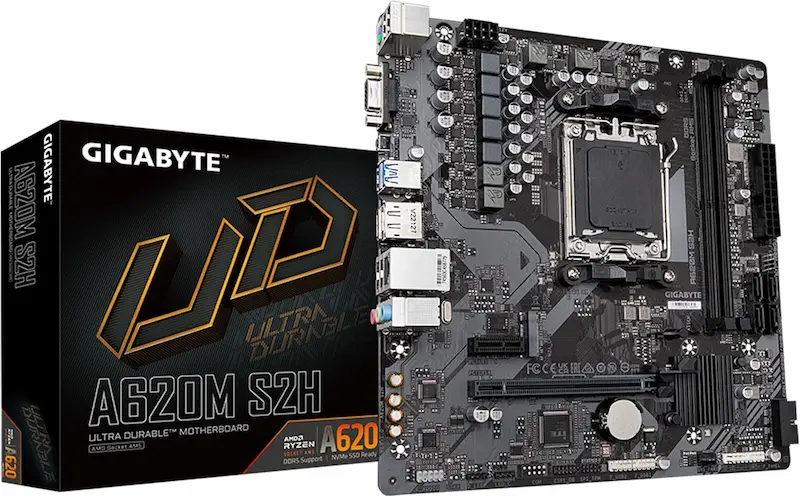
GIGABYTE A620M S2H Ultra Durable Motherboard | AMD A620 | Micro-ATX | PCIe 4.0 | 2 x DDR5 DIMM Slots | 1 x PCIe 4.0 x4 M.2 NVMe (2280) | 1 x DisplayPort 1.4, 1 x HDMI 2.1, 1 x D-Sub (VGA) | Check price on Amazon |
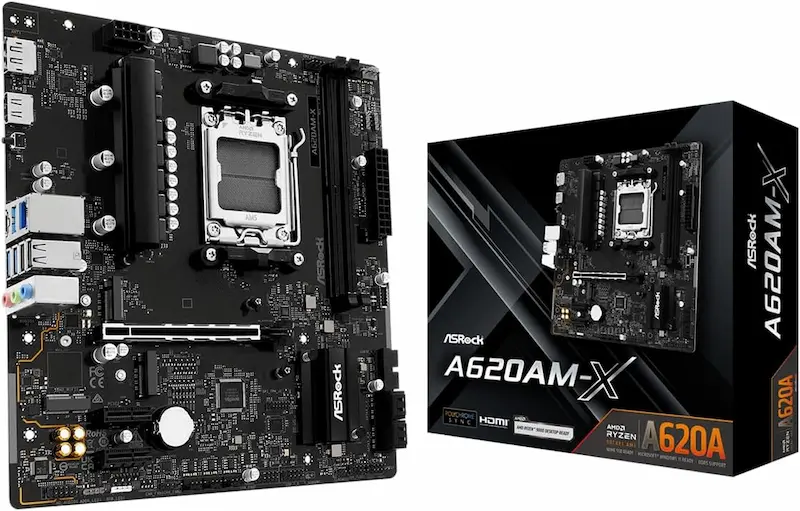
ASRock A620AM-X Micro-ATX Motherboard Best price | AMD A620A | Micro-ATX | PCIe 4.0 | 2 x DDR5 DIMM Slots | 2 x Hyper M.2 (PCIe Gen4 x4 NVMe) + 1 x M.2 Key-E (WiFi) | 1 x HDMI, 1 x DisplayPort 1.4 | Check price on Amazon |
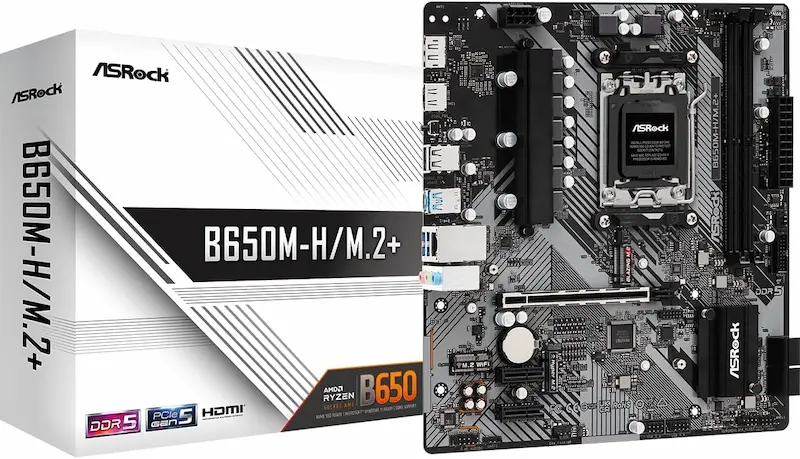
ASRock B650M-H/M.2+ Micro-ATX Motherboard Best Pick
AMD B650 | Micro-ATX | PCIe 4.0 (PCIe 5.0 M.2)
RAM:2 x DDR5 DIMM Slots (Max 128 GB)M.2 Slots:1 x Blazing M.2 (PCIe Gen5 x4) + 1 x Hyper M.2 (PCIe Gen4 x4) + 1 x M.2 Key-E (WiFi)Display Outputs:1 x DisplayPort 1.4, 1 x HDMI 2.1GIGABYTE A620M S2H Ultra Durable Motherboard
AMD A620 | Micro-ATX | PCIe 4.0
RAM:2 x DDR5 DIMM Slots (Max 128 GB)M.2 Slots:1 x PCIe 4.0 x4 M.2 NVMe (2280)Display Outputs:1 x DisplayPort 1.4, 1 x HDMI 2.1, 1 x D-Sub (VGA)ASRock A620AM-X Micro-ATX Motherboard Best price
AMD A620A | Micro-ATX | PCIe 4.0
RAM:2 x DDR5 DIMM Slots (Max 128 GB)M.2 Slots:2 x Hyper M.2 (PCIe Gen4 x4 NVMe) + 1 x M.2 Key-E (WiFi)Display Outputs:1 x HDMI, 1 x DisplayPort 1.4
* As an Amazon Associate I earn from qualifying purchases.
ASRock B650M-H/M.2+: Best Ultra-Budget B650 for CS2 & Valorant (PBO & PCIe 5.0)
* As an Amazon Associate I earn from qualifying purchases.
- 1
Uncapped B650 Platform: Curve Optimizer Undervolting & Blazing Gen5 NVMe
Unlocks complete Precision Boost Overdrive tuning, Curve Optimizer undervolting, and a dedicated PCIe Gen5 x4 Blazing M.2 slot, offering superior platform longevity for an entry-level price.
- 2
Dual High-Speed M.2 Storage plus Dedicated M.2 Key-E Wi-Fi Expansion
Equipped with two NVMe drive slots, an M.2 Key-E wireless card slot, and rear USB 3.2 Gen1 Type-C for modern high-speed peripheral connectivity.
Pros and Cons: ASRock B650M-H/M.2+
Pros
Full B650 chipset with unlocked Precision Boost Overdrive & Curve Optimizer
Blazing M.2 slot supports ultra-fast PCIe Gen5 x4 NVMe SSDs
Dual M.2 SSD slots plus dedicated M.2 Key-E slot for adding internal Wi-Fi
Rear USB 3.2 Gen1 Type-C port and DisplayPort 1.4 output
BIOS Flashback button for simple CPU upgrade compatibility
Cons
Costs slightly more than entry-tier A620 motherboards
Unheatsinked VRM (best limited to 65W TDP / 88W PPT processors)
2 DDR5 DIMM slots rather than 4 (plan capacity upfront with 2x16GB)
Conclusion
The ASRock B650M-H/M.2+ is our top overall pick: offering full B650 PBO tuning, PCIe 5.0 M.2 speed, dual SSD slots, and rear USB-C for just a modest step up over basic A620 boards.GIGABYTE A620M S2H: Ultra-Budget CS2 & Valorant Workhorse with Q-Flash Plus
* As an Amazon Associate I earn from qualifying purchases.
- 1
Foolproof Firmware Upgrades: Dedicated Q-Flash Plus Hardware Button
Features a robust 5+2+2 phase power design capable of sustaining 65W/88W PPT Ryzen processors, paired with GIGABYTE's Q-Flash Plus for effortless USB BIOS updates.
- 2
Triple Display Outputs with Smart Fan 6 Zero-RPM Tuning
Offers DisplayPort, HDMI, and legacy D-Sub VGA outputs, making it versatile for multi-monitor setups alongside granular fan curve tuning with zero-RPM fan stop.
Pros and Cons: GIGABYTE A620M S2H
Pros
Solid 5+2+2 digital power phase VRM for 65W Ryzen processors
Q-Flash Plus hardware button allows updating BIOS without CPU or RAM
Triple display outputs: DisplayPort 1.4, HDMI 2.1, and legacy D-Sub VGA
Smart Fan 6 hybrid headers with FAN STOP support
Cons
A620 chipset locks CPU multiplier overclocking and PBO Curve Optimizer
Single M.2 NVMe storage slot (cannot expand without PCIe add-in card)
No rear USB Type-C connector
Unheatsinked discrete MOSFET VRM runs warmer than Dr.MOS designs
Conclusion
The GIGABYTE A620M S2H is the most well-rounded A620 board, pairing a capable 5+2+2 digital VRM with Q-Flash Plus, triple display outputs, and dependable DDR5 stability.ASRock A620AM-X: Rock-Bottom Ultra-Budget AM5 Pick for CS2 & Valorant (2.5G LAN)
* As an Amazon Associate I earn from qualifying purchases.
- 1
Maximum Esports Value: 2.5G Networking & Dual Gen4 M.2 at Entry Cost
Provides the most affordable entry point for building a Zen 4/5 gaming system, retaining essential hardware BIOS Flashback for future processor compatibility.
- 2
Direct 2-DIMM Topology for Rock-Solid DDR5-6000 EXPO Latency
Direct point-to-point memory traces ensure seamless DDR5 EXPO profile loading, complemented by two PCIe 4.0 x4 Hyper M.2 NVMe slots and 2.5G Ethernet.
Pros and Cons: ASRock A620AM-X
Pros
Lowest entry price to get onto the AM5 platform with DDR5
Integrated BIOS Flashback button for updating firmware with USB drive
Direct 2-DIMM topology ensures rock-solid DDR5-6000 CL30 EXPO stability
Dual Hyper M.2 (PCIe 4.0 x4) slots plus M.2 Key-E Wi-Fi expansion
Dual modern display outputs (DisplayPort 1.4 and HDMI) plus fast 2.5G LAN
Rear USB-C and front panel USB-C header included
Cons
A620 chipset locks CPU multiplier overclocking and PBO tuning
No PCIe 5.0 M.2 support (limited to PCIe 4.0 x4)
Unheatsinked VRM requires adequate case airflow under sustained load
Conclusion
The ASRock A620AM-X is our Best Price champion: delivering the absolute lowest entry cost onto Socket AM5 while retaining vital BIOS Flashback functionality and dual M.2 storage.Verdict
Final Verdict: The Best Ultra-Budget AM5 Motherboard for CS2 & Valorant ASRock B650M-H/M.2+
The ASRock B650M-H/M.2+ earns our top recommendation as the best budget AM5 gaming motherboard. For a minor price step above basic A620 boards, you secure full B650 chipset PBO and Curve Optimizer tuning, a PCIe 5.0 x4 Blazing M.2 slot, dual NVMe storage, an M.2 Key-E Wi-Fi slot, and rear USB Type-C. It offers the ideal balance of modern features and long-term upgrade longevity for competitive esports rigs.
The ASRock A620AM-X takes our Best Price award as the most affordable way to get onto Socket AM5. It eliminates non-essential costs while retaining vital BIOS Flashback functionality, dual M.2 NVMe storage, fast 2.5G LAN, and direct 2-DIMM trace routing for reliable DDR5 EXPO memory performance.
The GIGABYTE A620M S2H is a dependable alternative for standard A620 builds, offering a solid 5+2+2 digital VRM, Q-Flash Plus, and versatile triple display outputs (DisplayPort, HDMI, and VGA).
Frequently Asked Questions
Yes. Competitive shooters are heavily CPU single-thread and memory latency limited. 65W TDP AM5 chips (like the Ryzen 5 7500F, 7600, or 8400F) draw only around 50W–65W during actual matches, which entry A620 motherboards power cleanly without thermal throttling.
The ASRock B650M-H/M.2+ costs only slightly more but brings critical upgrades: unlocked PBO and Curve Optimizer for undervolting, a PCIe 5.0 M.2 slot, dual M.2 SSD storage, a dedicated M.2 WiFi card slot, and a high-speed rear USB Type-C port.
On DDR5 platforms, 2-DIMM motherboards use direct 1DPC (1 DIMM Per Channel) point-to-point traces. This eliminates signal reflections found on 4-slot daisy-chain boards, making high-speed 6000MHz EXPO profiles much more stable on budget motherboards.
DDR5 performs memory training on cold boots. Once your EXPO profile is verified stable, enter BIOS, enable 'Memory Context Restore' and 'Power Down Enable'. This caches your memory training data and cuts boot times from 45+ seconds down to under 12 seconds.
Yes, for 65W TDP chips (and future Zen 5 / Zen 6 65W releases). For heavier 105W–120W TDP processors like the Ryzen 7 7700X or 7800X3D, they will work safely in gaming workloads (which draw modest ~50W–75W power), but heavy all-core rendering loads will cause thermal throttling on entry-level unheatsinked VRMs.
The ASRock B650M-H/M.2+ is our top overall recommendation because the small price premium unlocks full B650 PBO tuning, PCIe 5.0 M.2 speed, and dual storage slots. If your budget is strictly constrained to the lowest entry cost, the ASRock A620AM-X is the top value pick thanks to its rock-bottom price, dual M.2 storage, and BIOS Flashback button.
You May Also Like
- Best Ultra-Budget AM4 Motherboards Under $80: MSI A520M-A PRO vs GIGABYTE A520M K vs B550M K
- Best Ultra-Budget LGA1700 Motherboards Under $80: ASRock H610M vs GIGABYTE S2H vs MSI H610M
- Bufferbloat Fix & Network Tuning for CS2 & Valorant: Complete Guide
- Best Ultra-Budget 240Hz Monitors Under $120 for CS2 & Valorant (2026)
- Best Ultra-Budget 144Hz Monitors Under $80 for CS2 & Valorant (2026)