hardware
Best Ultra-Budget AM4 Motherboards Under $80: CS2 & Valorant
We break down the engineering compromises between A520 and entry B550: VRM thermals, PCIe bus limits on x8 GPUs, 2-DIMM vs 4-DIMM RAM topology, and diagnostic tools.
- 7 min read
The AM4 platform continues to dominate budget esports builds in 2026 for a simple reason: an affordable 6-core chip like the Ryzen 5 5600 paired with low-cost DDR4 RAM easily hits high refresh-rate targets in CS2 and Valorant without burning through a tight budget. However, ultra-budget motherboards are defined by their engineering compromises. When choosing between A520 and low-cost B550 boards, the real trade-offs aren't just chipset labels—they involve unheatsinked VRM thermal headroom, PCIe lane speeds for x8 graphics cards, slot clearance with thick modern GPUs, and whether troubleshooting a first-time boot issue requires blind trial-and-error. In this breakdown, we compare three of the most widely available sub-$80 AM4 motherboards—the MSI A520M-A PRO, GIGABYTE A520M K V2, and GIGABYTE B550M K. We dissect their VRM layouts, expansion limits, BIOS quirks, and real-world gaming trade-offs to show exactly where your money goes.
Info
AM4 Hardware Guide for Competitive CS2 & Valorant
Single-core IPC and memory sub-timings drive 1% low FPS in Source 2 and Unreal Engine competitive shooters. Your motherboard's primary job on a budget is delivering clean power to sustain peak CPU boost clocks without getting in the way.
Focus on VRM airflow and CPU matching over expensive board features Esports titles rarely push all CPU cores simultaneously, meaning 65W chips (Ryzen 5 5600, 5500, 3600) draw roughly 45W–65W during actual matches. Even bare-PCB motherboards without VRM heatsinks stay safely under 75°C under gaming loads as long as your case provides basic intake airflow.
Four technical realities budget builders need to know:
- The PCIe 4.0 vs 3.0 Caveat (CPU & GPU Matching) - B550 unlocks PCIe 4.0 only when paired with a Vermeer/Matisse CPU (like Ryzen 5 5600 or 3600). If you buy a Ryzen 5 5500 or 5600G (Cezanne architecture), the CPU itself only supports PCIe 3.0 regardless of chipset. For GPUs with cut-down x8 lanes (RX 6600, RX 7600, RTX 4060), running PCIe 4.0 via a 5600 + B550 prevents minor 1% low dips during heavy smoke and particle rendering.
- 2-DIMM Direct Routing vs 4-DIMM Flexibility - 2-slot boards (MSI A520M-A PRO, GIGABYTE A520M K V2) use direct trace routing with fewer signal reflections, making tight 3600 MHz CL16 XMP profiles exceptionally stable. 4-slot boards (B550M K) let you start with an affordable 2x8GB kit and add another 2x8GB later without throwing away your original memory.
- POST Diagnostics: Saving First-Boot Headaches - Budget boards skip seven-segment error codes, but MSI's EZ Debug LED array gives you four clear status lights (CPU, DRAM, VGA, BOOT). On boards without diagnostic LEDs, a bad memory seating or display handshake leaves you staring at a black screen with no clue what went wrong.
- DisplayPort Outputs on Budget Boards - While A520 boards commonly stick to HDMI and legacy DVI/VGA ports, the B550M K includes DisplayPort 1.4. This is a subtle but valuable perk for APU esports builds or multi-monitor setups running 180Hz–240Hz adaptive-sync displays.
Practical configuration tips for budget AM4 builds:
- Enable Resizable BAR (Smart Access Memory) in BIOS — both A520 and B550 support it with current AGESA updates, giving free 3–7% 1% low improvements on modern GPUs.
- Always install memory in slots A2/B2 (the 2nd and 4th slots from the CPU) on 4-DIMM boards to ensure proper daisy-chain termination and stable XMP.
- Because budget boards only have one chassis fan header, pick up a $5 PWM 4-pin splitter to power multiple intake fans off the board's automated thermal curve.
Watch: How to assemble a budget AM4 gaming PC step-by-step:
Complete assembly walkthrough covering CPU installation, RAM socketing, front panel headers, and first-time BIOS setup.
AM4 PC Build & BIOS Setup GuideAM4 Motherboard Comparison: Specs, VRM & Connectivity
| Chipset | Form Factor | PCIe Bus | RAM Slots | M.2 Storage | Display | ||
|---|---|---|---|---|---|---|---|
MSI A520M-A PRO Gaming Motherboard Best price | AMD A520 | Micro-ATX | PCIe 3.0 | 2 x DDR4 DIMM Slots | 1 x Turbo M.2 (PCIe Gen3 x4 & SATA) | 1 x HDMI 2.1 (4K@60Hz), 1 x DVI-D | Check price on Amazon |
GIGABYTE A520M K V2 Ultra Durable Motherboard | AMD A520 | Micro-ATX | PCIe 3.0 | 2 x DDR4 DIMM Slots | 1 x M.2 (PCIe 3.0 x4 & SATA) | 1 x HDMI 2.1 (4K@60Hz), 1 x D-Sub (VGA) | Check price on Amazon |
GIGABYTE B550M K Micro-ATX Motherboard Best Pick | AMD B550 | Micro-ATX | PCIe 4.0 | 4 x DDR4 DIMM Slots | Dual NVMe M.2 (1x PCIe 4.0 x4 + 1x PCIe 3.0 x2) | 1 x DisplayPort 1.4, 1 x HDMI 2.1 | Check price on Amazon |
MSI A520M-A PRO Gaming Motherboard Best price
AMD A520 | Micro-ATX | PCIe 3.0
RAM:2 x DDR4 DIMM Slots (Max 64 GB)M.2 Slots:1 x Turbo M.2 (PCIe Gen3 x4 & SATA)Display Outputs:1 x HDMI 2.1 (4K@60Hz), 1 x DVI-DGIGABYTE A520M K V2 Ultra Durable Motherboard
AMD A520 | Micro-ATX | PCIe 3.0
RAM:2 x DDR4 DIMM Slots (Max 64 GB)M.2 Slots:1 x M.2 (PCIe 3.0 x4 & SATA)Display Outputs:1 x HDMI 2.1 (4K@60Hz), 1 x D-Sub (VGA)GIGABYTE B550M K Micro-ATX Motherboard Best Pick
AMD B550 | Micro-ATX | PCIe 4.0
RAM:4 x DDR4 DIMM Slots (Max 128 GB)M.2 Slots:Dual NVMe M.2 (1x PCIe 4.0 x4 + 1x PCIe 3.0 x2)Display Outputs:1 x DisplayPort 1.4, 1 x HDMI 2.1
* As an Amazon Associate I earn from qualifying purchases.
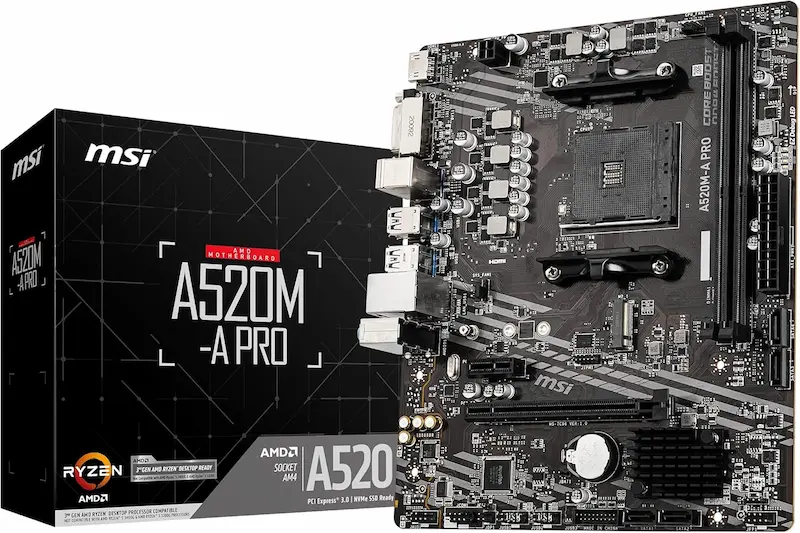
MSI A520M-A PRO: Lowest Price & Best Diagnostic Tools
* As an Amazon Associate I earn from qualifying purchases.
- 1
The most affordable AM4 option with dedicated EZ Debug LEDs
Delivers the lowest price floor in our lineup while integrating four hardware diagnostic LEDs (CPU, DRAM, VGA, BOOT) that eliminate blind troubleshooting on budget builds.
- 2
Clean Click BIOS with solid DDR4 3600MHz memory support
Direct 2-DIMM trace topology delivers rock-solid signal stability for DDR4 3200/3600 XMP kits, while MSI's clean UEFI layout makes setting fan curves and PBO straightforward.
Pros and Cons: MSI A520M-A PRO
Pros
Lowest purchase price among reputable AM4 motherboards
EZ Debug LED cluster instantly isolates CPU, RAM, GPU, or boot drive issues
Direct 2-DIMM memory layout delivers clean signal integrity for DDR4 3600 XMP
Clear, responsive Click BIOS layout with easy fan and PBO configuration
Cons
Locked to PCIe 3.0 speeds for graphics and NVMe SSD
Only 2 RAM slots and a single M.2 storage connector
Single 4-pin chassis fan header requires a PWM splitter for multi-fan cases
Conclusion
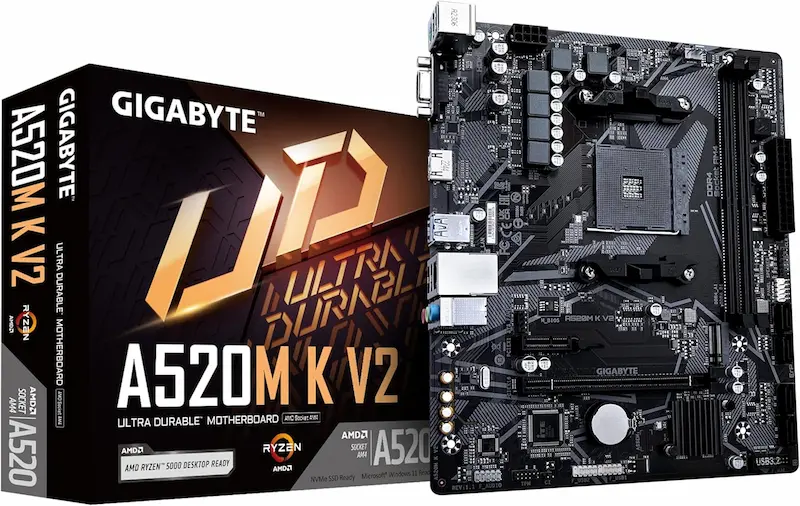
The MSI A520M-A PRO is the most affordable board in our lineup, pairing the lowest entry price with invaluable EZ Debug diagnostic LEDs and rock-solid DDR4 memory stability.GIGABYTE A520M K V2: Solid Budget Alternative for Pure Gaming
* As an Amazon Associate I earn from qualifying purchases.
- 1
Streamlined foundation with NVMe speed and Gigabit LAN
Cuts cosmetic extras to deliver an ultra-lean AM4 foundation featuring an NVMe M.2 slot, Gigabit Ethernet, and adequate power delivery for 65W stock processors.
- 2
Smart Fan 5 thermal control with silent idle fan stop
Offers granular fan curve management with zero-RPM idle capability, plus a legacy D-Sub VGA port alongside HDMI for repurposing older office monitors as secondary screens.
Pros and Cons: GIGABYTE A520M K V2
Pros
Budget-friendly pricing with solid core gaming fundamentals
Smart Fan 5 utility supports custom thermal curves and zero-RPM fan stop
Legacy D-Sub (VGA) port alongside HDMI allows using older secondary monitors
Reliable Gigabit Ethernet controller for stable low-ping gaming
Cons
Limited to PCIe 3.0 throughput
Only 2 DDR4 memory slots and 1 M.2 drive slot
No onboard diagnostic LEDs for hardware post troubleshooting
Conclusion
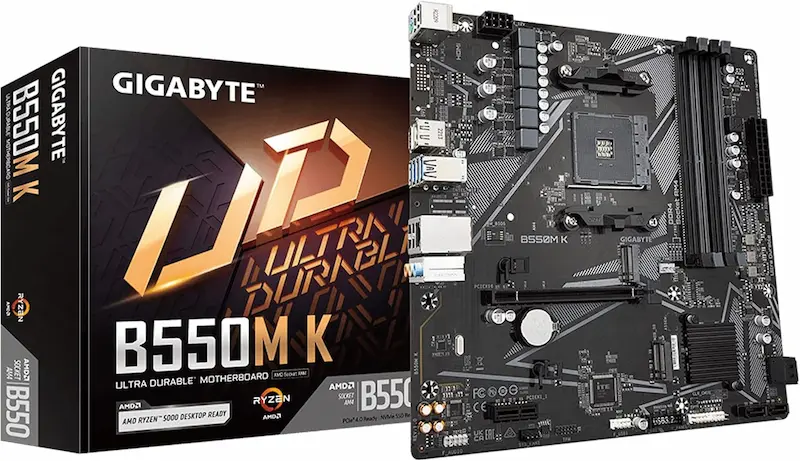
The GIGABYTE A520M K V2 strips AM4 down to pure essentials: solid NVMe storage speed, quiet Smart Fan 5 acoustic control, and dependable 65W gaming performance.GIGABYTE B550M K: Best All-Round Platform for Upgraders
* As an Amazon Associate I earn from qualifying purchases.
- 1
Full PCIe 4.0 pipeline with dual M.2 drive support
Combines a PCIe 4.0 x16 graphics slot with a primary PCIe 4.0 x4 M.2 connector, plus a secondary M.2 slot for adding a dedicated game drive down the road without sacrificing bandwidth on x8 GPUs like the RX 6600.
- 2
4 DIMM slots and modern display connectivity
Provides four DDR4 slots for painless RAM capacity doubling up to 128 GB, alongside DisplayPort 1.4 and HDMI 2.1 outputs for high-refresh competitive displays.
Pros and Cons: GIGABYTE B550M K
Pros
PCIe 4.0 x16 avoids bandwidth bottlenecks on budget x8 GPUs (RX 6600, RTX 4060)
4 DDR4 DIMM slots allow starting with 2x8GB and adding more RAM later
Dual NVMe M.2 slots for separating OS from high-capacity game storage
DisplayPort 1.4 output supports high-refresh adaptive sync displays
Smart Fan 5 controls with FAN STOP for quiet idle noise levels
Cons
Costs slightly more than barebones A520 options
No VRM heatsinks (keep to 65W TDP CPUs with decent case airflow)
Secondary M.2 slot shares chipset bandwidth at PCIe 3.0 x2 speed
Conclusion
The GIGABYTE B550M K is our top pick for builders wanting longevity: PCIe 4.0 graphics and NVMe bandwidth, 4 RAM slots for easy memory upgrades, and dual M.2 slots for a modest step up in cost.Verdict
Final Verdict: The Best Ultra-Budget AM4 Motherboard GIGABYTE B550M K
The GIGABYTE B550M K is our top recommendation for budget AM4 builders who want upgrade longevity. For a modest price step above basic A520 boards, you gain PCIe 4.0 x16 graphics bandwidth, 4 DDR4 memory slots for adding RAM later, and dual M.2 NVMe slots. If you pair a Ryzen 5 5600 with an x8 GPU like the RX 6600 or RTX 4060, it eliminates bus bottlenecks and delivers rock-solid frame pacing in competitive shooters.
The MSI A520M-A PRO takes our Best Price award as the absolute most affordable motherboard in this lineup. Despite having the lowest price tag, it includes an onboard EZ Debug LED cluster that removes the stress of first-time system assembly by instantly pinpointing startup issues, along with clean DDR4 3600 XMP memory stability.
The GIGABYTE A520M K V2 is a solid alternative for pure budget gaming builds. It covers all essentials—dependable power for 65W chips, NVMe M.2 speed, and Smart Fan 5 acoustic control—without inflating the bill for features you might not need.
Frequently Asked Questions
Yes. Esports titles rely primarily on CPU single-core speed and memory latency rather than massive multi-core power draw. A quality A520 board easily feeds 65W processors like the Ryzen 5 5600 at full boost clocks with zero thermal throttling, providing a stable high-FPS experience at minimal cost.
No. PCIe 4.0 requires both a B550 board AND a compatible CPU with PCIe 4.0 lanes, such as the Ryzen 5 5600 or 5700X. If you pair the B550M K with a Ryzen 5 5500, 4500, or 5600G (Cezanne/Renoir APU silicon), the system runs at PCIe 3.0 speeds because the CPU itself lacks PCIe 4.0 controllers.
Current retail units of the MSI A520M-A PRO, GIGABYTE A520M K V2, and B550M K ship with Ryzen 5000-ready BIOS versions pre-installed. However, if building with later refresh CPUs like the Ryzen 7 5700X3D or Ryzen 5 5600GT, double-check that the retailer packaging shows the 'AMD Ryzen 5000 Desktop Ready' label.
A520 chipsets lock manual CPU multiplier overclocking, though memory XMP and PBO curve tuning work normally. The B550M K allows unlocked multiplier tuning, but because its VRM lacks metal heatsinks, we recommend leaving 65W CPUs at stock settings or applying a moderate negative Curve Optimizer offset to lower temperatures.
Budget AM4 boards like the MSI A520M-A PRO and GIGABYTE A520M K V2 feature a single 4-pin chassis fan header alongside the CPU fan header. An inexpensive 4-pin PWM fan splitter cable ($4–$6) allows multiple case fans to run off that single header and follow a synchronized thermal curve.
The GIGABYTE B550M K is our top overall pick because its slight price premium gives you PCIe 4.0, four RAM slots for future expansion, and dual M.2 storage slots. If your budget is strictly focused on the lowest initial purchase price, the MSI A520M-A PRO is the top value pick thanks to its unbeatable price and invaluable EZ Debug LEDs.
You May Also Like
- Best Ultra-Budget Gaming Monitors Under $100 for CS2 & Valorant (2026)
- Best Ultra-Budget AM5 Motherboards Under $80: ASRock B650M-H vs GIGABYTE A620M S2H vs A620AM-X
- Bufferbloat Fix & Network Tuning for CS2 & Valorant: Complete Guide
- Best Ultra-Budget 240Hz Monitors Under $120 for CS2 & Valorant (2026)
- Best Ultra-Budget 144Hz Monitors Under $80 for CS2 & Valorant (2026)