hardware
Best Ultra-Budget LGA1700 Motherboards Under $80: CS2 & Valorant
We compare the top three budget LGA1700 motherboards: ASRock H610M-HDV/M.2+ D5, GIGABYTE H610M S2H V2, and MSI PRO H610M-G WiFi for esports builds.
- 8 min read
High frame rates and responsive 1% low frame times in competitive tactical shooters like CS2 and Valorant depend heavily on memory bandwidth and low memory access latency. For years, budget competitive builders remained locked to DDR4 platforms to minimize upfront expenditure. However, recent memory market adjustments have brought DDR5 kits into direct competition with legacy memory, making ultra-budget DDR5 motherboards the best sweet spot for esports builders. The Intel LGA1700 platform with the H610 chipset provides the absolute lowest financial barrier to entry into DDR5 gaming. Pairing effortlessly with affordable quad-core and six-core processors like the Core i3-12100F and Core i5-12400F, H610 DDR5 motherboards give budget builders modern memory bandwidth without having to pay the premium required for mid-range B760 or Z790 boards. In this guide, we compare the top three ultra-budget sub-$80 LGA1700 motherboards: the ASRock H610M-HDV/M.2+ D5, the GIGABYTE H610M S2H V2, and the MSI PRO H610M-G WiFi. We tested their verified specs, VRMs under competitive loads, connectivity options, and real-world gaming and esports value for CS2 and Valorant.
Info
LGA1700 Hardware Guide for Competitive CS2 & Valorant
DDR5 signal stability and single-core boost consistency govern frametime smoothness in CPU-bound competitive games. Understanding the capabilities and constraints of the Intel H610 chipset prevents costly configuration mistakes.
A 65W gaming processor consumes only ~40W–65W during competitive matches Budget processors such as the Intel Core i3-12100F, Core i3-13100F, and Core i5-12400F operate within modest thermal boundaries during CS2 and Valorant sessions. Real-world gaming power draw rarely exceeds 65W. Entry-tier 4-phase to 6-phase VCore power delivery designs (4+1+1 on Gigabyte, 5+1 on MSI, 6+1+1 on ASRock) easily sustain these workloads without thermal throttling, provided your chassis maintains decent ambient airflow across the unheatsinked VRM components.
Four technical realities buyers of budget Intel H610 DDR5 boards must know:
- DDR5 Frequency Limits on the Intel H610 Chipset - Intel H610 chipsets do not allow memory overclocking beyond the processor's native rated controller speeds (IMC). On all budget 12th, 13th, and 14th Gen chips (Core i3-12100F, i5-12400F, i3-13100F, i5-13400F, and i3-14100F), the native controller speed is rated at 4800 MT/s. Native 5600 MT/s is supported only by higher-tier 13th and 14th Gen processors (Core i5-13600K/14600K and above). Instead of paying extra for 6000MHz+ kits that will be capped at 4800 MT/s, choose low CAS latency kits (CL36–CL38) at 4800 MT/s to maximize 1% low frametimes in CS2.
- 2-DIMM Topology Delivers Clean DDR5 Signal Routing - All three budget H610 motherboards feature two physical DIMM slots rather than four. In DDR5 memory architecture, a 1-DIMM-per-channel (1DPC) layout eliminates signal reflection and trace stub interference, ensuring dependable memory training and rock-solid boot stability with standard dual-channel memory kits.
- Networking Hardware: Realtek LAN vs Intel GbE & Wi-Fi 6E - In competitive tactical shooters, network packet consistency is critical. While ASRock and GIGABYTE utilize standard Realtek Gigabit LAN, the MSI PRO H610M-G WiFi steps up with an Intel I219-V controller known for low driver overhead, alongside pre-installed Wi-Fi 6E and Bluetooth 5.3 for clean cable-free setups.
- M.2 Storage Bandwidth & Display Flexibility - On the H610 platform, Intel disables direct CPU-attached PCIe 4.0 x4 storage lanes. Consequently, all M.2 storage routes through the H610 PCH at PCIe 3.0 x4 (~3,500 MB/s), which is plenty fast for instant map loading in CS2 and Valorant. Note that rear display ports only function with CPUs featuring integrated graphics; if you use an F-series CPU (like the i3-12100F or i5-12400F), display cables must be connected directly to your dedicated GPU.
Configuration and optimization tips from real community feedback:
- Select a DDR5 memory kit with tight CL timings (CL36–CL38 at 4800 MT/s) rather than chasing expensive 6000MHz+ kits that the H610 chipset will automatically cap at the CPU's native 4800 MT/s speed on budget Core i3 and i5 processors.
- Because all three ultra-budget motherboards feature bare VRM MOSFETs without aluminum heatsinks, use a standard downdraft or tower air cooler rather than an all-in-one liquid cooler to maintain ambient airflow over the voltage delivery circuits.
- If you need built-in wireless connectivity, the MSI PRO H610M-G WiFi is noticeably cheaper overall than buying a board and adding a separate PCIe or USB Wi-Fi card, while also including an Intel I219-V Ethernet controller.
- For multi-monitor workstations using CPU integrated graphics (non-F processors), the GIGABYTE H610M S2H V2 provides dual DisplayPort alongside HDMI and VGA outputs for up to 3 simultaneous active displays.
- Remember that Intel F-series processors (e.g., i3-12100F, i5-12400F) lack an integrated GPU, rendering all rear motherboard video ports inactive. Always connect your monitor cables directly to your dedicated graphics card.
Ultra-Budget DDR5 Motherboards for LGA1700: H610 Specs Comparison
| Socket | Chipset | DDR5 Memory | M.2 Storage | Display | ||
|---|---|---|---|---|---|---|
ASRock H610M-HDV/M.2+ D5 Micro-ATX Motherboard Best pick | Socket LGA1700 | Intel H610 | Up to DDR5 5600 MT/s (CPU IMC dependent; locked to 4800 MT/s on Core i3/i5 non-K) | 1 x Ultra M.2 (PCIe Gen3 x4 up to 32 Gb/s) | 1 x HDMI 2.1 (4K@60Hz), 1 x DisplayPort 1.4, 1 x D-Sub (VGA) | Check price on Amazon |
GIGABYTE H610M S2H V2 Ultra Durable Motherboard | Socket LGA1700 | Intel H610 | Up to DDR5 5600 MT/s (CPU IMC dependent; locked to 4800 MT/s on Core i3/i5 non-K) | 1 x M.2 Socket 3 (PCIe Gen3 x4/x2) | 2 x DisplayPort, 1 x HDMI, 1 x D-Sub (Max 3 simultaneous displays) | Check price on Amazon |
MSI PRO H610M-G WiFi DDR5 Motherboard | Socket LGA1700 | Intel H610 | Up to DDR5 5600 MT/s (CPU IMC dependent; locked to 4800 MT/s on Core i3/i5 non-K) | 1 x M.2 PCIe Gen3 x4 (up to 32 Gb/s), 1 x Key-E M.2 (Wi-Fi pre-installed) | 1 x HDMI 2.1 (4K@60Hz), 1 x DisplayPort 1.4, 1 x D-Sub (VGA) | Check price on Amazon |
ASRock H610M-HDV/M.2+ D5 Micro-ATX Motherboard Best pick
Socket LGA1700 | Intel H610 | Micro-ATX
RAM:2 x DDR5 DIMM Slots (Up to DDR5 5600 MT/s (CPU IMC dependent; locked to 4800 MT/s on Core i3/i5 non-K))M.2 Slots:1 x Ultra M.2 (PCIe Gen3 x4 up to 32 Gb/s)Display Outputs:1 x HDMI 2.1 (4K@60Hz), 1 x DisplayPort 1.4, 1 x D-Sub (VGA)GIGABYTE H610M S2H V2 Ultra Durable Motherboard
Socket LGA1700 | Intel H610 | Micro-ATX
RAM:2 x DDR5 DIMM Slots (Up to DDR5 5600 MT/s (CPU IMC dependent; locked to 4800 MT/s on Core i3/i5 non-K))M.2 Slots:1 x M.2 Socket 3 (PCIe Gen3 x4/x2)Display Outputs:2 x DisplayPort, 1 x HDMI, 1 x D-Sub (Max 3 simultaneous displays)MSI PRO H610M-G WiFi DDR5 Motherboard
Socket LGA1700 | Intel H610 | Micro-ATX
RAM:2 x DDR5 DIMM Slots (Up to DDR5 5600 MT/s (CPU IMC dependent; locked to 4800 MT/s on Core i3/i5 non-K))M.2 Slots:1 x M.2 PCIe Gen3 x4 (up to 32 Gb/s), 1 x Key-E M.2 (Wi-Fi pre-installed)Display Outputs:1 x HDMI 2.1 (4K@60Hz), 1 x DisplayPort 1.4, 1 x D-Sub (VGA)
* As an Amazon Associate I earn from qualifying purchases.
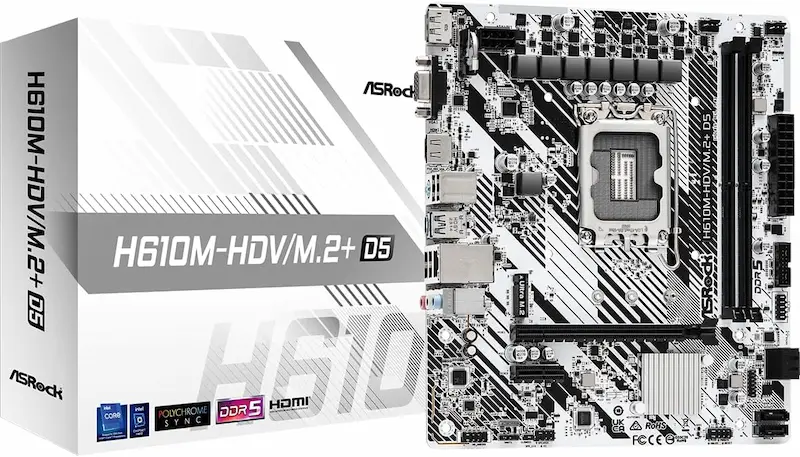
ASRock H610M-HDV/M.2+ D5: The Lowest Cost Entry to DDR5 Gaming
* As an Amazon Associate I earn from qualifying purchases.
- 1
Absolute Lowest Financial Barrier to Modern DDR5
Delivers full DDR5 memory compatibility for Intel 12th, 13th, and 14th Gen processors at the most affordable price point on the market, leaving maximum budget for your dedicated graphics card.
- 2
Rear USB Type-C and Robust 6+1+1 Power Phase VRM
Unexpectedly integrates a rear USB 3.2 Gen1 Type-C connector alongside HDMI, DisplayPort 1.4, and D-Sub outputs, plus a 6+1+1 power phase layout offering the best VCore phase count in the ultra-budget category.
Pros and Cons: ASRock H610M-HDV/M.2+ D5
Pros
Lowest price point for any DDR5 gaming motherboard on the market
Includes modern rear USB 3.2 Gen1 Type-C and DisplayPort 1.4 outputs
Robust 6+1+1 power phase design (6 VCore phases) easily handles 65W Core i3 and i5 processors
Integrated Auto Driver Installer streamlines initial operating system setup
Cons
Intel H610 chipset locks memory frequencies to native CPU IMC specs (4800 MT/s on budget i3/i5)
Unheatsinked VRM (best paired with 65W TDP processors like i3-12100F/i5-12400F)
Single M.2 storage slot capped at PCIe 3.0 x4 bandwidth (~3,500 MB/s)
Lacks onboard Wi-Fi or Bluetooth (requires Ethernet or separate USB adapter)
Conclusion
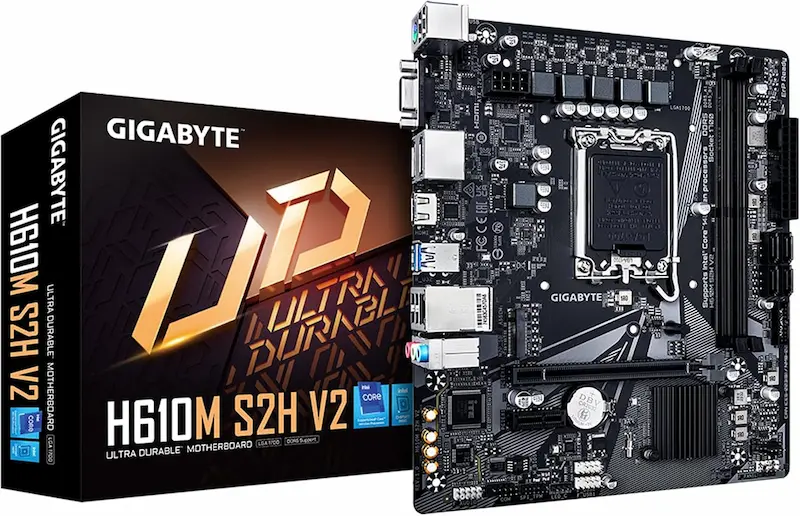
The ASRock H610M-HDV/M.2+ D5 is our Best Price champion: delivering the absolute lowest financial barrier to DDR5 gaming with rear USB-C, 6 VCore power phases, and stable 65W power delivery.GIGABYTE H610M S2H V2: Versatile Multi-Display Ultra-Budget Board
* As an Amazon Associate I earn from qualifying purchases.
- 1
Dual DisplayPort and Multi-Monitor Output Flexibility
Features two DisplayPort outputs alongside HDMI and D-Sub video connectors (supporting up to 3 simultaneous displays with non-F CPUs), allowing budget players and multitaskers to connect multiple monitors.
- 2
Smart Fan 6 Thermal Management with Fan Stop
Equipped with multiple internal temperature sensors and hybrid fan headers that support complete fan shutoff at idle temperatures for whisper-quiet desktop operation.
Pros and Cons: GIGABYTE H610M S2H V2
Pros
Four display outputs including dual DisplayPorts, HDMI, and D-Sub (up to 3 simultaneous monitors)
Smart Fan 6 software provides comprehensive fan curve tuning and Fan Stop
Anti-Sulfur resistor design guards against airborne corrosive compounds
Solid pin ATX power connectors enhance electrical stability under load
Cons
No rear USB Type-C port
Memory frequency capped at native IMC speeds (4800 MT/s on budget i3/i5) by H610 chipset
Single M.2 slot operates at PCIe 3.0 x4 rather than Gen4 bandwidth
No built-in Wi-Fi or Bluetooth connectivity
Conclusion
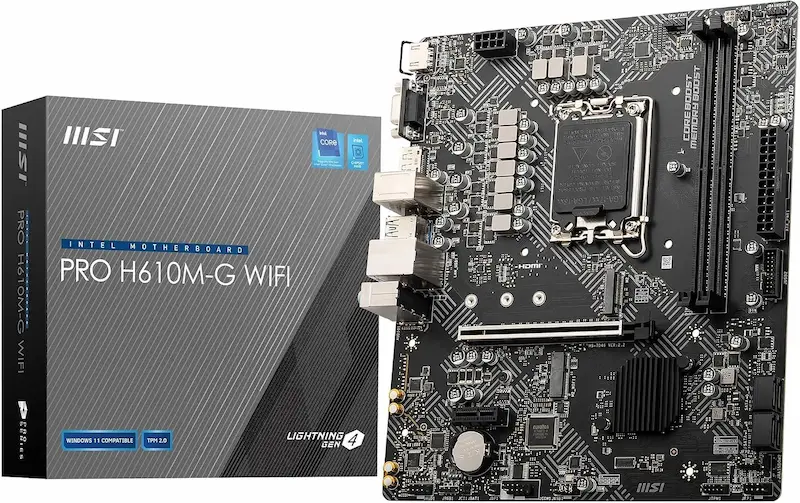
The GIGABYTE H610M S2H V2 is the most versatile video-output board, boasting dual DisplayPorts (up to 3 concurrent displays with non-F CPUs), Smart Fan 6 acoustic tuning, and anti-sulfur protection.MSI PRO H610M-G WiFi: The Best Value All-in-One with Wi-Fi 6E & Intel LAN
* As an Amazon Associate I earn from qualifying purchases.
- 1
Pre-Installed Wi-Fi 6E, Bluetooth 5.3 & Intel Gigabit LAN
Includes factory-installed Wi-Fi 6E and Bluetooth via a dedicated M.2 Key-E slot, plus an Intel I219-V Ethernet controller that delivers stable, jitter-free network traffic for esports matches.
- 2
Steel Armor Reinforced PCIe Slot and EZ Debug LEDs
Features a metal-shielded PCIe 4.0 x16 slot to prevent GPU sag and slot damage from heavy modern graphics cards, along with onboard EZ Debug LEDs that simplify build troubleshooting.
Pros and Cons: MSI PRO H610M-G WiFi
Pros
Pre-installed Wi-Fi 6E and Bluetooth 5.3 eliminate the cost of separate wireless cards
Intel I219-V Gigabit LAN controller provides stable, low-latency esports packet delivery
Steel Armor reinforced PCIe 4.0 x16 slot protects against heavy modern graphics cards
Onboard EZ Debug LEDs make diagnosing boot and POST issues effortless
Cons
Only one 4-pin system fan header (requires a PWM splitter cable if your case has 2+ chassis fans)
Slightly higher initial price tag than bare-bones boards without Wi-Fi
No rear USB Type-C port (standard Type-A ports only)
Memory frequency locked to native IMC speeds (4800 MT/s on budget i3/i5) by H610 chipset
Unheatsinked VRM design best reserved for 65W TDP processors
Conclusion
The MSI PRO H610M-G WiFi is our top all-in-one pick, delivering integrated Wi-Fi 6E, Bluetooth 5.3, Intel Gigabit LAN, and EZ Debug troubleshooting LEDs without needing extra add-in cards.Verdict
Final Verdict: The Best Ultra-Budget LGA1700 Motherboard for CS2 & Valorant ASRock H610M-HDV/M.2+ D5
The ASRock H610M-HDV/M.2+ D5 earns our top recommendation as the best pure value ultra-budget DDR5 gaming motherboard for Intel LGA1700. It shatters the price barrier to the DDR5 generation, enabling builders to assemble an Intel Core i3-12100F or i5-12400F esports system at the lowest possible cost while enjoying modern DDR5 bandwidth, a convenient rear USB Type-C port, and a superior 6+1+1 power phase layout.
The GIGABYTE H610M S2H V2 is our runner-up for builders who need multi-monitor versatility. With dual DisplayPort connectors alongside HDMI and D-Sub outputs (supporting up to 3 simultaneous monitors with non-F CPUs), plus Smart Fan 6 acoustic controls and anti-sulfur protection, it serves as an ultra-reliable platform for gaming and daily multitasking.
The MSI PRO H610M-G WiFi takes our Best All-in-One award. For builders who need wireless connectivity and reliable wired gaming networking, its pre-installed Wi-Fi 6E module, Bluetooth 5.3, Intel I219-V Ethernet controller, and EZ Debug LEDs make it the smartest and most complete budget choice without needing extra add-in cards.
Frequently Asked Questions
No. DDR4 and DDR5 memory modules are physically and electrically incompatible. They have different pin counts, distinct notch positions along the connector, and differing voltage regulation requirements. These motherboards feature dedicated DDR5 DIMM slots and will only work with DDR5 memory modules.
Intel restricts memory overclocking (frequencies above the CPU's native memory controller specification) to B-series and Z-series chipsets. On H610 motherboards, memory operates strictly at the processor's native IMC frequency: 4800 MT/s on budget 12th, 13th, and 14th Gen processors (such as the Core i3-12100F, i5-12400F, i3-13100F, i5-13400F, and i3-14100F). Native 5600 MT/s is supported only by higher-tier 13th and 14th Gen processors (Core i5-13600K/14600K and above). Buying expensive 6000MHz+ kits on H610 will simply downclock to 4800 MT/s, so focus on low latency (CL36–CL38) at 4800 MT/s instead.
Yes, though the improvement in lightweight esports titles is modest. Even at native 4800 MT/s speeds, DDR5's dual 32-bit subchannel architecture per DIMM reduces memory access contention, helping deliver slightly smoother 1% low frame times compared to standard DDR4-3200 configurations. The biggest advantage of choosing DDR5 today is platform longevity and a modern upgrade path, as DDR4 is a legacy standard with no further development.
Yes, provided you pair them with 65W TDP processors like the Intel Core i3-12100F, Core i3-13100F, or Core i5-12400F. During competitive gaming, these processors draw roughly 40W to 65W, which entry 4-phase to 6-phase VCore power deliveries (4+1+1 on Gigabyte, 5+1 on MSI, 6+1+1 on ASRock) handle without overheating. However, they are not designed for power-hungry 125W+ unlocked K-series processors.
No. Intel processors with the 'F' designation (such as Core i3-12100F, Core i3-13100F, or Core i5-12400F) lack an integrated graphics processor (iGPU). If you install an F-series CPU, the HDMI, DisplayPort, and VGA ports on the motherboard will output no display signal. You must connect your monitor cables directly to your dedicated graphics card (GPU).
Most motherboards manufactured recently come with an updated BIOS supporting 13th and 14th Gen CPUs. However, because none of these ultra-budget boards feature an external rear BIOS Flashback button, an older warehouse stock board might fail to POST with a 13th/14th Gen chip until updated using a 12th Gen CPU. In this scenario, MSI's onboard EZ Debug LEDs are a major advantage, clearly showing if a POST failure is CPU or DRAM related.
Yes. Buying a standalone PCIe Wi-Fi 6E card or quality USB dongle is significantly more expensive than the small price difference between these motherboards. The MSI board includes a pre-installed Intel Wi-Fi 6E and Bluetooth 5.3 module out of the box, making your total build cheaper, freeing up PCIe slots, and providing the reliable Intel I219-V Ethernet chip for competitive wired play.
You May Also Like
- Best Ultra-Budget AM5 Motherboards Under $80: ASRock B650M-H vs GIGABYTE A620M S2H vs A620AM-X
- Best Ultra‑Budget Gaming Mice under $20 for CS2 & Valorant — 4 Contenders, 1 Clear Winner
- Best Ultra‑Budget PSU 2026: MSI MAG A550BN vs Thermaltake Smart 600W vs Apevia SP700 — Are Extra Watts a Lie?
- Best Budget Gaming PC Cases under $50
- How to Set Up 4:3 Stretched in CS2: No Black Bars + FPS Boost (NVIDIA, AMD & Intel)