peripherals
Best Ultra-Budget Rapid Trigger Keyboards Under $40 for CS2 & Valorant (2026)
Three ultra-budget Rapid Trigger Hall Effect gaming keyboards under $40 compared: Redragon K617-HE vs AULA WIN68 HE vs MonsGeek FUN60 Pro for instantaneous counter-strafing in 2026.
- 8 min read
Rapid Trigger technology has revolutionized competitive first-person shooters like CS2 and Valorant. By eliminating physical reset points with Hall Effect magnetic switches, keys deactivate the very moment your finger lifts upward even by a tenth of a millimeter. For tactical shooter enthusiasts, this translates directly to razor-sharp counter-strafing, lightning-quick jiggle-peeking, and instantaneous first-shot accuracy. While flagship magnetic keyboards originally debuted with steep enthusiast price tags, the ultra-budget category under $40 has dramatically evolved in 2026. Today, competitive players can secure authentic Hall Effect precision without spending a fortune. We compared three of the most accessible Rapid Trigger keyboards available on the market — the barebones Redragon K617-HE, the arrow-key-equipped AULA WIN68 HE, and the enthusiast-grade MonsGeek FUN60 Pro — analyzing real-world community feedback, switch consistency, software configurators, and competitive FPS performance in the sub-$40 category.
Info
Rapid Trigger & Magnetic Switch Buying Guide for Tactical Shooters
How Hall Effect sensors transform counter-strafing Traditional mechanical keyboards rely on physical metal leaf contacts, requiring the switch stem to pass a fixed reset barrier before registering a release. In CS2 and Valorant, where standing still is mandatory for zero shot deviation, that mechanical delay wastes critical milliseconds. Magnetic switches use Hall Effect sensors to monitor continuous magnetic flux, allowing keys to reset dynamically the microsecond upward movement begins.
What matters most when buying budget Hall Effect keyboards When shopping for ultra-budget Rapid Trigger keyboards, software accessibility and sensor temperature stability matter far more than flashy RGB modes. Look for boards with web-based drivers (like AULA) or reliable cloud drivers (like MonsGeek) that store key profiles onboard. Cheaper boards like the Redragon K617-HE offer an unbeatable price floor for raw mechanical replacement, while the MonsGeek FUN60 Pro stands out with its ultra-fine 0.01 mm step precision and superior acoustics.
Key factors to evaluate in budget magnetic gaming keyboards:
- Dynamic Rapid Trigger Sensitivity (0.1 mm vs 0.01 mm) - In tactical FPS titles, being able to adjust both the initial actuation depth (e.g., 0.3 mm on W/A/S/D for instant response) and the release deadzone dictates how crisp your counter-strafes feel. While standard 0.1 mm steps feel exceptionally snappy compared to mechanical switches, sub-millimeter 0.01 mm calibration provides the ultimate competitive advantage.
- Polling Rate & Scan Rate (1000 Hz vs 8000 Hz) - High polling rates (up to 8000 Hz) reduce USB transmission latency from 1.0 ms down to 0.125 ms. Combined with a fast internal matrix scan rate, higher polling ensures your rapid release inputs are sent to the game engine without micro-stutter or dropped frames. All three boards in this comparison ship with native 8,000 Hz polling.
- Configurator Software: Web-Based vs Heavy Desktop Installers - Hall Effect keyboards require software to calibrate switch travel and adjust individual key sensitivities. Web-based configurators (accessible directly via Chrome or Edge through WebHID) prevent system bloat, whereas basic desktop utilities may require extra setup time.
- Layout Practicality: 60% vs 65% with Dedicated Arrow Keys - A 60% board maximizes desktop real estate for low-DPI mouse sweeps, which is ideal for competitive CS2 and Valorant arm aimers. However, if you also use your PC for typing, coding, or navigating menus, a 65% board like the AULA WIN68 HE preserves dedicated physical arrow keys.
Essential tips for setting up budget Rapid Trigger keyboards:
- Calibrate your magnetic switches immediately out of the box through the configurator software to prevent phantom keypresses and establish accurate bottom-out limits
- Set movement keys (W/A/S/D) to a shallow actuation (0.3–0.5 mm) with Rapid Trigger enabled at 0.1 mm for instantaneous counter-strafing
- Keep non-movement keys like Spacebar, Jump, or Ultimate abilities at a deeper actuation (1.5–2.0 mm) without aggressive Rapid Trigger to avoid accidental triggers during tense rounds
- Always plug your 8,000 Hz magnetic keyboard directly into rear motherboard USB 3.0+ ports rather than unpowered USB hubs or front panel extensions to maintain stable power draw
Ultra-Budget Rapid Trigger Keyboards Under $40: Key Specs & Features
Redragon K617-HE Hyper-Fast Magnetic Gaming Keyboard | 60% Compact | 0.1 mm – 3.4 mm | 0.1 mm dynamic step | Native 8,000 Hz / 0.125 ms Ultra-low latency | Redragon HE Dedicated Software / Web Driver | Mid-Tier (Classic 60% Platform) | Check price on Amazon |
AULA WIN68 HE Magnetic Switch Gaming Keyboard | 65% Compact (Dedicated Arrows) | 0.02 mm – 3.44 mm | 0.1 mm step | 8000 Hz Polling Rate / 0.3 ms Latency | Browser Web-Based Configurator | Slightly Pricier (Premium 65% Layout) | Check price on Amazon |
MonsGeek FUN60 Pro Rapid Trigger Magnetic Keyboard Best Pick | 60% Compact | 0.1 mm – 3.4 mm | 0.01 mm Ultra-fine step | 8000 Hz Polling Rate / 16K Scan | MonsGeek Web Driver (DKS, Mod-Tap, Snap Key) | Most Affordable (Best Overall Value) | Check price on Amazon |
Redragon K617-HE Hyper-Fast Magnetic Gaming Keyboard
60% Compact0.1 mm – 3.4 mm0.1 mm dynamic stepMid-Tier (Classic 60% Platform)AULA WIN68 HE Magnetic Switch Gaming Keyboard
65% Compact (Dedicated Arrows)0.02 mm – 3.44 mm0.1 mm stepSlightly Pricier (Premium 65% Layout)MonsGeek FUN60 Pro Rapid Trigger Magnetic Keyboard Best Pick
60% Compact0.1 mm – 3.4 mm0.01 mm Ultra-fine stepMost Affordable (Best Overall Value)
* As an Amazon Associate I earn from qualifying purchases.
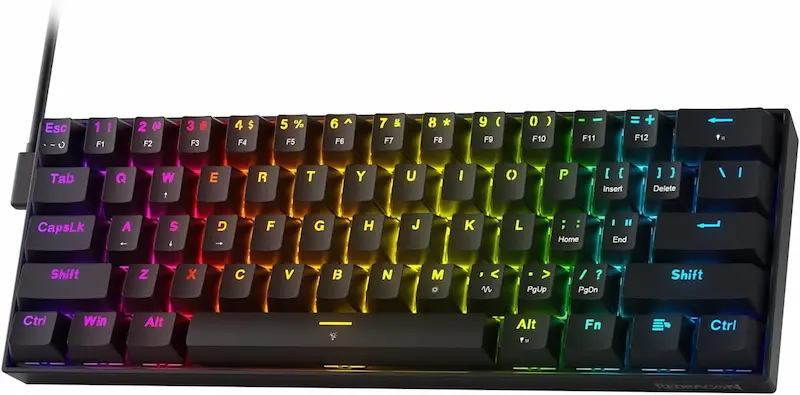
Redragon K617-HE: Classic 60% competitive platform with native 8,000 Hz polling
* As an Amazon Associate I earn from qualifying purchases.
- 1
Community Verdict on Counter-Strafing
Competitive players on Reddit and FPS forums consistently report a clear and immediate improvement in CS2 counter-strafe responsiveness over standard mechanical switches. The magnetic sensors eliminate debounce delay, and most users notice the difference within the first ranked match — particularly on W/A/S/D micro-releases.
- 2
Precision: 0.1 mm Step — Competitive, but Not the Finest
The K617-HE operates at a 0.1 mm Rapid Trigger adjustment step — the standard entry point for Hall Effect performance, and a colossal improvement over any fixed-reset mechanical switch. However, it does trail the MonsGeek FUN60 Pro's 0.01 mm ultra-fine step. For the vast majority of competitive CS2 and Valorant players, 0.1 mm is more than sufficient; only players at the top end of ranked who feel the need to fine-tune actuation below that threshold will notice the gap.
- 3
Where It Falls Short
The hollow all-plastic chassis transmits vibration noticeably during intensive gaming sessions. Considering it sits slightly above the MonsGeek in price, the absence of internal dampening foam is the most recurring criticism in user reviews. The proprietary desktop driver is functional but barebones compared to modern web-based alternatives.
Redragon K617-HE Pros & Cons
Pros
Immediate, noticeable counter-strafe improvement over standard mechanical switches
Ultra-compact 60% footprint maximizes mousepad space for low-DPI arm aimers
Native 8,000 Hz polling rate — not a given at this price floor
Cons
Priced above the MonsGeek despite a hollow all-plastic chassis with zero dampening foam
Proprietary desktop driver is functional but outdated in interface and depth of features
No physical arrow keys — FN-layer combinations required for basic navigation
Chassis resonates noticeably during heavy typing sessions; acoustics trail the competition
Conclusion
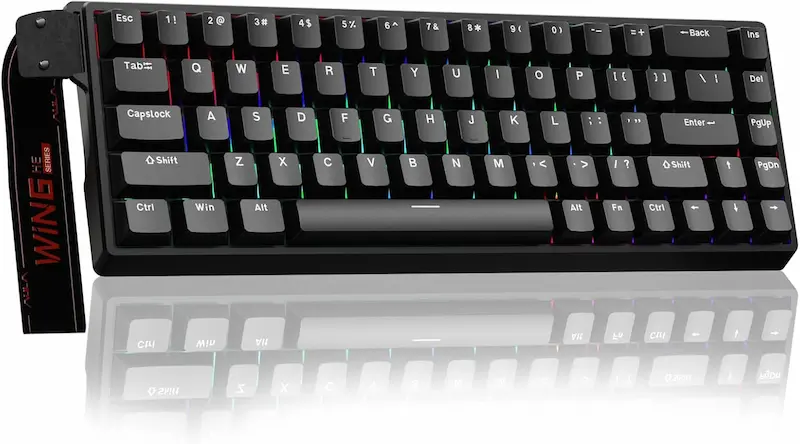
A reliable, lightweight 60% weapon for players who want the immediate competitive edge of Rapid Trigger counter-strafing and native 8,000 Hz polling on a familiar, agile chassis in 2026.AULA WIN68 HE: The most practical all-rounder with native 8000 Hz and dedicated arrows
* As an Amazon Associate I earn from qualifying purchases.
- 1
65% Layout — The Real Differentiator
Among budget Hall Effect keyboards, the 65% form factor is genuinely rare. Adding dedicated physical arrow keys without meaningfully expanding the footprint gives the AULA a massive everyday usability edge over pure 60% competitors. Players who also use their PC for work, browsing, or Discord navigation will feel this difference immediately — no FN-layer gymnastics required.
- 2
Browser-Based Configurator: Zero Bloatware
The WebHID configurator runs directly in Chrome or Edge without installing any software. Community reviewers specifically praise this approach — it eliminates driver conflicts, system tray bloat, and the security concerns that come with shady third-party gaming utilities. Per-key rapid trigger sensitivity is fully adjustable within seconds of plugging in.
- 3
Switch Feel & Actuation Range
Valorant players highlight the unusually wide 0.02 mm to 3.44 mm actuation window as a standout spec, giving room to fine-tune finger positioning habits precisely. Switch action is consistently smooth across the full keyboard matrix with no reported hot spots or mushy outliers in community feedback.
- 4
Known Trade-offs to Expect
Factory stabilizers on larger keys — particularly the spacebar — can exhibit a faint rattle at stock. It is audible in quiet rooms but not distracting during active gaming sessions. Users also note that switching USB ports may prompt a quick two-minute re-calibration in the web driver to restore zero-point accuracy.
AULA WIN68 HE Pros & Cons
Pros
Dedicated physical arrow keys without meaningfully increasing the keyboard footprint
Browser-based WebHID configurator — no software to install, no bloat, no security risk
Native 8000 Hz polling rate with a wide 0.02 mm – 3.44 mm actuation range
Smooth, consistent switch feel across the matrix — no reported hot spots
Best all-around choice for players who also work, code, or browse on the same PC
Cons
Sits at the highest price point among the three boards in this sub-$40 comparison
Factory spacebar stabilizer has a faint rattle at stock that may bother sensitive users
Conclusion
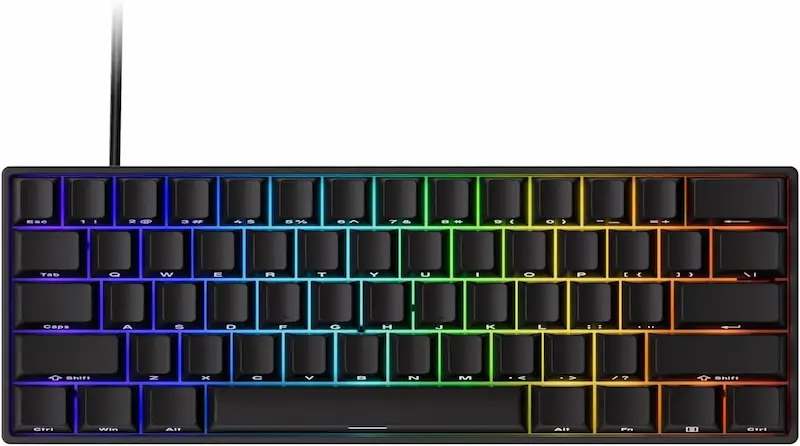
The most practical hybrid choice in 2026. While it sits at the upper end of our sub-$40 budget limit, dedicated arrow keys, web-based driver ease, and true 8000 Hz polling bridge the gap between competitive CS2/Valorant performance and daily desktop utility.MonsGeek FUN60 Pro: Lowest price in the lineup, highest Rapid Trigger precision
* As an Amazon Associate I earn from qualifying purchases.
- 1
0.01 mm Precision at the Lowest Price Point
What separates the FUN60 Pro from every other board in this comparison is its 0.01 mm step precision at the most accessible price. Enthusiasts on Reddit note this level of sensitivity is normally found in keyboards costing significantly more — and the difference is tangible when dialing in W/A/S/D actuation depth for CS2 counter-strafing.
- 2
Sound Profile: Thocky, Not Cheap
Internal multi-layer acoustic dampening foam and a denser case produce a solid, muted keystroke sound rather than the hollow clack typical of budget boards. Community reviewers consistently describe it as 'unexpectedly premium-sounding' for its price tier — a meaningful detail for streamers and players sharing spaces.
- 3
Software Depth vs. Learning Curve
MonsGeek's web driver supports DKS (Dynamic Key Strokes), Mod-Tap, and Snap Key — features that go well beyond what entry-level HE boards typically offer. For competitive players willing to spend an hour in the configurator, the payoff is exceptional per-key customization. Complete beginners may find the interface less intuitive than the AULA's simpler web tool.
MonsGeek FUN60 Pro Pros & Cons
Pros
Most affordable board in this lineup while delivering the finest 0.01 mm RT precision
8000 Hz polling + 16K matrix scan rate for near-zero actuation-to-game-engine latency
Multi-layer acoustic foam produces a solid, thocky keystroke — unusual at budget pricing
Feature-rich web driver with DKS, Mod-Tap, and Snap Key for deep per-key customization
Cons
Pure 60% layout — no physical arrow keys and FN-layer reliance for navigation
Web configurator has a steeper learning curve than AULA's cleaner web tool
Out-of-box calibration required to prevent phantom inputs at very shallow actuation
Conclusion
The undisputed price-to-performance champion in 2026. Despite being the most affordable option in this lineup, it offers the finest 0.01 mm precision, Akko Glare switches with wide cross-compatibility, and refined acoustics that outclass its price tag.Verdict
The Verdict: Best Ultra-Budget Rapid Trigger Keyboards Under $40 for CS2 & Valorant (2026) — MonsGeek FUN60 Pro Magnetic Gaming Keyboard
MonsGeek FUN60 Pro emerges as the undisputed overall winner and value champion in this 2026 ultra-budget Rapid Trigger comparison. Remarkably positioned as the most affordable keyboard in this lineup, it pairs an esports-ready 8000 Hz polling rate and 16K matrix scan with an ultra-fine 0.01 mm Rapid Trigger step precision that outperforms typical budget controllers. Combined with multi-layer acoustic dampening foam that eliminates hollow case reverberation, Akko Glare switches with wide magnetic cross-compatibility, and durable shine-through keycaps, it sets the benchmark for sub-$40 gaming gear.
🎯 When to consider the alternatives:
-
AULA WIN68 HE — Best for hybrid gaming & everyday productivity. If you refuse to sacrifice dedicated physical arrow keys or want a completely driverless browser-based WebHID configurator, the AULA justifies its slightly higher price tag near the top of our $40 limit.
-
Redragon K617-HE — Best for players who favor the classic Fizz ergonomics. If you want an ultra-lightweight, agile 60% chassis maximizing mousepad real estate for low-DPI arm aimers with native 8,000 Hz polling, and don't mind a louder, hollow acoustic profile.
💡 Rapid Trigger setup tip:
Calibrate magnetic switches in your configurator immediately upon unboxing. For CS2 and Valorant, keep W/A/S/D keys at an aggressive 0.2–0.4 mm actuation with 0.1 mm Rapid Trigger release, while keeping Jump and Ultimate abilities deeper (1.5–2.0 mm) to prevent accidental misfires in high-pressure rounds.
Frequently Asked Questions
In tactical shooters like CS2 and Valorant, moving while shooting causes massive weapon inaccuracy. Counter-strafing requires tapping the opposite directional key to stop your character instantly. On traditional mechanical switches, you must wait for the key to physically rebound past a fixed reset point before a release registers. Rapid Trigger uses Hall Effect magnetic sensors to deactivate the key the exact millisecond your finger begins releasing upward, stopping your character and restoring first-shot pinpoint accuracy significantly faster.
Because Hall Effect switches rely on continuous magnetic flux measurement, temperature shifts or initial factory variance can occasionally cause minor calibration drift. Budget keyboards solve this with software calibration routines. Out of the box, always perform a 30-second switch calibration in the configurator (pressing every key to bottom-out) and avoid setting your initial actuation shallower than 0.2–0.3 mm on resting fingers to prevent accidental misclicks.
Yes, particularly in combination with Rapid Trigger. While standard 1000 Hz polling reports every 1.0 ms, 8000 Hz polling slashes reporting intervals to 0.125 ms. In fast-paced tactical duels where micro-adjustments and jiggle-peeking determine the round outcome, the reduced transmission delay ensures your rapid release inputs reach the game engine with virtually zero latency.
For pure competitive gaming, a 60% layout (like the Redragon K617-HE and MonsGeek FUN60 Pro) is favored by low-DPI players because it leaves the maximum possible mousepad space for wide crosshair swipes. However, if your setup serves both gaming and daily typing, coding, or office tasks, a 65% board (like the AULA WIN68 HE) includes dedicated physical arrow keys, eliminating the need to hold an FN modifier for basic navigation.
Magnetic Hall Effect switches do not use traditional 3-pin or 5-pin solder/hot-swap sockets with metal pins; they have a hollow center or bottom magnet that hovers over a sensor on the PCB. While you can hot-swap them, you must use compatible magnetic switches with matching magnetic polarity (such as the switches each brand lists as cross-compatible in its own driver) rather than standard mechanical switches, or arbitrary third-party HE switches.
Yes. Standard Rapid Trigger dynamically adjusts switch reset based on your physical finger movement, which is 100% compliant with Valve Anti-Cheat (VAC) and Riot Vanguard. Features like automated Snap Tap / SOCD (hardware null-canceling of opposing keys without physical release) were banned by Valve in official CS2 matchmaking; however, simple analog actuation and Rapid Trigger remain completely legal and universally used across professional esports.
You May Also Like
- Best Ultra‑Budget PSU 2026: MSI MAG A550BN vs Thermaltake Smart 600W vs Apevia SP700 — Are Extra Watts a Lie?
- Best Ultra-Budget USB-C to 3.5mm Audio Adapters Under $10 for CS2 & Valorant: UGREEN vs JXMOX vs JSAUX
- Best Ultra-Budget Gaming Keyboards Under $20 for CS2 & Valorant (2026) — 4 Contenders, 1 Clear Winner
- Best Ultra-Budget Wireless Keyboards Under $20: CS2 & Valorant
- How to Lube Mechanical Keyboard Switches: From Scratchy to Smooth on a Budget