Tuning Guide
The Coin/Battery Mod for Wireless Mice: Perfecting Balance for CS2 & Valorant
Does your wireless gaming mouse feel heavy or pull backward during fast mouse lifts and flicks? Discover how a simple AAA battery swap completely resets your center of gravity for absolute crosshair precision.
- 3 min read
The Back-Heavy Wireless Dilemma
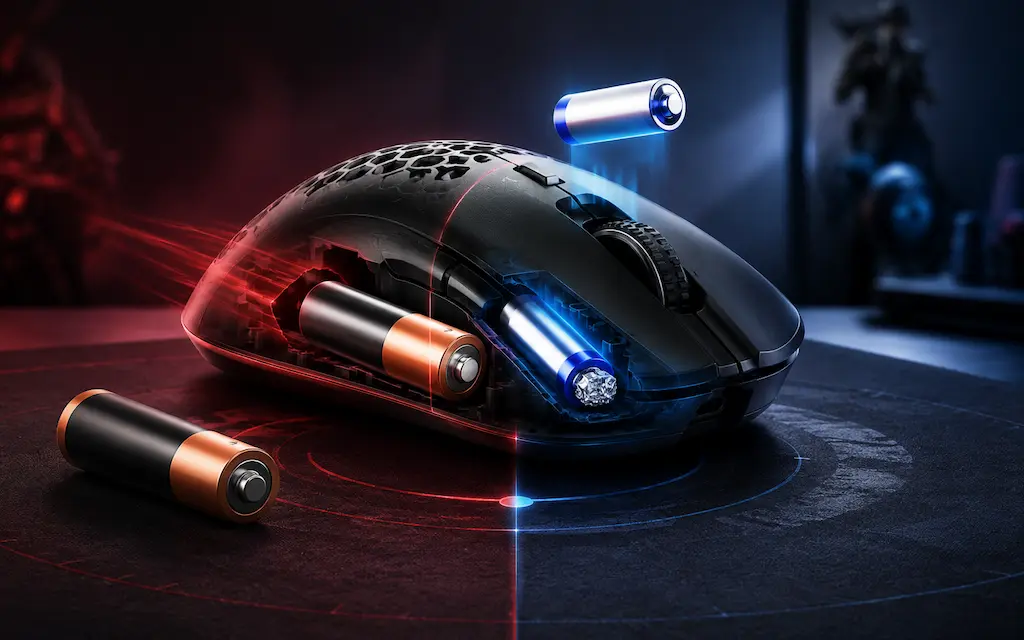
Many legendary budget wireless gaming mice rely on a standard AA battery to keep manufacturing costs low. While this format offers incredible uptime, it introduces a massive hidden flaw for competitive tactical shooters: terrible weight distribution. A standard AA alkaline battery weighs roughly 23–25 grams and sits far behind the sensor, making the mouse heavily 'back-heavy'. When you quickly lift your mouse to reset position or drag it down for complex spray control in CS2 or Valorant, this rear lag pulls the sensor off-balance. If you want to fix your heavy wireless mouse with the AAA battery and foil mod as part of your budget mouse tuning cs2 routine, reduce weight, restore perfect center balance, and eliminate crosshair overshoot in CS2, you don't need a premium $150 shell. You can easily execute The Coin/Battery Mod for Wireless Mice: Perfecting Balance for CS2 & Valorant using simple tools.
The Math Behind the Weight Reduction
Shifting your center of gravity isn't just about making the chassis lighter; it's about shifting the remaining mass right over the tracking sensor structure. To pull off a successful wireless mouse battery weight mod: fix balance issues by swapping a heavy stock AA alkaline down to an AAA format. By choosing a lightweight cell, you instantly slice off massive inertia from the tail-end of your mouse, giving your hands much cleaner feedback when clicking heads in both Valorant and CS2.
The Tin Foil / Coin Method ($0)
Zero-Cost DIY Choice
Using a small ball of kitchen aluminum foil or a tiny coin to bridge the structural physical gap between a smaller AAA battery and the positive AA contact terminal. It costs nothing and lets you adjust the positioning on the fly.
What you need:
- 1x AAA Lithium Battery (Energizer Ultimate Lithium is best)
- A small square of standard kitchen aluminum foil
- Zero spending required
Plastic AAA to AA Converter Shell ($2 - $5)
Cleanest Fit Choice
A lightweight, hollow plastic sleeve that snaps directly around your AAA battery, matching the exact spatial footprint of a standard AA battery. This removes any reliability issues or internal rattle completely.
What to look for:
- Hollowed-out ultra-light plastic adapter shells
- Weight of adapter under 3 grams
- Solid clip-lock mechanism to prevent disconnecting
* As an Amazon Associate I earn from qualifying purchases.
How to Execute the Battery Mod Perfectly
1Select the Right Cell (Alkaline vs. Lithium)
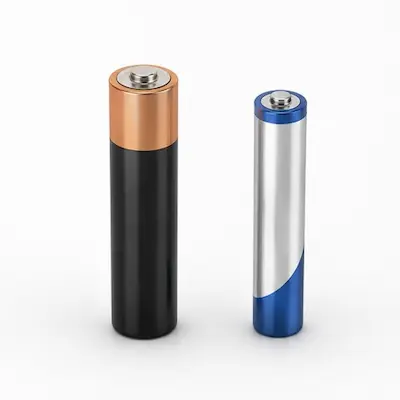
Do not use a standard AAA alkaline battery if you want maximum performance. Grab an AAA Lithium battery (like an Energizer Ultimate Lithium). A standard AA alkaline weighs ~24g, a standard AAA alkaline weighs ~11g, but an AAA Lithium weighs a mere 7 grams. This single choice cuts your mouse weight by up to 17 grams instantly.
Avoid heavy rechargeable NiMH AAA cells for this specific mod. They have thick internal metal structures and weigh nearly twice as much as a disposable Lithium cell.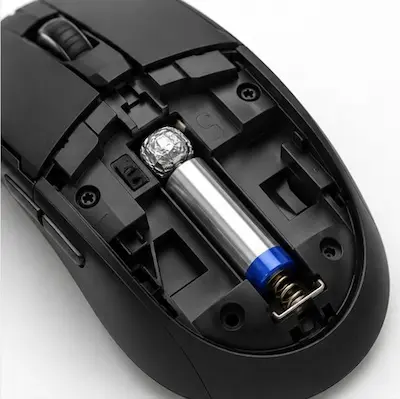
2Bridge the Gap (Foil or Adapter Set)
If using the foil method: Roll a small, tight ball of aluminum foil roughly the size of a pea. Place the AAA battery into the compartment, pushing the negative (flat) side against the spring. Insert the foil ball tightly into the remaining open gap between the positive (nub) tip of the battery and the mouse's forward contact terminal. If using an adapter: Simply snap the AAA cell into the plastic sleeve and insert it normally into the compartment.
Ensure the foil ball is compressed very tightly. If it is loose, aggressive swipes, fast round-resets, or desk-slams during intense Valorant or CS2 clutch matches will break the electrical connection, turning your mouse off mid-fight.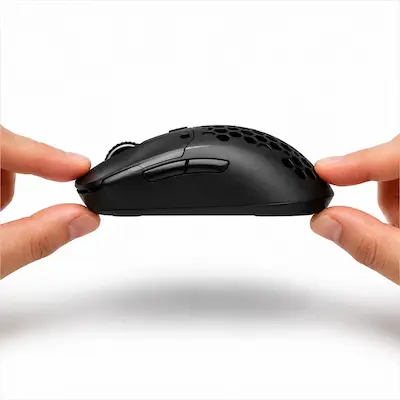
3Test Center of Gravity & Seal
Pick up your gaming mouse using only your thumb and ring finger directly at its side midpoints. Lift it straight up. The mouse should lift perfectly parallel to your desk surface. If the back still dips down slightly, try pushing the battery further forward within the compartment or adding a tiny piece of double-sided tape to keep it locked near the front contact.
The Tactical In-Game Impact for Competitive Play
Eliminating Vertical and Diagonal Overshoot
When pulling off vertical or diagonal micro-flicks to catch an opponent Jett dashing across your screen or a player dropping from a high ledge in CS2, a back-heavy mouse creates dangerous momentum inertia. This makes stopping on a dime incredibly difficult. Perfect 50/50 balance eliminates this tail wag, matching your crosshair instantly to your hand's physical stop command.
Flawless Mouse Lifts & Quick Repositioning
Low-sensitivity players in tactical shooters constantly lift and reset their mice on the pad. If the rear of your mouse is heavy, lifting it causes the tail to drag slightly or tilt, altering your sensor re-engagement timing. A centered mass profile means the mouse lifts uniformly, keeping your crosshair dead steady during high-speed repositioning.
Drastically Reduced Wrist Fatigue
Dropping 15+ grams from your mouse shell alters the physical effort needed to overcome static friction. Your micro-corrections and tracking feel completely effortless, letting you play long competitive sessions, overtimes, or intense 12-round halves without experiencing heavy wrist drag or muscle fatigue.
Frequently Asked Questions
No. Aluminum foil is highly conductive and perfectly safe for low-voltage DC currents used by wireless gaming mice (1.5V). It does not create short circuits or damage components. Just ensure the foil ball is clean, compact, and doesn't touch anything outside the battery terminal pins.
An AAA Lithium cell holds roughly 1200mAh of energy compared to around 2800mAh on a high-end AA alkaline. Depending on your mouse's internal power efficiency, your battery life might drop from 250 hours down to roughly 90–110 hours of active gaming. Given the huge weight and balance advantage in CS2 and Valorant, this is an incredibly worthwhile trade-off.
Weight and voltage consistency. Lithium chemistry allows the cell to be built with incredibly light materials (7g vs 11.5g for alkaline). Furthermore, Lithium cells maintain a steady 1.5V output until they are completely dead, whereas alkaline batteries slowly lose voltage over time, which can occasionally cause sensor stutter or dropouts on specific budget mice.
This happens because the foil ball isn't compressed tightly enough, causing the spring terminal to momentarily lose contact during heavy vertical vibrations. Remove the battery, roll a slightly larger and denser ball of foil, squeeze it firmly into place, and make sure the battery cannot wiggle back and forth.
A plastic adapter sleeve is cleaner, eliminates the risk of terminal rattle, and makes battery swaps much faster. However, the adapter adds 3–4 grams of plastic right back to the build. If your absolute goal is the lowest possible total weight, a tight foil ball mod is technically lighter and highly effective.
You May Also Like
- How to Overclock Your Monitor from 60 Hz to 75+ Hz Using CRU
- Mouse Cable Management: Get Wireless Freedom on a Budget for CS2 & Valorant
- CS2 Mouse Settings Guide 2026: DPI, eDPI & Sensitivity Explained
- Best Ultra-Budget Gaming Mousepads Under $5 for CS2 & Valorant (2026)
- High LOD Tape Trick: How to Lower Sensor Lift-Off Distance for CS2 & Valorant