Setup Guide
Wired to Wireless Feel: Ultimate Mouse Cable Management for CS2 & Valorant
Is your mouse cord catching on the edge of your mousepad or dragging behind your desk? You don't need a $100 wireless mouse. Eliminate cable tension for under $5.
- 6 min read
The Physics Against Your Aim
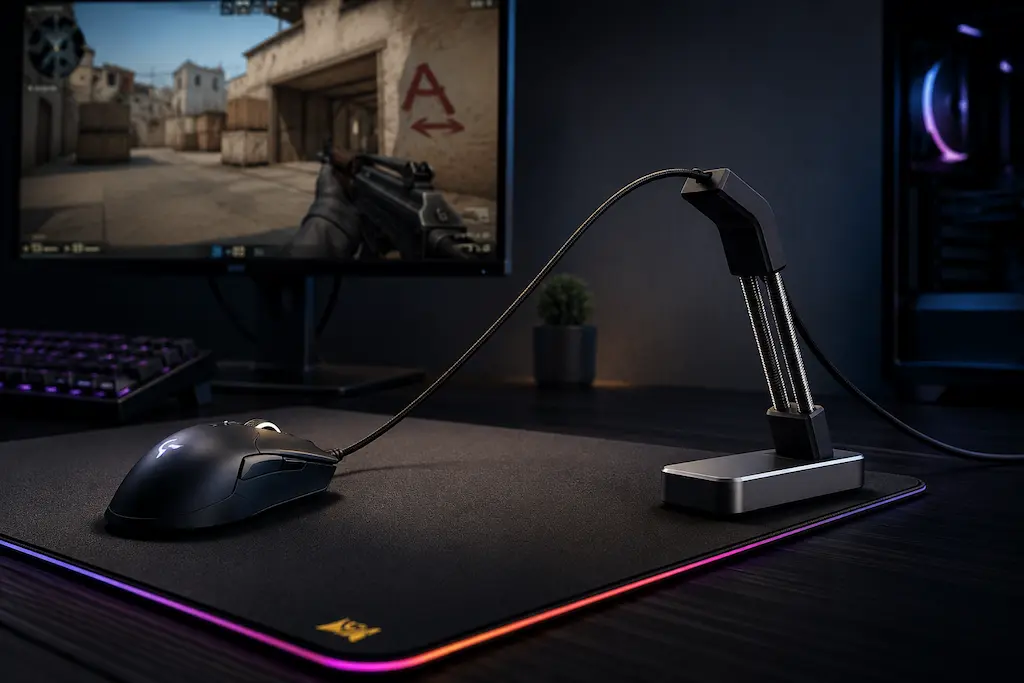
When you are playing tactical shooters on a low in-game sensitivity, you consistently make massive, aggressive flicks. If you are using a wired mouse, a loose cord is silently killing your muscle memory. Using a proper cs2 mouse cord holder to stop mouse cable drag is an essential ultra budget mouse modding step to improve mouse flicking cs2 consistency. It resolves two major issues: cable drag (the cord constantly rubs against the edge of your desk) and cable tension (the weight of the hanging cord pulls the mouse backward). In a competitive match where single pixels determine a headshot, you must learn how to eliminate cable drag and tension in CS2 & Valorant using cheap bungees, monitor clips, or zero-dollar DIY hacks before it completely ruins your consistency.
Budget Solutions: Bungees vs. Monitor Clips
If you are looking for the best budget mouse bungees for cs2: fix cable drag for cheap, there are two practical approaches to fixing consistency without spending big. The classic spring-loaded bungee sits on your desk and actively suspends the cable from below. Monitor-mounted clips take the opposite approach — routing the cable from above so it never touches your mousepad at all. Both solutions cost under $10. Your choice mainly comes down to your desk space and whether your monitor bezel has a flat lip to clip onto.
Classic Spring-Loaded Bungee
Best for Heavy Desks
The traditional desktop solution. Active dual springs hold your cable aloft, flexing perfectly when you make deep swipes and returning to center automatically. Unbranded generic versions perform identically to premium brands for half the price.
Recommended Gear:
- Razer Mouse Bungee V3
- Kiwifotos Compact Bungee
- Generic Metal Base Bungees
Monitor-Mounted Silicone Clips
Ultra-Budget & Space Saver
A brilliant, minimalist alternative. These tiny silicone routing clips adhere directly to the bottom or side bezel of your monitor via 3M tape. Suspension from above means your cable completely hovers in the air, creating absolute zero friction.
Recommended Gear:
- Silicone Cable Organizer Clips (Multi-packs)
* As an Amazon Associate I earn from qualifying purchases.
Step-by-Step Guide: Tuning Your Cable Slack
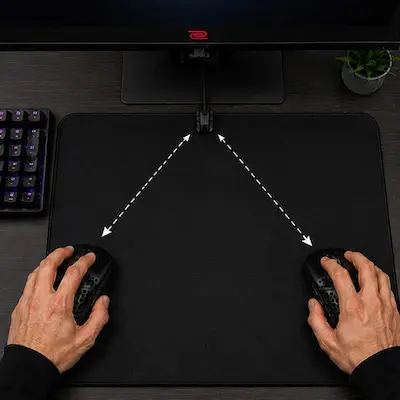
1Find Your Maximum Swipe Distance
Place your mouse at the absolute farthest bottom-left and bottom-right corners of your mousepad. This simulates your most extreme in-game panic flicks when checking corners.
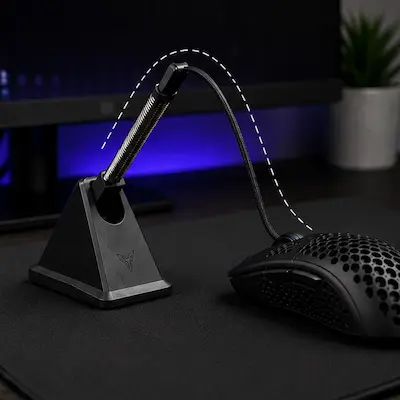
2Set the Perfect Cable Slack (The Loop)
Feed the cable into the bungee arm or monitor clip so there is just enough slack to comfortably reach those far corners without pulling the bungee over or straining the wire. The cord should form a clean, elevated arc.
Giving too much slack defeats the entire purpose, letting the wire sag and drag across your mousepad surface. Keep it hovering.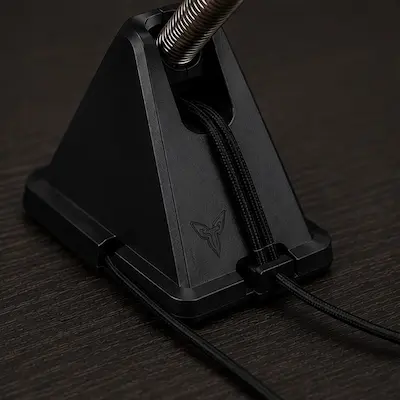
3Secure the Core Wire
Press the rest of the cable firmly into the rear routing tracks of the bungee base or down behind your desk setup. Ensure the base is placed far enough back so it doesn't collide with your keyboard during aggressive micro-strafing.
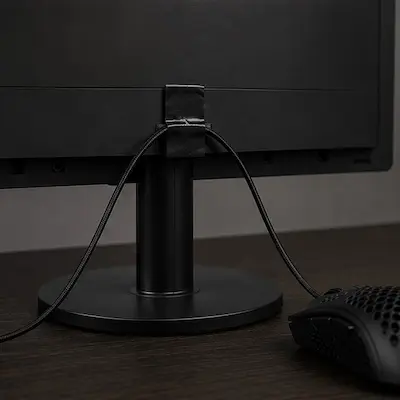
4The Zero-Dollar DIY Alternative
If your budget is literally $0, you can achieve 90% of this performance using standard electrical tape. Measure your corner-to-corner slack loop, then firmly tape the cable to the top-back center of your monitor stand so the cable drops straight down to your mouse.
Avoid brittle masking tape or packing tape; they leave nasty adhesive residue on your monitor plastic and dry out rapidly under heat.
What This Upgrade Gives You in CS2 & Valorant
Consistent Muscle Memory
With static cord friction removed, every flick feels the same regardless of direction. A leftward swipe to peek A site carries the same resistance as a hard right swipe to counter-strafe — your aim training starts translating directly into matches instead of being canceled out by random cable pull.
Clutter-Free Swiping Space
No more heavy cables bunching up mid-pad or physically knocking into your keyboard during close-range spray transfers. Your entire mousepad surface becomes usable, which matters most on low sensitivity where you're covering the full pad on every engagement.
Massive Cost Efficiency
Top-tier wireless mice often cost a premium just for the wireless tax. By spending less than $5 on a cable solution, you unlock that exact same lightweight, unrestricted movement while using a highly accurate, ultra-budget wired mouse. It maximizes your performance per dollar without any compromise on your aim.
Frequently Asked Questions
In 99% of cases, no. When hunting for the best budget mouse bungees for cs2: fix cable drag for cheap, remember that a bungee is a passive device. As long as the base is heavy enough so it doesn't slide around your desk, a $7 unbranded option will elevate your cable exactly like an expensive branded alternative.
Yes, but you need to check the rubber channel width. Most classic braided cables are rigid and heavy, making them ideal candidates for a bungee. Simply press the cable firmly into the silicone slots. If it's too thick, monitor-mounted clips are a safer bet since they offer wider loops.
An aftermarket paracord is an ultra-flexible, lightweight fabric cable that replaces a stiff stock rubber cord. They typically cost around $10 on Amazon and are available for most budget-friendly gaming mice (like the Razer DeathAdder Essential or Viper Mini). Combining a paracord modification with a cheap mouse bungee results in a setup that genuinely feels indistinguishable from a true wireless mouse — it's the ultimate performance upgrade per dollar for wired setups.
The optimal position is directly in front of your mousepad, aligned perfectly with the center vertical axis of your main swiping zone. This ensures that the cable slack distributes completely evenly whether you flick hard left or hard right.
You May Also Like
- The Coin/Battery Mod for Wireless Mice: Perfecting Balance for CS2 & Valorant
- Mouse Double-Click Fix: How to Repair Mouse Debounce Issues in CS2 & Valorant
- Best Ultra-Budget Gaming Mousepads Under $5 for CS2 & Valorant (2026)
- High LOD Tape Trick: How to Lower Sensor Lift-Off Distance for CS2 & Valorant
- Valorant Mouse Settings Guide 2026: DPI, eDPI & Sensitivity Explained