Repair Guide
Mouse Double-Click Fix: How to Repair Mouse Debounce Issues in CS2 & Valorant
Your mouse fires twice on a single click — an accidental grenade throw, a double-buy, a missed shot. It's not your aim. It's a dying microswitch. Here's how to diagnose and fix mouse debounce issues in CS2 and Valorant for good.
- 6 min read
Why Your Mouse Starts Double-Clicking
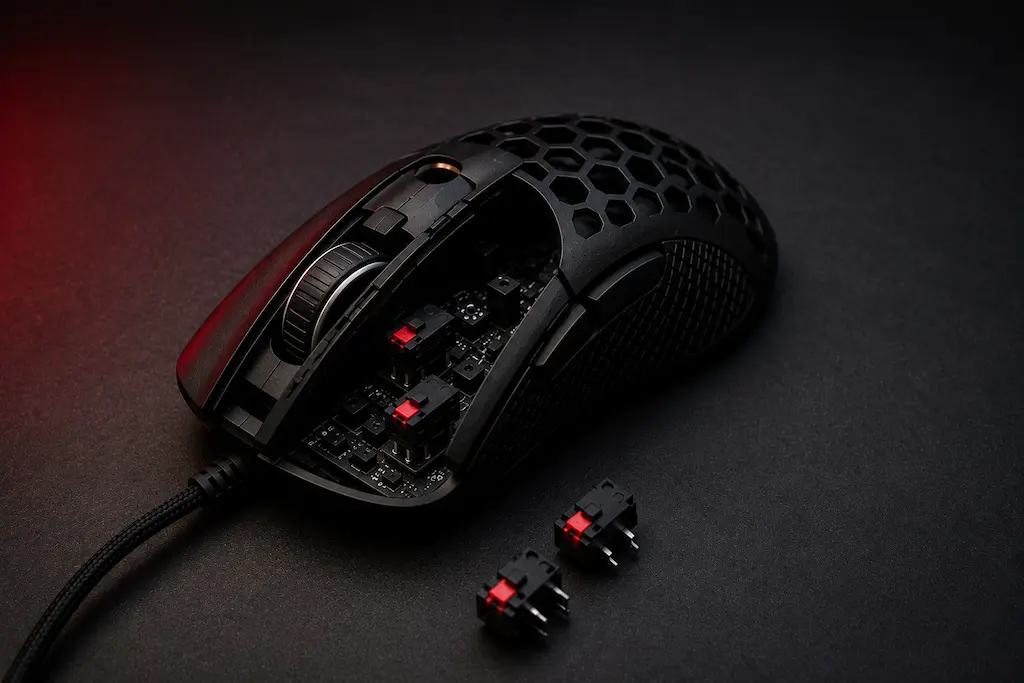
If you want to fix mouse double-clicking and missed inputs in CS2 and Valorant, you need to understand what's actually causing these hardware issues. When you press a mouse button, the mechanical microswitch inside makes physical metal contact. As that switch wears down over months of gaming, the metal contacts briefly bounce against each other before fully settling — producing two or more electrical signals from a single physical press. This is called contact bounce. The mouse firmware normally filters this out using a debounce delay — a brief window during which it ignores additional signals after the first one. But once the switch physically degrades past a threshold, no debounce setting can fully compensate. The result: your mouse double-clicks on its own, or conversely, starts missing clicks entirely. Both symptoms mean the same underlying issue — a worn microswitch — and both require the same step-by-step mouse double-click fix and debounce repair for CS2 and Valorant covered in this guide.
Diagnosing the Root Cause: Software or Hardware?
Before replacing anything, confirm where the fault actually lies. Open a browser and search for 'mouse button test' — several free online tools display real-time click registration. Slow-click each mouse button multiple times and watch the output. If a single physical press registers as two or more clicks consistently, your switch is failing. If the double-click only happens intermittently in specific games, a driver setting may be amplifying the problem. This distinction determines whether a quick software debounce fix is enough or whether you need a hardware microswitch replacement.
Software Fix
Try This First
If the driver debounce setting is too low, it fails to filter out the physical contact bounce of an aging switch, causing phantom double-clicks. Adjusting these software settings costs nothing and takes under two minutes — always attempt this before opening the mouse.
Tools needed:
- Manufacturer software (Razer Synapse / Logitech G Hub / SteelSeries GG)
- DoubleClickFix utility (for mice without official debounce controls)
Hardware Fix (Microswitch Replacement)
Permanent Fix
When the switch contacts are physically worn, no software adjustment stops the bouncing signal. Replacing the microswitch with a brand-new Kailh or Omron unit restores the mouse to factory-fresh click quality — permanently and at a fraction of the cost of a new mouse.
Tools needed:
- Replacement microswitch: Kailh GM 8.0 or Omron D2FC-F-7N
- Soldering iron and solder
- Desoldering pump or braid
* As an Amazon Associate I earn from qualifying purchases.
Software Fix: Step-by-Step
1Increase Debounce Time in Manufacturer Software
Open your mouse's official software: Razer Synapse (Razer), G Hub (Logitech), SteelSeries GG (SteelSeries), or Pulsar Fusion (Pulsar). Navigate to the performance or advanced settings section. Look for a Debounce Time or Click Latency slider and increase it by one or two steps — typically from the default of around 4ms to 8–12ms. This tells the firmware to ignore additional click signals for a longer window after the first click, effectively masking switch bounce. Save the profile and test in-game.
Setting debounce time too high in CS2 or Valorant makes fast double-actions like quick-switching or fast burst-fire feel delayed. Increase gradually and test after each step.2Use DoubleClickFix for Mice Without Debounce Controls
Budget mice and older models often have no official debounce setting. The open-source DoubleClickFix utility intercepts Windows mouse input and discards any click registered within a configurable millisecond window after the previous one. Download it, set the filter to 50–80ms, and run it in the background.
DoubleClickFix is a workaround, not a repair. It masks the symptom but the switch continues degrading. If the bounce frequency increases, the filter window becomes too aggressive and starts eating legitimate fast-clicks. Third-party tools that intercept input can interact unpredictably with kernel-level anti-cheat like Vanguard — check current community reports for your specific game before running anything like this alongside ranked play, and never use it on FACEIT or other platforms with their own anti-cheat layer.
Hardware Fix: Replacing the Microswitch
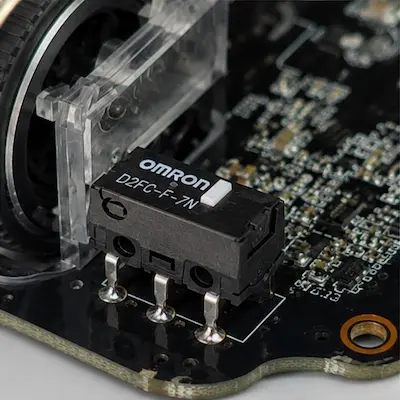
1Identify and Order the Correct Switch
Open your mouse and examine the microswitch on the failing button. Most gaming mice use standard 20mm-spaced PCB-mount switches — either Omron D2FC-F-7N (most common), Huano, or Kailh GM series. The model number is printed on top of the switch body. Order an exact replacement or a Kailh GM 8.0 as a universal upgrade — it fits the same footprint, has a rated lifespan significantly higher than most stock Omron units, and provides a crisper, more tactile click feel out of the box.
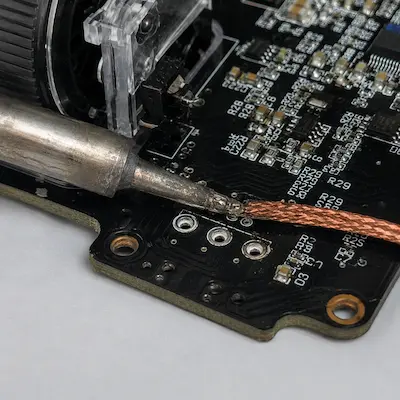
2Desolder the Old Switch
Unplug the mouse and open the shell (remove the skates to access hidden screws, check under warranty stickers). Locate the failing switch on the PCB — it has three legs soldered through the board. Heat each joint with your soldering iron for 2–3 seconds and extract solder with a desoldering pump or wick until all three legs are free. Gently rock the switch out of the PCB holes with tweezers. Clean the pads with fresh solder if they look oxidized.
Never force the switch out while solder is still solid — you will tear the PCB pad clean off, creating an irreparable fault. Ensure all three joints are fully liquid before lifting.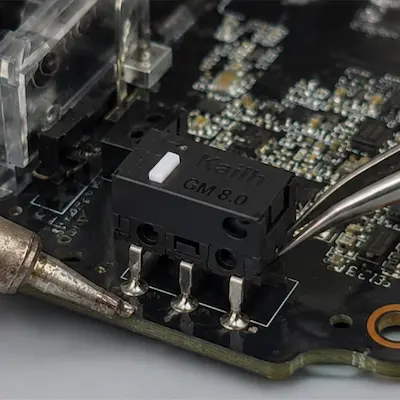
3Solder the New Switch and Reassemble
Insert the new microswitch into the same three PCB holes — the switch body should sit flush against the board with all three legs fully through. Apply a small amount of fresh solder to each joint: heat the leg and pad together, then feed solder until a clean, shiny cone forms. Let each joint cool fully before moving to the next. Reassemble the mouse shell, reinstall the screws, and press the skates back on. Plug in and run the click test again — a properly replaced switch will show zero double-clicks across hundreds of test presses.
What This Fix Does for Your CS2 & Valorant Performance
Zero Accidental Actions
Double-clicking is responsible for some of the most frustrating moments in competitive play: accidentally throwing a grenade by double-pressing G, buying two of the same weapon in the shop, or firing twice when you intended to tap-fire for accuracy. After the fix, every physical press maps to exactly one registered action — every time.
Reliable Click Registration Under Fast Inputs
Switch bounce doesn't only cause double-clicks — it can also cause missed clicks when the firmware aggressively rejects what it identifies as bounce noise. In fast-paced scenarios like burst-firing, quick weapon switches, or rapid defuse-plant actions, missed inputs are just as damaging as phantom ones. A replaced switch or properly tuned debounce setting restores full click reliability at any speed.
Extended Mouse Lifespan
A microswitch replacement costs a fraction of buying a new mouse and restores the mouse to better-than-new click quality. Since only the switch is worn — not the sensor, shell, or scroll wheel — the repair is a complete fix. A quality Kailh GM 8.0 switch is rated for significantly more actuations than most stock units, giving the repaired mouse years of additional competitive use.
Frequently Asked Questions
It depends on the manufacturer, the age of the mouse, and their specific policy — some brands cover switch failure within the warranty window, while others classify it as normal wear and tear and exclude it. Contact support first with video evidence of the double-click happening; it's worth asking even if you're not sure it qualifies. If out of warranty or excluded, the microswitch replacement is the most cost-effective path.
This isn't something to assume either way. Kernel-level anti-cheat like Vanguard is designed to be cautious around any tool that intercepts input at the driver level, and policies and detection methods change over time. Check current community reports and official statements for your specific game before running it, and avoid it entirely on FACEIT or other platforms with their own additional anti-cheat layer.
Yes, through the software fixes covered in this guide. For many users with mild switch wear, adjusting the manufacturer's debounce setting completely resolves the issue. DoubleClickFix handles more severe cases without any hardware work. Soldering is only necessary when the switch has physically degraded past the point where software compensation works.
The Kailh GM 8.0 is the most popular enthusiast upgrade — it has a noticeably crisper and more tactile click than most stock Omron units, a higher actuation rating, and fits the standard 20mm footprint used in the vast majority of gaming mice. The Omron D2FC-F-7N is the stock equivalent for a like-for-like replacement that maintains the mouse's original click feel exactly.
Technically yes, but the impact is imperceptible in practice. The default debounce time on most gaming mice is around 4ms. Even if you reduce it to 2ms, the difference is far smaller than the latency introduced by your monitor, USB polling interval, or game engine tick rate. Only adjust debounce time to fix actual double-clicking or missed inputs — never reduce it purely for a competitive edge, as you risk introducing the very problems you're trying to fix.
You May Also Like
- Mouse Cable Management: Get Wireless Freedom on a Budget for CS2 & Valorant
- Mouse Tuning: Replacing Mouse Skates for Better Performance in CS2 & Valorant
- Best Ultra-Budget Gaming Mousepads Under $5 for CS2 & Valorant (2026)
- High LOD Tape Trick: How to Lower Sensor Lift-Off Distance for CS2 & Valorant
- Valorant Mouse Settings Guide 2026: DPI, eDPI & Sensitivity Explained