Guide
Mouse Tuning: How to Revive Your Mouse Glide for CS2 & Valorant
Is your crosshair stuttering or dragging across the mousepad? Fix your mouse glide in under 10 minutes by choosing the best PTFE skates. It’s not the sensor. It’s the feet.
- 5 min read
The Root of the Problem
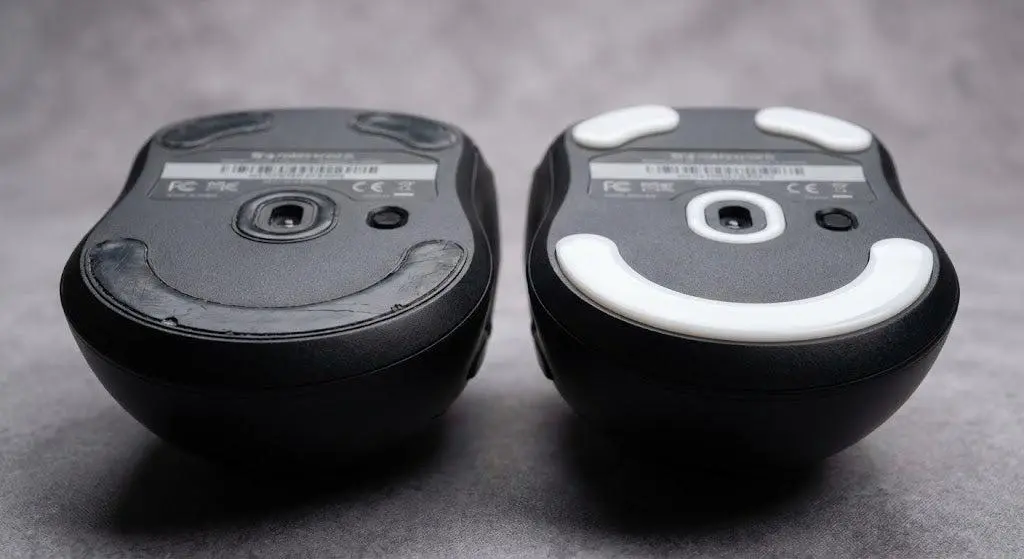
Even if you're holding an expensive wireless gaming mouse, you aren't safe from terrible glide mechanics. Mouse tuning through simple mouse modding for CS2 and Valorant—specifically mouse skates replacement—is the most effective way to improve mouse glide CS2 performance. Manufacturers pour budgets into top-tier sensors and marketing campaigns but frequently cut corners on a cheap component—the material of the feet. Stock glides wear out rapidly, causing the mouse to literally lose its speed. This creates a sticky, muddy resistance: your crosshair moves in erratic jumps, smooth micro-tracking becomes a struggle, and in tactical shooters, that instantly costs you the round. Learn how to revive your mouse glide before it ruins your rank.
What to Buy: PTFE vs Glass
100% PTFE (Teflon)
Best for CS2 / Valorant
The absolute gold standard for tactical shooters. It offers the perfect balance of speed and control—making it easy to micro-adjust and effortlessly stop the mouse to lock your crosshair right on the enemy's head. Choose the best PTFE skates for maximum precision.
Recommended Brands:
- Tiger Gaming ICE / Arc
- Corepad Skatez
- Hotline Games
Glass Skates
Best for Apex / Overwatch
Ultra-slick feet crafted from tempered glass. The speed is insane, but in CS2, your crosshair might overshoot heads due to low stopping power. They also come with a higher price tag.
Recommended Brands:
- Pulsar Superglides
* As an Amazon Associate I earn from qualifying purchases.
Step-by-Step Guide: How to Replace Mouse Skates in 10 Minutes
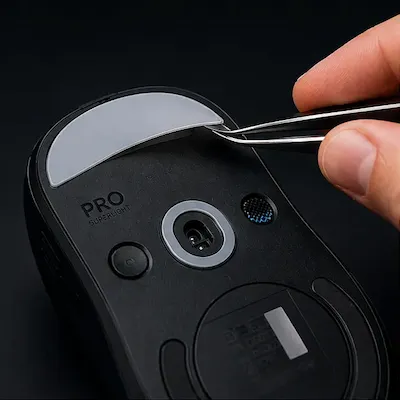
1Remove the Old Feet
Grab a pair of tweezers, a needle, or a thin hobby knife. Gently pry up the old glide from an edge and peel it off. If the stock adhesive is stubborn, heat the feet with a hairdryer for 10–15 seconds to soften the glue for effortless removal.
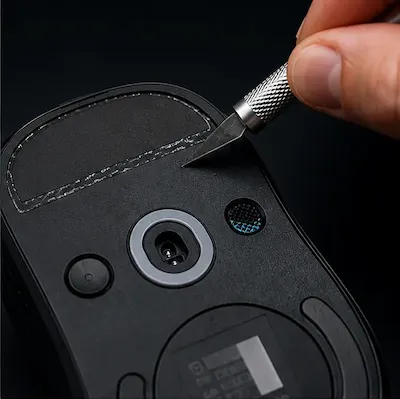
2Clean the Grooves Down to the Bare Plastic
Scrape away all remaining residue and double-sided tape until you reach the bare plastic shell of the mouse. Leaving even a tiny bit of old adhesive will cause the new skate to sit unevenly, making your mouse wobble and causing the sensor to spin out.
This is the most common beginner mistake: peeling off the top plastic layer but leaving the grey foam tape underneath. Scrape it all off clean.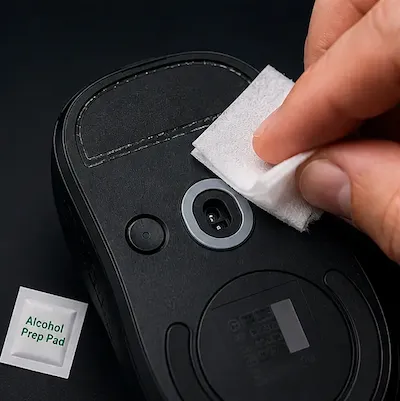
3Degrease the Surface
Wipe down the empty socket grooves with an alcohol prep pad (usually included with most aftermarket skates) or a cotton pad dipped in rubbing alcohol. Let it dry completely for about one minute.
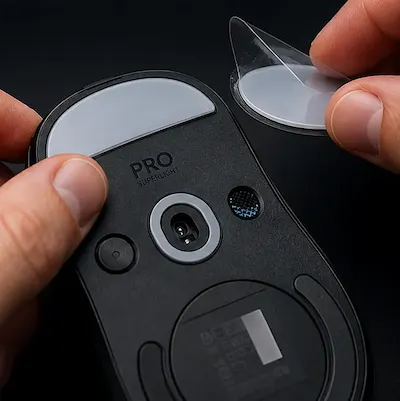
4Apply the New Skates
Peel the backing off the new skate, align it perfectly within the groove, and press down firmly with your thumb for 5–10 seconds. Now you can replace them in under 10 minutes without any issues.
Brands like Tiger ICE include a nearly invisible protective plastic film on top of the glides themselves—make sure to peel this off after installation, otherwise the mouse won't slide at all.
What This Upgrades Gives You in CS2 & Valorant
Flawless Micro-Tracking
Static friction completely vanishes. Pixel-perfect aiming at long distances becomes significantly smoother and easier.
Smooth Spray Control
The mouse glides uniformly without any micro-stutters, making your recoil pull-down pattern completely predictable.
Great Cost Savings
Instead of throwing away your current mouse and spending $50–$100 on a new one, you fully restore its premium glide for the price of a cup of coffee.
Frequently Asked Questions
For tactical shooters, PTFE vs Glass is an easy choice: PTFE is superior in 90% of scenarios. It provides the essential stopping power needed to prevent your crosshair from shaking when flicking onto a target. Glass is better suited for high-tracking tracking shooters like Apex Legends and Overwatch.
High-quality PTFE skates usually last between 6 to 12 months of heavy gaming. If you use a hard plastic or hybrid mousepad (like a Fnatic Dash or Artisan), they will wear down faster—around 4 to 5 months. Look out for a matte texture, deep scratches, or a muddy, sluggish glide as signs to replace them.
There are two main culprits: first, you didn't clean off the old adhesive, which raises the mouse's height by a fraction of a millimeter and pushes the sensor past its Lift-Off Distance (LOD). Second, you might have forgotten to remove the clear protective film on top of the new glides (a very common oversight with Tiger Gaming and Hotline Games).
No. Doing this increases the mouse's distance from the surface, meaning the sensor will either stop tracking entirely or lose contact with the pad during fast, aggressive flicks. Always completely remove the old feet.
Yes, they are excellent. A pack of 20–40 small, round PTFE dots is a perfect choice for rare or budget mice where custom-fitted shapes aren't available. Just apply 4–6 dots symmetrically in the corners. Because the contact surface area is smaller, the mouse actually glides slightly faster than with traditional large feet.
You May Also Like
- Mouse Double-Click Fix: How to Repair Mouse Debounce Issues in CS2 & Valorant
- Mouse Grip Tape: Are Cheap Anti-Slip Stickers Worth It for CS2 & Valorant?
- Best Ultra-Budget Gaming Mousepads Under $5 for CS2 & Valorant (2026)
- High LOD Tape Trick: How to Lower Sensor Lift-Off Distance for CS2 & Valorant
- Valorant Mouse Settings Guide 2026: DPI, eDPI & Sensitivity Explained