accessories
Best Ultra-Budget Monitor Light Bars Under $20 for CS2 & Valorant
Reduce screen glare, ease visual fatigue, and preserve full mousepad clearance. We compare three ultra-budget USB monitor light bars for competitive setups.
- 10 min read
In competitive tactical shooters like CS2 and Valorant, desk space and visual comfort both matter. Low-sensitivity players running roughly 400 to 800 eDPI in CS2 (about 125 to 250 eDPI in Valorant) need a lot of unobstructed mousepad room: at 400 eDPI a 180-degree turn takes around 52 cm of mouse travel, and at 800 eDPI about 26 cm. Conventional desk lamps with wide weighted bases take up desk territory right where your mousepad or angled keyboard sits. Meanwhile, playing in a dark room puts a bright high-refresh panel against a very dim background, and that large brightness gap can add to eye fatigue during long matchmaking sessions. A monitor light bar rests on the top of your display using a counterweight arm, so your entire desktop stays clear for mouse movement. Dedicated light bars with an angled, asymmetric beam send light down onto your keyboard and mousepad while keeping most of it off the screen surface, which minimizes reflections on both matte and glossy panels. In this comparison, based on listing specifications and customer feedback, we look at three ultra-budget USB-powered monitor light bars: the SAMPHON SC04, the dual-light SAMPHON SC03 with rear RGB, and a generic 40cm USB LED task lamp. Below is how their mounting, beam design, controls, and power requirements compare for a competitive esports desk.
Info
Esports Lighting Mechanics: Contrast, Glare, and Desk Clearance
Why competitive shooter players mount light bars directly onto the display: When holding angles in CS2 or micro-adjusting your crosshair in Valorant, visual comfort affects how long you can stay sharp. In a dark room, a 250-nit to 400-nit gaming monitor sits against a very dim background, and that large brightness gap makes the eyes work harder and can add to fatigue and discomfort over long sessions. Soft task light on the desk, and optionally a glow behind the screen, narrows that gap without adding reflections on the panel.
What to verify before buying an ultra-budget monitor bar: Check your monitor's rear housing and top bezel before buying. If your display has a strongly curved back, a thick rear housing, or an ultra-thin bezel with no flat area on top, make sure the counterweight arm sits securely and the front ledge does not touch the active panel area. Also read the listing for any compatibility note about curved monitors. For power, a 5W bar needs about 1A at 5V: a 5V/1A (or higher) charger or powered hub is the safest choice, a USB 3.x port (900 mA) is usually close enough, while an older USB 2.0 port (500 mA) may limit brightness.
Four physical factors to evaluate in budget monitor light bars:
- Asymmetric Optical Cutoff vs. Diffuse Spill - A 45-degree asymmetric reflector sends light down and forward toward the desk. If a budget bar has an unshielded diffuser instead, stray light can reach the panel face and lower perceived contrast in dark game scenes.
- Counterweight Clip Stability - Budget bars use a weighted rear arm that hooks over the back of the monitor instead of a screw clamp. Make sure the front ledge rests on the top bezel without overlapping the active screen area, especially on slim-bezel gaming monitors.
- Control Mechanism (Mechanical Switch vs. Touch) - Tapping a touch control on a lightly balanced bar can shift its tilt angle. A mechanical side switch gives physical feedback and makes it easier to adjust settings without knocking the beam off target.
- USB Power Line Routing and Draw - All three models run on 5V USB, and the SC03 and the generic lamp list 5W. Route the cable along your monitor arm or stand with cable clips so it stays off your mousepad and does not snag during fast arm swipes.
Practical lighting setup tips for competitive FPS:
- Use a neutral color temperature (around 4000K) during daytime play and a warmer setting (around 3000K) in the evening. These bars offer three preset levels, so pick the closest one.
- Tilt the light bar slightly until the edge of the beam falls at the bottom of the screen rather than on the panel.
- Avoid maxing out brightness in completely dark rooms; match desk illumination intensity to the overall luminance of your monitor.
- If using a monitor arm, route the USB power cord alongside your DisplayPort cable to prevent slack from dragging across your mousepad.
Best Ultra-Budget Monitor Light Bars: Specifications Compared
| Light Bar Model | Optics & Lighting Modes | Controls & Color Temp | Dimensions & Power | |
|---|---|---|---|---|
SAMPHON SC04 15.7-Inch Ultrawide Computer Monitor Light Bar Best Anti-Glare Focus | 45° Asymmetric Optical Path Front Task Light (Stepless Dimming) | Mechanical Side Switch 3 Levels (3000K – 6500K) | 15.75" x 0.78" x 3.3" (40 x 2 x 8.4 cm) USB Powered (5V) | Check price on Amazon |
SAMPHON SC03 Dual-Light Monitor Bar with RGB Backlight Dual Front & Rear Ambient | 45° Asymmetric Front + Rear Ambient Dual Light: Task Light + 9 RGB Modes | Integrated Housing Controls 3 Levels (Warm, Natural, Cool White) | 15.75" x 0.78" x 3.15" (40 x 2 x 8 cm) USB Powered (5V / 5W, 150 lm max) | Check price on Amazon |
USB LED 40cm Computer Monitor Task Lamp Compact Touch Pick | Screen Bar (asymmetric cutoff not specified) Dimmable Desk Illumination | On-Bar Touch Controls 3 Modes (Warm to Cool White) | 15.7" (40 cm length) USB Powered (5V / 5W) | Check price on Amazon |
SAMPHON SC04 15.7-Inch Ultrawide Computer Monitor Light Bar Best Anti-Glare Focus
Optics: 45° Asymmetric Optical PathModes: Front Task Light (Stepless Dimming)Controls: Mechanical Side SwitchDimensions: 15.75" x 0.78" x 3.3" (40 x 2 x 8.4 cm)SAMPHON SC03 Dual-Light Monitor Bar with RGB Backlight Dual Front & Rear Ambient
Optics: 45° Asymmetric Front + Rear AmbientModes: Dual Light: Task Light + 9 RGB ModesControls: Integrated Housing ControlsDimensions: 15.75" x 0.78" x 3.15" (40 x 2 x 8 cm)USB LED 40cm Computer Monitor Task Lamp Compact Touch Pick
Optics: Screen Bar (asymmetric cutoff not specified)Modes: Dimmable Desk IlluminationControls: On-Bar Touch ControlsDimensions: 15.7" (40 cm length)
* As an Amazon Associate I earn from qualifying purchases.
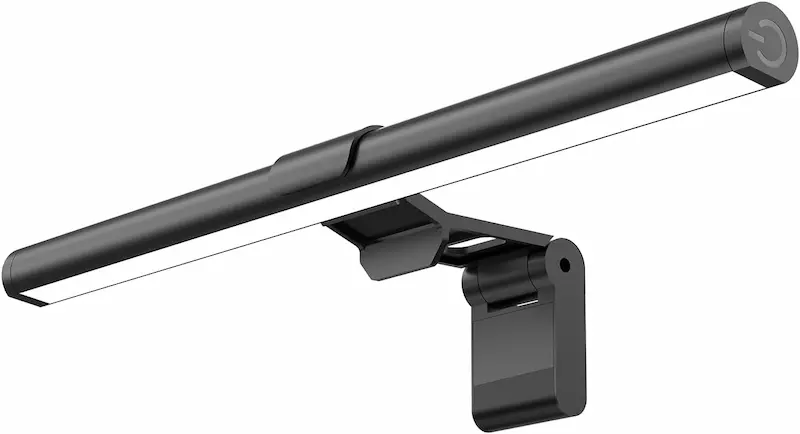
SAMPHON SC04: 15.7-Inch Ultrawide Bar with Dedicated Asymmetric Optics
* As an Amazon Associate I earn from qualifying purchases.
- 1
45° Asymmetric Optical Path Minimizes Screen Reflections
The SAMPHON SC04 uses an optical reflector designed to direct light forward and down onto your keyboard and mousepad at about 45 degrees. By aiming the light away from the panel face, it lights the desk area without adding a reflective veil over the dark parts of the image.
- 2
Mechanical Side Switch with Stepless Brightness Tuning
Unlike budget bars that rely on touch-sensitive controls, the SC04 has a dedicated mechanical side switch. A short press cycles through 3 color temperatures (warm, neutral, cool white), while a long press adjusts brightness smoothly with stepless dimming. The bar also remembers its last brightness and color temperature when powered back on.
- 3
Tool-Free Counterweight Clip
Weighing approximately 0.40 lbs (181 g), the SC04 uses a weighted rear arm to rest on the monitor without adhesive tape or thumbscrews. Its low mass keeps the extra load on the top edge of the monitor small.
- 4
Real-World Considerations and Trade-Offs
Because the clip works by balance and gravity, fit depends on the shape of your monitor's rear housing. On monitors with a very thick or sharply tapered back, adjust the counterweight arm during installation and check that the bar sits level before relying on it.
SAMPHON SC04: Pros & Cons
Pros
45° asymmetric optical design keeps direct light off the display panel
Dedicated mechanical side switch lowers the risk of knocking the bar off its angle compared with touch controls
Stepless dimming and 3 color temperatures with saved settings
Lightweight 181 g construction keeps extra load on the monitor's top edge small
Zero desktop footprint, preserving 100% of mousepad area for low-eDPI arm resets
Cons
Counterweight clip can fit loosely on screens with sharp rear tapers or thick rear housings
Front lip rests on the top bezel, so check bezel clearance on borderless screens
Conclusion
The SAMPHON SC04 is our top pick for competitive CS2 and Valorant desks. Its 45° asymmetric reflector focuses light over your mousepad and keyboard without washing out dark game scenes, and its mechanical side switch is less likely to shift the beam angle than the touch controls common on budget bars.SAMPHON SC03: Dual-Mode Task Light with Integrated Rear RGB Backlight
* As an Amazon Associate I earn from qualifying purchases.
- 1
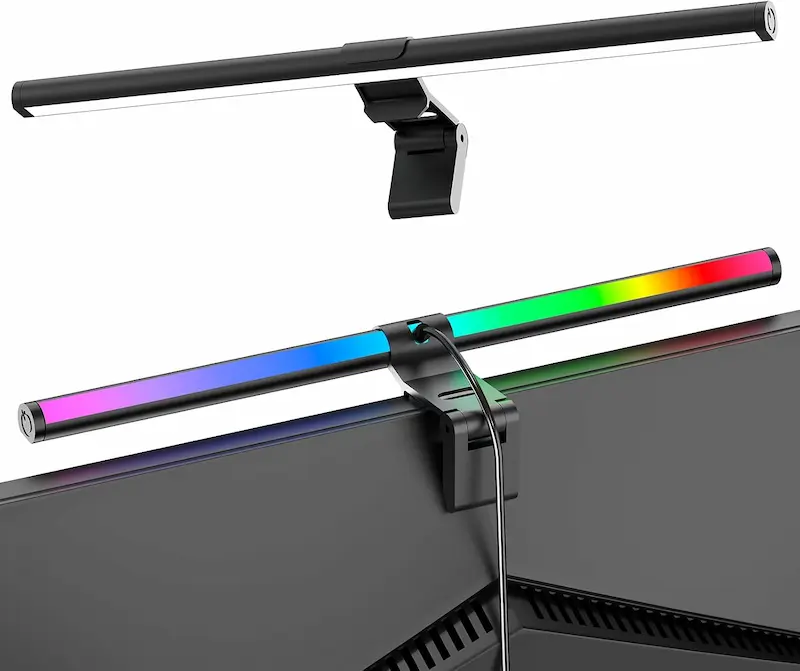
Dual Lighting: Front Task Light + Rear RGB Glow
The SAMPHON SC03 combines a 15.75-inch front task light with a rear-facing RGB backlight. The front light uses an asymmetric 45-degree beam with 3 color temperatures for focused desk visibility, while the rear backlight offers 9 RGB modes that cast ambient light on the wall behind your monitor.
- 2
Rear Backlight Softens the Screen-to-Room Contrast
In a dark room, lighting the wall behind your monitor reduces the brightness gap between the screen and its surroundings, which many players find more comfortable over long sessions. It gives a bias-light style effect without needing a separate LED strip kit, though colored RGB light is not a substitute for a neutral-white bias light if you care about color accuracy.
- 3
Standard 5V/5W USB Power with Compact Footprint
The SC03 is rated at 5W with a maximum output of 150 lumens and runs from a USB port, monitor USB hub, or basic phone charger (ideally rated 5V/1A). The housing measures 15.75 x 0.78 x 3.15 inches and the unit weighs about 6.4 oz (181 g).
- 4
Documented Trade-Offs from User Reports
The rear RGB modes are cycled through sequentially on the housing, so there is no direct jump to a specific preset. The 150-lumen maximum output also makes the SC03 better suited to dim or darkened gaming spaces than to brightly lit rooms.
SAMPHON SC03 RGB: Pros & Cons
Pros
Dual front task and rear RGB lighting in a single USB-powered unit
Rear wall glow reduces the screen-to-room brightness gap in dark rooms
Asymmetric 45° front beam keeps screen reflections minimized
9 selectable RGB ambient modes for room customization without extra light strips
Cons
Maximum output is rated at only 150 lumens, so it is less punchy in bright daytime rooms
Cycling RGB modes requires stepping through presets sequentially on the bar body
Rear glow needs a wall reasonably close behind the monitor to work well
Conclusion
The SAMPHON SC03 is the versatile pick for players who grind ranked matches in unlit rooms. Combining front desk illumination with a rear RGB backlight, it reduces the brightness gap between screen and room while adding atmosphere without occupying table space.USB LED 40cm Task Lamp: Minimalist Form Factor with Touch Control
* As an Amazon Associate I earn from qualifying purchases.
- 1
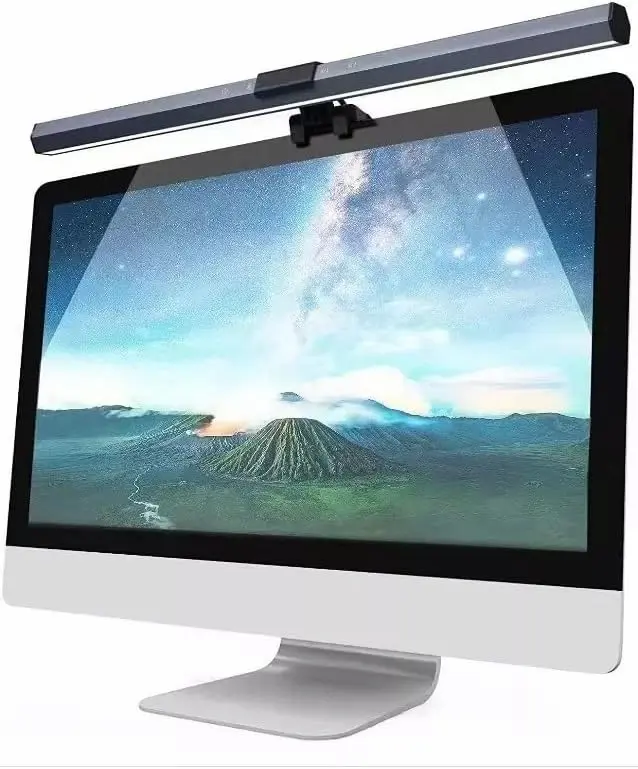
Compact 15.7-Inch (40 cm) Bar Profile
This 40 cm USB LED task lamp clips onto the top of a monitor to light the desk without using desk space. It runs on 5V/5W USB power and offers three selectable color temperatures from warm to cool white.
- 2
On-Bar Touch Controls for Direct Mode Switching
Touch-sensitive controls on the bar handle power, color temperature, and brightness, so you do not have to reach behind the panel.
- 3
Documented Trade-Offs and Hardware Limitations
Pressing a touch control on a lightweight bar can shift its tilt angle, especially if the clip is loose on a thin bezel. The listing also does not describe a 45-degree asymmetric cutoff like the SAMPHON bars, so expect to spend more time angling it to keep light off the monitor screen.
USB LED 40cm Task Lamp: Pros & Cons
Pros
Slim 40 cm profile fits typical 24- to 27-inch esports displays
3 selectable color temperatures cover warm relaxation and cool focus lighting
Universal 5V USB connectivity runs off monitors, PCs, or basic wall chargers
Cons
Touch controls can shift the physical tilt angle during button presses
No asymmetric cutoff is described in the listing, so more light may spill onto the screen
Clip fit depends on bezel thickness; a loose fit makes touch presses more likely to move the bar
Conclusion
The 40cm USB task lamp provides basic, functional desk lighting on a modest budget. Its touch controls and less defined beam require careful positioning to avoid screen spill, but it delivers adequate workspace illumination for standard flat monitors.Verdict
The Verdict: Best Ultra-Budget Monitor Light Bars Under $20 (2026) SAMPHON SC04 15.7-Inch Ultrawide Computer Monitor Light Bar
The SAMPHON SC04 takes our top recommendation for competitive CS2 and Valorant setups under $20. Its 45° asymmetric optical design directs light onto your keyboard and mousepad while keeping it off the monitor panel, preserving visibility in dark game scenes. Combined with a mechanical side switch that is less likely to shift the beam angle than touch controls and a lightweight 181 g body, it offers the strongest anti-glare design of the three models we compared.
When to Consider the Alternatives:
-
SAMPHON SC03 RGB — Best for dark-room sessions and ambient backlighting. If you play late-night matches in an unlit room, the SC03's rear RGB backlight projects ambient light onto the wall behind your monitor. This reduces the brightness gap between the screen and the room without requiring a separate LED strip kit.
-
USB LED 40cm Task Lamp — Basic compact alternative. A functional choice if you need simple desk illumination for a standard flat monitor, though its touch controls and less defined beam demand more careful positioning to avoid screen spill.
Frequently Asked Questions
Competitive shooter players using low sensitivity (typically 400 to 800 eDPI in CS2 or roughly 125 to 250 eDPI in Valorant) need unobstructed desk space for large arm swipes. At 400 eDPI in CS2, a 180-degree turn takes about 52 cm of mouse travel; at 800 eDPI, about 26 cm. Standard desk lamps sit on bases that often take 15 to 20 cm of space right where your mousepad or angled keyboard rests. A monitor light bar mounts on top of your display, leaving the desk surface completely clear for your mousepad.
Light bars with an asymmetric optical design (the SAMPHON SC04 and SC03 both list a 45-degree beam) direct light downward and forward toward the desk instead of at the monitor. When the bar is angled properly, very little light reaches the display panel, so reflections stay minimal and dark areas of the image keep their contrast. The generic 40cm lamp does not list an asymmetric cutoff, so it needs more careful tilt adjustment.
It depends on the monitor's curvature and rear housing shape, and some monitor light bars are explicitly sold as not compatible with curved screens, so read each listing's compatibility notes before buying. In general, counterweight arms sit more securely on gently curved or flat monitors with a flat top edge, and are less stable on strongly curved screens or panels with a thick rear housing.
Monitor light bars rest on a counterweight arm, so pressing a touch control on a lightly balanced bar can nudge it and change where the beam falls, potentially spilling light onto the screen. A mechanical side switch, like the one on the SAMPHON SC04, gives clear physical feedback and makes it easier to steady the bar with your other hand while changing modes.
All three models run on 5V USB power, and the SC03 and the generic lamp list a 5W rating, which means about 1A at full brightness. A 5V/1A (or higher) charger or powered USB hub is the safest choice. A USB 3.x port (900 mA) usually works, while an older USB 2.0 port (500 mA) may limit brightness. If you use a monitor's USB port, make sure it keeps providing power when the display goes to sleep.
You May Also Like
- Best Ultra-Budget Gaming Monitors Under $100 for CS2 & Valorant (2026)
- Best Ultra-Budget AM4 Motherboards Under $80: MSI A520M-A PRO vs GIGABYTE A520M K vs B550M K
- Best Ultra-Budget Monitor Arms Under $20 for CS2 & Valorant (2026): Bracwiser vs HUANUO vs Utopia Home
- Gaming Eye Strain Prevention Guide 2026: Monitor Settings, Lighting & Habits
- Best Ultra‑Budget Gaming Desk 2026 under $100: WALKINGDESK 48" vs Sweetcrispy 48" vs Korfile 48"