peripherals
Best Ultra-Budget Wireless Gaming Keyboards for CS2 & Valorant (2026): GEODMAER 65% vs CHONCHOW Full-Size vs ONIKUMA G80 Tri-Mode
Three ultra-budget wireless gaming keyboards compared for CS2 counter-strafe consistency, Valorant key rollover, anti-ghosting, battery life, and wireless connection stability.
- 7 min read
Playing CS2 and Valorant wirelessly used to mean sacrificing anti-ghosting, key rollover, or battery runtime for a liveable price. Modern ultra-budget 2.4GHz wireless keyboards with genuine gaming-grade rollover and large built-in batteries now provide solid entry-level performance, but not all of them are equally prepared for ranked competitive play. In CS2, a dropped W+A+D counter-strafe keystroke costs you the round. In Valorant, a missed Shift-walk or ability key during a gunfight means a free kill for the enemy. We compared three popular options — GEODMAER 65% Wireless, CHONCHOW Full-Size Wireless, and ONIKUMA G80 Tri-Mode — evaluating wireless connection quality, anti-ghosting rollover, key consistency, battery runtime, and the build features that separate them in actual competitive play.
Info
Wireless Keyboard Buying Guide for CS2 & Valorant
Key rollover & anti-ghosting are among the most important keyboard specs for competitive CS2 and Valorant play. Wireless keyboards with low rollover will drop inputs during W+A+D counter-strafe combinations — leaving your character frozen in the open for a free headshot.
2.4GHz Wireless vs Bluetooth — what to use for FPS Always use the 2.4GHz USB receiver mode (not Bluetooth) for competitive CS2 and Valorant. All three keyboards here run at a 125Hz polling rate over 2.4GHz — noticeably higher latency than a 1000Hz wired gaming keyboard or mouse, but consistent and predictable, which matters more than raw speed for most players below the very top competitive tier. Bluetooth adds further, less consistent latency on top of that and should be avoided for ranked play. The ONIKUMA G80 supports tri-mode; always default to its 2.4GHz dongle for gaming, and save Bluetooth for non-gaming use.
What to check in an ultra-budget wireless gaming keyboard:
- Anti-Ghosting Rollover (minimum 19-key) - Wireless keyboards with poor rollover drop keys when you press multiple inputs simultaneously — a critical flaw in CS2 counter-strafes and Valorant ability combos. All three keyboards here meet the 19-key minimum; the GEODMAER's 26-key rollover gives extra headroom for more complex multi-key inputs.
- 2.4GHz Connection (not Bluetooth) for Gaming - Bluetooth wireless adds latency variability that can make CS2 sub-tick movement feel inconsistent. Always use 2.4GHz USB dongle mode for competitive FPS. Only the ONIKUMA G80 offers Bluetooth as a secondary option for non-gaming use. Note that none of these three keyboards use a high-polling-rate (1000Hz) wireless protocol, so treat them as solid budget options rather than esports-grade peripherals.
- Battery Life & Charging Port - Large rechargeable batteries (2000–2500mAh) reduce mid-session charging anxiety. USB-C is strongly preferred over Micro-USB — it offers faster charging and is more durable with daily use; all three keyboards in this comparison use USB-C. Manufacturer-published battery hour ratings vary in reliability — the GEODMAER and ONIKUMA both list specific hour figures, while CHONCHOW's listings only give vague 'long battery life' marketing language without an official hours-of-use number.
- Compact Layout for Mousepad Space - In CS2 and Valorant, low-sensitivity play requires wide mouse sweeps. A 65% layout frees up meaningfully more mousepad space than full-size or even 96% layouts. Full-size keyboards force a wider arm posture that can limit large arm movements during clutch rounds.
Four rules for competitive wireless keyboard play:
- Always use the 2.4GHz USB dongle — never Bluetooth — for CS2 and Valorant competitive matches to keep latency low and consistent
- Plug the USB receiver directly into a motherboard port (avoid unpowered hubs) to prevent packet loss during intensive firefights
- Turn off RGB backlighting when battery is low — running a 2000mAh keyboard at max brightness drains it several times faster than with lights off
- Use a compact 65% layout over full-size or 96% for competitive play — extra mousepad space directly benefits low-sensitivity CS2 and Valorant aiming
Wireless Keyboard Comparison: Key Specs & Features
GEODMAER 65% Wireless Gaming Keyboard, Ultra-Compact 68 Keys Best Pick | 65% compact | 2.4GHz Wireless (USB receiver, up to 10m) | 26-key rollover | 2000 mAh rechargeable | 68 | 550 g | Check price on Amazon |
CHONCHOW Wireless Gaming Keyboard, 104 Keys Full-Size Rechargeable | Full-size | 2.4GHz Wireless (USB receiver, plug-and-play) | 19-key rollover | 2500 mAh rechargeable | 104 | 720 g | Check price on Amazon |
ONIKUMA G80 Tri-Mode Wireless Keyboard, 94 Keys RGB, LCD Display & Knob | 96% compact (with numpad) | Tri-mode: 2.4GHz Wireless / Bluetooth 5.0 / USB-C Wired | 19-key rollover | 2000 mAh rechargeable | 94 | 720 g | Check price on Amazon |
GEODMAER 65% Wireless Gaming Keyboard, Ultra-Compact 68 Keys Best Pick
65% compact26-key rollover68 keys2000 mAh rechargeable1 yearCHONCHOW Wireless Gaming Keyboard, 104 Keys Full-Size Rechargeable
Full-size19-key rollover104 keys2500 mAh rechargeable12 monthsONIKUMA G80 Tri-Mode Wireless Keyboard, 94 Keys RGB, LCD Display & Knob
96% compact (with numpad)19-key rollover94 keys2000 mAh rechargeable1 year
* As an Amazon Associate I earn from qualifying purchases.
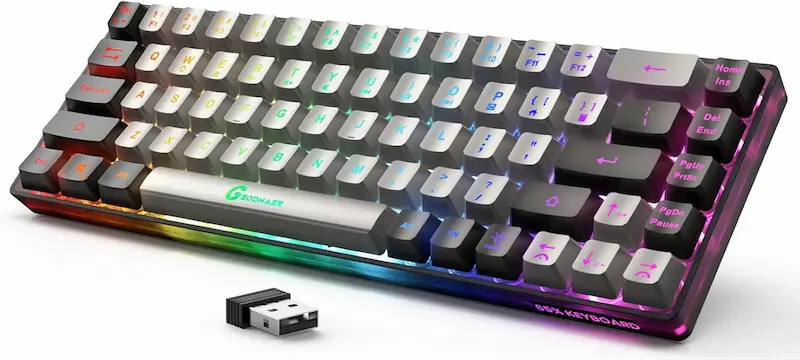
GEODMAER 65% Wireless: Verified battery life in a compact 65% form factor
* As an Amazon Associate I earn from qualifying purchases.
- 1
2000mAh battery with a manufacturer-rated 500 hours wireless playtime (lights off)
The GEODMAER 65% Wireless stands out with the most clearly documented battery longevity of the three. Its 2000mAh rechargeable lithium battery is rated for 500 hours of play with RGB disabled — or approximately 50 hours with backlight at maximum brightness. For weekly top-ups rather than daily charging, it is a highly hassle-free wireless gaming keyboard. The USB-C charging port also allows continued play while the cable is connected, eliminating forced downtime.
- 2
65% compact layout with 26-key rollover for CS2 counter-strafes
The 65% layout (68 keys with dedicated arrow keys) frees up significant desk space compared to a full-size or 96% keyboard — a real advantage in CS2 and Valorant for players using low-sensitivity mice that require large arm sweeps. The 26-key anti-ghosting rollover is the highest in this comparison, giving extra headroom for fast W+A+D counter-strafe combinations and multiple simultaneous inputs. Two-color injection-molded keycaps provide bright, legible legends in dark room conditions. Like the other two keyboards here, it runs at a 125Hz polling rate over 2.4GHz — fine for casual-to-mid competitive play, though not on par with a wired 1000Hz peripheral.
Pros & Cons: GEODMAER 65% Wireless
Pros
26-key anti-ghosting rollover — the highest in this comparison
Manufacturer-rated 500-hour battery life (RGB off), the clearest figure of the three
65% compact layout maximizes mousepad space for CS2 & Valorant
USB-C charging with play-while-charging support
Two-color injection-molded keycaps with luminous legends
Stable 2.4GHz wireless with 10m range
Cons
No numpad or dedicated function row (65% layout trade-off)
Membrane switches, not mechanical
125Hz polling rate — noticeably behind 1000Hz wired peripherals
RGB limited compared to ONIKUMA G80's 15 dynamic modes
Conclusion
The GEODMAER 65% Wireless combines the highest anti-ghosting rollover of the group (26-key), the best-documented battery runtime (500 hours lights-off), and a mousepad-friendly form factor. The 65% layout is ideal for CS2 and Valorant players who rely on wide arm sweeps. USB-C charging and use-while-charging support means uninterrupted sessions.CHONCHOW Full-Size Wireless: Largest battery with full-size comfort
* As an Amazon Associate I earn from qualifying purchases.
- 1
2500mAh — the largest battery in this comparison
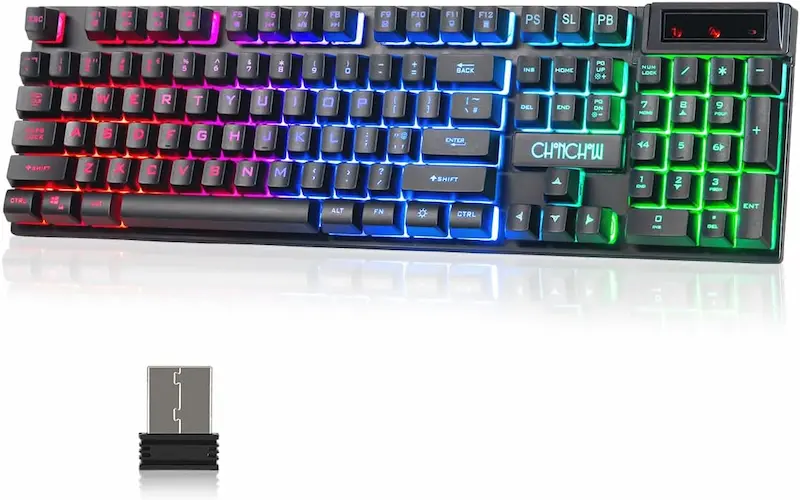
The CHONCHOW Full-Size Wireless is equipped with the largest rechargeable battery of the three at 2500mAh, paired with a 5-minute auto-sleep function that kicks in when you step away. The manufacturer doesn't publish an official hours-of-use figure the way GEODMAER and ONIKUMA do — listings only describe it in general terms as long-lasting — so treat runtime as a strength on paper (biggest cell, most aggressive sleep timer) rather than a directly comparable number.
- 2
Full-size 104-key layout for work-and-play setups
With 104 keys including a dedicated numpad and function row, the CHONCHOW is an effective option for users who split time between gaming, productivity, and data entry. Its rainbow LED backlighting with adjustable brightness and breathing modes adds visual depth. The 19-key anti-ghosting rollover matches the ONIKUMA G80 and covers standard CS2/Valorant movement combos, though it sits below the GEODMAER's 26-key for players who lean on more complex multi-key inputs.
Pros & Cons: CHONCHOW Full-Size Wireless
Pros
Largest battery capacity (2500mAh) in the comparison
Full 104-key layout with numpad for productivity
5-minute auto-sleep helps conserve battery
USB-C charging, plug-and-play 2.4GHz wireless, no driver needed
Compatible with PS4, PS5, Xbox, PC, and Mac
Cons
19-key rollover — tied with ONIKUMA for the lowest anti-ghosting spec here
No official battery-life hour rating published by the manufacturer
Full-size layout takes up significant desk space
ABS keycaps prone to shine and fingerprint buildup
No Bluetooth or wired fallback mode
Conclusion
The CHONCHOW Full-Size Wireless carries the largest battery (2500mAh) and a classic 104-key layout ideal for mixed work-and-gaming setups, though the manufacturer doesn't publish an exact hours-of-use figure. Its 19-key rollover is on par with the ONIKUMA G80 and covers standard CS2 and Valorant sessions, but falls short of the GEODMAER's 26-key for players who want extra headroom on complex counter-strafe combos.ONIKUMA G80 Tri-Mode: The feature-rich wireless option with LCD display & PBT keycaps
* As an Amazon Associate I earn from qualifying purchases.
- 1
Tri-mode connectivity (2.4GHz + Bluetooth 5.0 + USB-C wired) with LCD screen
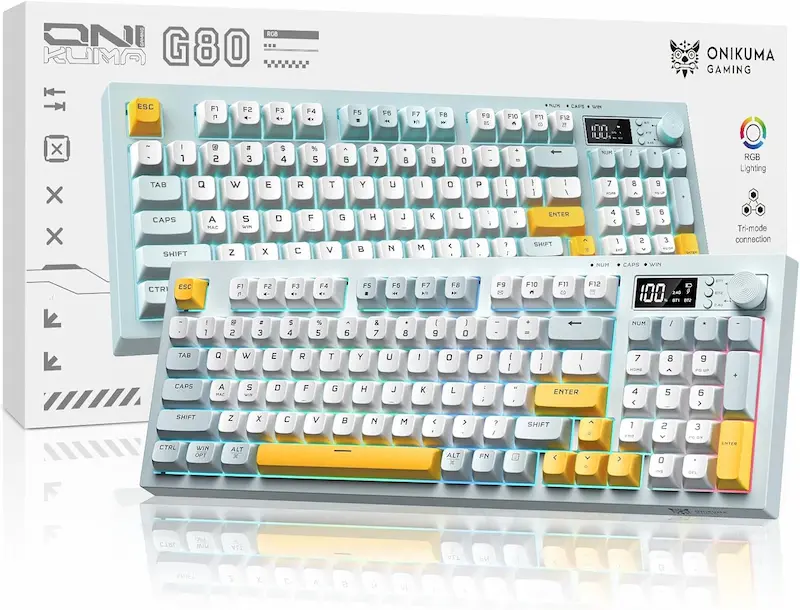
The ONIKUMA G80 is the most feature-rich keyboard in this comparison. Its tri-mode connectivity allows switching between 2.4GHz wireless (for competitive gaming), Bluetooth 5.0 (for tablets, phones, or secondary devices), and USB-C wired mode — covering every use case in one keyboard. The built-in LCD smart display shows battery percentage, connection mode, and RGB status at a glance, eliminating guesswork mid-session. A multifunction knob provides instant control over volume, RGB brightness, and lighting effects without leaving your game.
- 2
19-key rollover, PBT keycaps, and a 200-hour wireless battery life
The G80 carries a manufacturer-confirmed 19-key anti-ghosting rollover — matching the CHONCHOW and sufficient for standard CS2 and Valorant movement combos, though below the GEODMAER's 26-key. Its PBT keycaps are a standout feature, resisting shine and fingerprints noticeably better than the ABS keycaps used on the other two boards. The 2000mAh battery is rated for up to 200 hours with RGB off (roughly 60 hours with lighting on) — lower than the GEODMAER's 500-hour rating despite an identical battery capacity, largely because the always-on LCD display, tri-mode radio, and multifunction knob draw more standby power. The 96% compact layout retains the numpad while still saving some desk space over a traditional full-size keyboard, though it's noticeably larger than the GEODMAER's 65% footprint.
Pros & Cons: ONIKUMA G80
Pros
Tri-mode connectivity: 2.4GHz + Bluetooth 5.0 + USB-C wired
PBT keycaps — more durable and fingerprint-resistant than ABS
Built-in LCD smart display shows battery, mode, and RGB status
Multifunction knob for instant volume & RGB control
15 dynamic RGB lighting effects
Manufacturer-rated up to 200 hours battery life (RGB off)
Cons
Highest price point in this comparison group
19-key rollover — tied with CHONCHOW, below the GEODMAER's 26-key
Lower battery rating than GEODMAER despite the same 2000mAh cell — the LCD and tri-mode radio draw more power
96% layout still relatively large for low-sensitivity mouse users
Silent membrane switches lack mechanical feedback
Conclusion
The ONIKUMA G80 brings the most versatile feature set: PBT keycaps, an LCD smart display, a multifunction knob, and tri-mode wireless (2.4GHz + Bluetooth + USB-C wired). Its 19-key rollover matches the CHONCHOW and its 200-hour battery life (RGB off) trails the GEODMAER, largely a trade-off for the extra onboard electronics. For pure FPS competitive play on a tight budget, the GEODMAER's 26-key rollover, longer battery rating, and smaller 65% layout have the edge — the G80 makes more sense if you value the LCD display, PBT keycaps, and multi-device Bluetooth switching.Verdict
The Verdict: Best Ultra-Budget Wireless Gaming Keyboards for CS2 & Valorant — GEODMAER 65% Wireless Gaming Keyboard
GEODMAER 65% Wireless is the best overall pick for ultra-budget wireless competitive CS2 & Valorant gaming. It delivers the highest anti-ghosting rollover (26-key) in this comparison, the most clearly documented battery life (500 hours lights-off, verified by the manufacturer's own rating rather than vague marketing language), a desk-space-saving 65% compact layout ideal for wide mouse sweeps, and USB-C charging with play-while-charging support — a combination that directly addresses what competitive FPS players need most at this price point.
🎯 Best for different needs:
-
CHONCHOW Full-Size Wireless — the best work-and-play pick. Featuring a full 104-key layout with a numpad and the largest raw battery capacity (2500mAh) of the three, it covers both productivity and casual-to-mid gaming sessions, though buyers should note its manufacturer doesn't publish an exact battery-hours figure the way GEODMAER and ONIKUMA do.
-
ONIKUMA G80 Tri-Mode — the best feature-rich pick. PBT keycaps, an LCD smart display, a multifunction control knob, tri-mode connectivity (2.4GHz + Bluetooth 5.0 + USB-C wired), and 15 dynamic RGB effects make it the most versatile wireless keyboard in this comparison — its 19-key rollover and 200-hour battery rating are the trade-offs for that extra functionality.
💡 Wireless vs. Wired for CS2 & Valorant — the final verdict:
2.4GHz wireless keyboards at this price point are a reasonable choice for most CS2 and Valorant players, but it's worth being realistic: all three keyboards here run a 125Hz polling rate, meaningfully behind the 1000Hz wired peripherals used by top competitive players. For casual and mid-tier ranked play, that gap is unlikely to be the deciding factor in your games. Bluetooth, on the other hand, is not recommended for competitive CS2 and Valorant play on any of these keyboards — if you need multi-device support, reserve Bluetooth for productivity tasks and switch to 2.4GHz when launching games.
Frequently Asked Questions
For most players, yes — all three keyboards in this comparison use 2.4GHz dongles rather than Bluetooth, which keeps latency low and consistent. Note that all three run at a 125Hz polling rate, lower than a 1000Hz wired gaming keyboard, so very top-tier competitive players chasing every millisecond may prefer wired. For the vast majority of ranked CS2 and Valorant players, though, the difference is not the limiting factor. Avoid Bluetooth mode for competitive matches regardless — it adds further, less predictable latency on top of the base connection.
A minimum of 19-key rollover for reliable play. CS2 counter-strafes (W+A+D combinations) and Valorant ability keys require simultaneous keypresses — if your keyboard has insufficient rollover, inputs will be silently dropped and your character will freeze momentarily. The CHONCHOW and ONIKUMA G80 both offer 19-key rollover, which covers standard movement combos. The GEODMAER's 26-key rollover gives extra headroom for more complex, fast multi-key inputs.
Always use 2.4GHz for competitive gaming. Bluetooth introduces additional, less consistent latency on top of your base connection, which can cause noticeable delay during flick shots and rapid key presses. The ONIKUMA G80 supports both modes — use Bluetooth for casual browsing or switching between devices, and 2.4GHz when you launch CS2 or Valorant.
It depends on RGB settings and, in this comparison, on how much power the keyboard's other electronics draw. The GEODMAER 65% Wireless carries the clearest manufacturer rating: up to 500 hours with RGB off (around 50 hours at maximum brightness). The ONIKUMA G80 is rated for up to 200 hours with RGB off despite having the same 2000mAh cell as the GEODMAER — its LCD display, tri-mode radio, and multifunction knob draw extra standby power. The CHONCHOW has the largest battery (2500mAh) but its manufacturer doesn't publish a specific hours-of-use figure, only general 'long battery life' marketing language. Turning off or reducing RGB is the single most effective way to extend wireless battery life on any of the three.
For pure FPS gaming: yes. A 65% layout (like the GEODMAER) frees up significant mousepad space and reduces shoulder/arm reach compared to full-size or even 96% layouts. In CS2 and Valorant at low sensitivity, wide arm swings are common — a full-size or 96% keyboard forces the mouse further to the right, creating a more cramped aiming position. Full-size keyboards are better suited to productivity use alongside gaming.
PBT keycaps (used on the ONIKUMA G80) are denser, more resistant to fingerprint oils, and don't develop a shiny worn appearance over time. ABS keycaps (used on GEODMAER and CHONCHOW) are lighter and cheaper but begin to feel greasy and look glossy within a few months of heavy use. PBT keycaps stay looking and feeling fresh significantly longer.
You May Also Like
- Best Ultra-Budget USB-C to 3.5mm Audio Adapters Under $10 for CS2 & Valorant: UGREEN vs JXMOX vs JSAUX
- Best Ultra-Budget Wireless Gaming Mice under $20 for CS2 & Valorant in 2026
- Best Ultra-Budget Rapid Trigger Keyboards Under $40 for CS2 & Valorant (2026)
- Budget Keyboard Tuning: The $2 Tape Mod for a Premium Sound and Feel
- How to Lube Mechanical Keyboard Switches: From Scratchy to Smooth on a Budget