accessories
Best Ultra-Budget Keycap & Switch Pullers for CS2 & Valorant
Fix counter-strafe switch chattering and maintain movement keys without bent socket pins. We compare three budget keycap and switch extraction tools.
- 9 min read
In competitive tactical first-person shooters like CS2 and Valorant, keyboard input concentrates on a handful of movement keys: W, A, S, D, Left Shift, and Space. Counter-strafing requires rapid, repetitive taps on A and D to cancel directional velocity before firing, so these switches see far more actuations than most of the board. Mechanical switches are rated for tens of millions of presses, so true wear-out is rare, but a switch under a movement key can still start chattering (registering double inputs) or missing releases because of dirt, oxidized contacts, or a poorly seated pin. When that happens during tight jiggle-peeks, round outcomes suffer. On hot-swappable mechanical keyboards, replacing an erratic counter-strafe switch takes only a minute or two. However, removing it with a cheap plastic ring puller or a thin, flexible metal tweezer can crack the switch housing, scratch custom PBT keycaps, or bend the metal pins that plug into the hot-swap sockets. A dedicated extraction tool grips the housing latches and lifts the switch straight up, which keeps the pins straight and the socket contacts intact. In this spec comparison, based on manufacturer and retailer listing specifications and published owner and reviewer feedback, we look at three ultra-budget keyboard maintenance tools: the New Fashion Kingdom wire keycap puller with brushes, the dedicated Glorious stainless steel switch puller, and the KEMOVE P10 semi-automatic 2-in-1 extractor.
Info
Movement Key Maintenance: Counter-Strafing Wear and Socket Physics
Why competitive tactical shooter players replace individual movement switches: A typical typing workload spreads actuations across dozens of keys. In CS2 and Valorant, rapid input toggles during a match pile up on a few movement keys. Dust, skin oils, and contact oxidation under A and D can eventually cause chatter or missed releases, which throws off counter-strafing timing. Hot-swappable boards let you replace a single switch in minutes, but a poor extraction tool can bend the switch pins or damage the socket contacts.
What to verify before pulling switches on your gaming keyboard: Make sure your keyboard has hot-swappable sockets (usually Kailh, Gateron, or Outemu modular sockets) and unplug it before you start. Soldered boards cannot have switches pulled from the top without desoldering, and forcing them out can damage the switch, the solder pads, and the PCB. When extracting a switch, seat the tool on opposite sides of the housing so it grips the latches, squeeze just enough to hold, and pull straight up. Rocking or tilting the switch bends the two metal contact pins underneath.
Four physical factors to evaluate in budget keyboard extraction tools:
- Perpendicular Vertical Alignment vs. Angle Tilt - Hot-swap switch pins enter narrow contact sockets. If an extractor tilts during lifting, the pins bend against the plate edge, which can cause contact failures when you insert a replacement switch.
- Wire Loop Clearance on Tight Keycap Spacing - Thin stainless steel wire loops fit between narrow key gaps without prying against adjacent keys, which helps protect keycap edges on compact 60% and 75% layouts.
- Arm Thickness and Plate Clearance - Recessed plates leave little room between the switch housing latch and the plate rim. Slim extraction arms fit into tight recesses where bulky tools do not.
- Housing Debris and Contact Cleaning - Skin oils, dust, and desk grime collect around WASD stems over months of play. A soft brush lets you clear debris from the plate opening before seating a replacement switch.
Practical switch maintenance tips for competitive FPS:
- Before pulling an erratic switch under A or D, test it in a key-event viewer and check your keyboard's firmware debounce setting to confirm the chatter is a hardware problem and not a configuration one.
- Always inspect the two metal pins on the bottom of a replacement switch and make sure they are straight before pressing it into the socket.
- Keep a few spare switches of the exact same model as your movement keys, or borrow one from a rarely used key such as Menu or Right Win. Mixing switch types changes feel and actuation on a single key.
- Use a wire puller for wide keys like Left Shift and Space, lifting gently from both ends to avoid popping stabilizer wires loose.
Best Keycap & Switch Puller Tools: Specifications Compared
| Tool Model | Design & Construction | Components & Scope | Dimensions & Mass | |
|---|---|---|---|---|
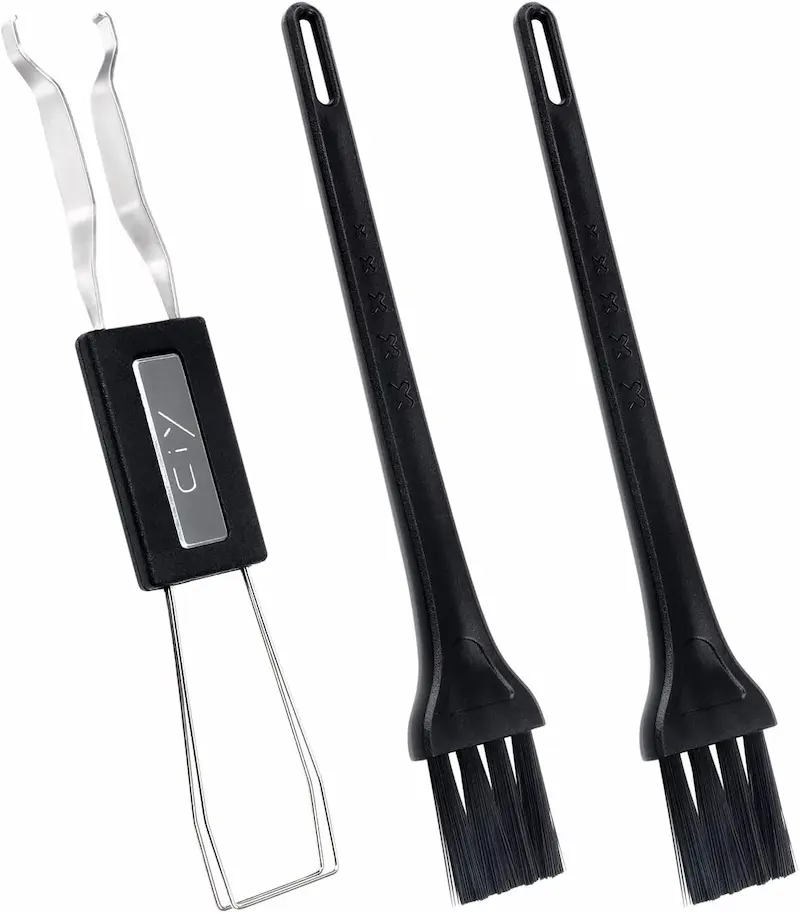
New Fashion Kingdom Keycap Puller with 2 Cleaning Brushes Best Keycap + Cleaning Combo | Wire Keycap Puller + Cleaning Brushes Stainless Steel Wire, Plastic Handle, Anti-Static Nylon Bristles | 1x Wire keycap puller, 2x Keyboard cleaning brushes Cherry MX, Alps, Topre, and standard MX keycaps (keycap removal only) | 5.0" x 0.7" x 0.2" (12.7 x 1.8 x 0.5 cm) 0.02 lbs (10 g) | Check price on Amazon |
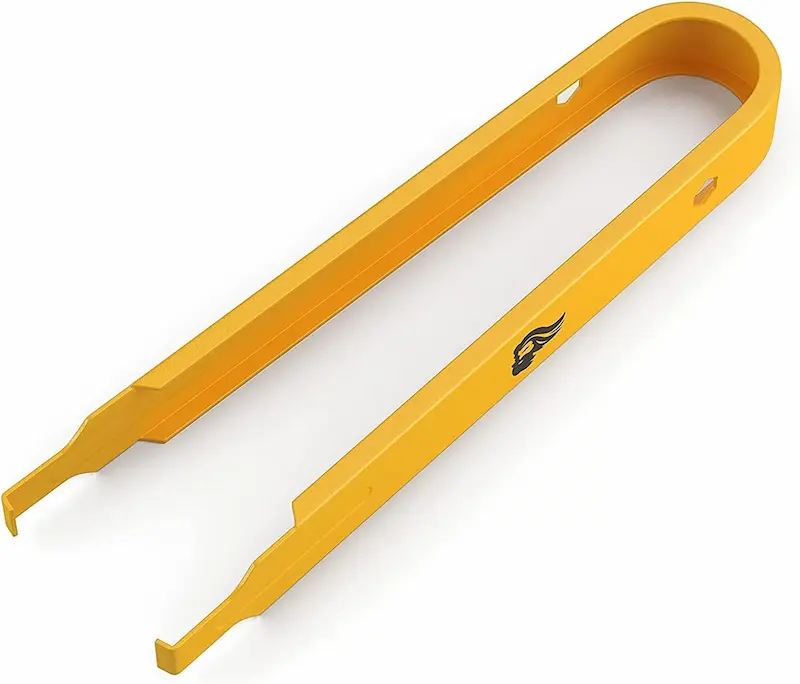
Glorious Mechanical Keyboard Switch Puller (GLO-ACC-SP) Best Dedicated Switch Tool | Dedicated Mechanical Switch Extractor 100% Stainless Steel Body with Matte Finish | 1x Switch puller tool MX-style switches on hot-swap (modular) keyboards only | 3.5" x 0.5" x 0.7" (9.0 x 1.2 x 1.8 cm) 0.02 lbs (11 g) | Check price on Amazon |
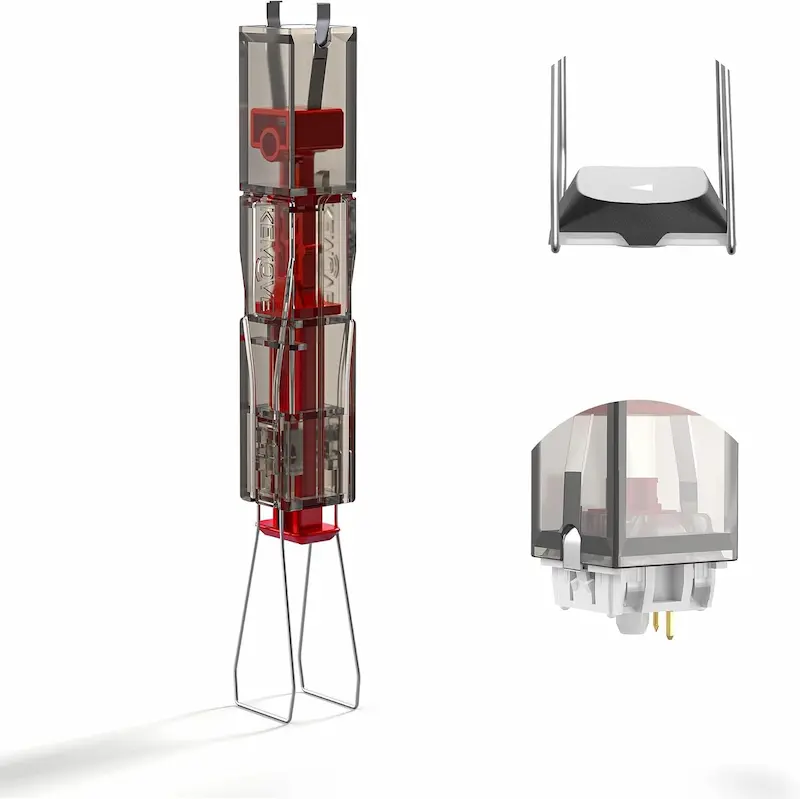
KEMOVE P10 2-in-1 Semi-Automatic Switch and Keycap Puller Best Semi-Auto Mechanism | Semi-Automatic Spring-Clamp 2-in-1 Puller 304 Stainless Steel & Manganese Steel Parts, Translucent Plastic Housing | 1x Integrated dual-purpose tool (switch clamp + foldable keycap wires) Hot-swap MX-style switches and 1U to 6.25U keycaps | 4.3" x 0.7" x 0.7" (11.0 x 1.8 x 1.8 cm) Approx. 60-100 g (listings vary) | Check price on Amazon |
New Fashion Kingdom Keycap Puller with 2 Cleaning Brushes Best Keycap + Cleaning Combo
Type: Wire Keycap Puller + Cleaning BrushesMaterial: Stainless Steel Wire, Plastic Handle, Anti-Static Nylon BristlesComponents: 1x Wire keycap puller, 2x Keyboard cleaning brushesProfile: 5.0" x 0.7" x 0.2" (12.7 x 1.8 x 0.5 cm)Glorious Mechanical Keyboard Switch Puller (GLO-ACC-SP) Best Dedicated Switch Tool
Type: Dedicated Mechanical Switch ExtractorMaterial: 100% Stainless Steel Body with Matte FinishComponents: 1x Switch puller toolProfile: 3.5" x 0.5" x 0.7" (9.0 x 1.2 x 1.8 cm)KEMOVE P10 2-in-1 Semi-Automatic Switch and Keycap Puller Best Semi-Auto Mechanism
Type: Semi-Automatic Spring-Clamp 2-in-1 PullerMaterial: 304 Stainless Steel & Manganese Steel Parts, Translucent Plastic HousingComponents: 1x Integrated dual-purpose tool (switch clamp + foldable keycap wires)Profile: 4.3" x 0.7" x 0.7" (11.0 x 1.8 x 1.8 cm)
* As an Amazon Associate I earn from qualifying purchases.
New Fashion Kingdom 3-Piece Kit: Wire Keycap Puller with Anti-Static Brushes
* As an Amazon Associate I earn from qualifying purchases.
- 1
Wire Puller with Multi-Key Capacity
The New Fashion Kingdom kit centers on a wire-style keycap puller made from stainless steel wire with a lightweight plastic handle. The listing says it can grip up to three keys at once, and the thin wire slides between narrow keycap gaps to lift PBT and ABS keycaps without prying.
- 2
Two Included Anti-Static Cleaning Brushes
The bundle includes two anti-static nylon cleaning brushes for sweeping dust, sweat residue, and grime from around stabilizer bars and switch plate cutouts before you install a fresh switch.
- 3
Lightweight and Minimalist Profile
Measuring 5.0 x 0.7 x 0.2 inches and weighing about 10 grams, the tool takes up almost no space in a travel kit or desk drawer.
- 4
Limitations and Trade-Offs
Although the Amazon title includes the words "Switch Puller", the listed contents are one wire keycap puller and two brushes, with no switch-gripping mechanism. We treat it as a keycap-only tool. Pulling hot-swap switches still requires a dedicated switch puller, because wire loops cannot release the housing latches.
New Fashion Kingdom 3-Piece Kit: Pros & Cons
Pros
Keycap puller and two cleaning brushes in a single package
Thin stainless steel wire loops lift textured PBT keycaps without prying
Anti-static brushes help clear dust and grime around WASD before a switch swap
Ultra-lightweight 10 g profile fits in any keyboard travel pouch
Cons
Does not include a dedicated switch extractor, so it cannot pull hot-swap switches
Wire loops need manual adjustment to hook under larger stabilized keys
Conclusion
The New Fashion Kingdom 3-piece kit is the entry-level pick for players who mainly need to pull keycaps safely and sweep dust away from their movement keys. Its wire loops are gentle on keycap surfaces, but hot-swap switch swaps require a dedicated switch tool.Glorious Switch Puller: 100% Stainless Steel Body with Reinforced Arms
* As an Amazon Associate I earn from qualifying purchases.
- 1
Reinforced Bend-Resistant Stainless Steel Frame
The Glorious Switch Puller (GLO-ACC-SP) is built only for removing switches from hot-swap keyboards. Glorious describes it as 100% stainless steel with reinforced "bend-proof" arms and a smooth matte finish, which helps the arms hold their shape under firm pinching pressure.
- 2
Slim Arms That Grip the Housing Latches
You position the arms on opposite sides of the switch, squeeze to grip the housing, and pull straight up. The slim profile lets the arms reach the gap between the housing and the plate, so you can lift the switch without prying at an angle.
- 3
Compact Ergonomic Profile
At about 3.5 inches (89.9 mm) long and 11 grams, the tool is easy to hold and fits in any drawer or travel pouch.
- 4
Dedicated Single-Purpose Scope
The Glorious tool only removes switches and only works on hot-swap boards. It does not pull keycaps, so you still need a keycap puller (most keyboards ship with one) to expose the switch first. It is also out of stock or discontinued at several retailers, so check Amazon availability before buying.
Glorious Switch Puller: Pros & Cons
Pros
100% stainless steel frame with reinforced arms that resist bending under pinching pressure
Slim arms reach tight gaps between the switch housing and the plate
Makes it easier to keep the pull straight, which protects the metal contact pins
Compact 3.5-inch, 11 g body with a smooth matte finish
Cons
Switch removal only; it does not pull keycaps and only works on hot-swap boards
Squeezing too hard can crack the switch's upper housing, as Glorious's own guide warns
Listed as out of stock or discontinued at several retailers, so availability can be spotty
Conclusion
The Glorious Switch Puller is our top dedicated tool for hot-swap keyboard owners. Its rigid stainless steel arms grip the switch housing from both sides, so you can lift a failing counter-strafe switch straight up and avoid bending the contact pins.KEMOVE P10: Semi-Automatic Spring-Clamp 2-in-1 Maintenance Tool
* As an Amazon Associate I earn from qualifying purchases.
- 1
Integrated 2-in-1 Switch and Keycap Design
The KEMOVE P10 combines a switch puller and a keycap puller in one handheld body. The switch clamp sits at one end of a square housing, and the keycap puller uses foldable wire wings that stow in recesses in the housing.
- 2
Semi-Automatic Spring-Loaded Switch Clamp
Instead of making you squeeze a metal clamp with your fingertips, the P10 uses a spring-loaded mechanism. The square opening guides the tool onto the switch, the clamp grips the housing when you press down, and you pull the switch straight up. Pressing the top button then releases the switch from the clamp.
- 3
Metal Clamp Parts in a Translucent Plastic Housing
KEMOVE lists 304 stainless steel and manganese steel for the metal parts, while the body is a translucent plastic housing that shows the internal mechanism. The housing measures about 110 x 18 x 18 mm, and listed weights vary widely (roughly 60 to 100 g), but it is clearly heavier and bulkier than the other two tools.
- 4
Size and Keycap Puller Considerations
Because of its roughly 18 mm square body, you need to line the tool up carefully on crowded layouts or boards with high side bezels. The folding keycap wings do not lock in the open position, and reviewers describe the keycap function as a convenient extra rather than a replacement for a dedicated wire puller.
KEMOVE P10 2-in-1: Pros & Cons
Pros
Integrated 2-in-1 design handles both keycap and switch removal in one tool
Spring-loaded clamp grips the switch without finger-pinching, with a square opening that helps with aiming
Stainless and manganese steel clamp parts for long-term durability
Keycap wings support 1U keycaps up to 6.25U spacebar profiles
Cons
Highest price of the three compared tools
Bulkier 18 x 18 mm body and noticeably more weight need extra clearance along case bezels
Foldable keycap wings do not lock open, so a dedicated wire puller is still easier for keycaps
Conclusion
The KEMOVE P10 is the all-in-one pick for enthusiasts. Its spring-loaded clamp grabs the switch without finger strain, and the foldable keycap wings mean you can handle a full teardown or a quick switch replacement with a single tool.Verdict
The Verdict: Best Ultra-Budget Keycap & Switch Tools (2026) Glorious Mechanical Keyboard Switch Puller
The Glorious Switch Puller earns our top recommendation for competitive gamers maintaining hot-swap mechanical keyboards. When counter-strafe keys begin chattering mid-season, a rigid stainless steel extractor with slim reinforced arms lets you pull and replace failing A/D switches cleanly without bending the contact pins. It only removes switches, so pair it with the keycap puller that came with your keyboard, and check Amazon availability because some retailers list it as out of stock.
When to Consider the Alternatives:
-
KEMOVE P10 2-in-1 Puller — Best unified all-in-one solution. If you want a spring-loaded switch clamp and foldable keycap wings in one tool, the P10 saves you from juggling multiple tools during a full teardown. It costs more than the other two and the keycap wings are better as a backup than a main keycap puller.
-
New Fashion Kingdom 3-Piece Kit — Best keycap and cleaning combo. If your main goal is safely pulling keycaps and cleaning the dust and sweat around your WASD cluster, this kit delivers a wire puller and two brushes. It cannot pull hot-swap switches, so you will still need a switch tool for that job.
Frequently Asked Questions
Counter-strafing means constantly tapping and releasing A and D during jiggle-peeks and angle fights, so these switches see far more actuations than most keys. Mechanical switches are rated for tens of millions of presses, so outright wear-out is uncommon. Chatter or missed releases more often come from dust, oxidized contacts, or a poorly seated pin, and it is worth checking your keyboard's debounce setting before swapping hardware.
Stock plastic ring pullers have thick, rigid prongs that grip keycaps with high friction. That can scratch the textured finish of PBT keycaps, and an uneven pull can stress the keycap stem or tug on stabilizers. A wire puller lifts the keycap more evenly with less contact.
Mechanical switches connect to hot-swap PCBs through two thin metal pins that sit in contact sockets. If you pry a switch out with an angled tool or pull from one side, the switch tilts and the pins bend against the plate. A dedicated switch puller such as the Glorious or the KEMOVE P10 grips the housing latches on opposite sides, so you can lift the switch straight up and keep the pins straight.
Yes, on a hot-swap board you remove the keycap first and then the switch. The New Fashion Kingdom kit covers keycaps, the Glorious covers switches only, and the KEMOVE P10 combines both in one tool. Many keyboards ship with a basic keycap puller, which is enough to pair with the Glorious.
Wire keycap pullers work on most mechanical keyboards with MX-style stems. Switch pullers only work on keyboards with hot-swappable sockets. If your switches are soldered to the PCB, pulling them from the top can damage the switch, the solder pads, and the circuit board, so check your keyboard's spec sheet first.
The chatter and contact-wear explanation applies to traditional mechanical switches with metal leaf contacts. Hall-effect and optical boards have no leaf contacts to wear out. Many of them still use MX-style hot-swap housings that these tools can remove, but check your keyboard's manual for supported switch types and removal steps.
If a switch does not sit flush with the plate, do not force it down. Pull it back out and inspect the pins on the bottom. If a pin is bent, gently straighten it with fine tweezers until it is perpendicular to the switch base, then realign and reinsert it. If the pin is kinked or snaps, replace the switch.
You May Also Like
- Best Ultra-Budget Gaming Keyboards Under $20 for CS2 & Valorant (2026) — 4 Contenders, 1 Clear Winner
- Best Budget Microphones for CS2 & Valorant Under $20 (2026): TONOR TC‑777 vs Neptune Sonus vs LRUFOB MU5000
- Best Ultra-Budget Rapid Trigger Keyboards Under $40 for CS2 & Valorant (2026)
- Best Ultra-Budget Wireless Keyboards Under $20: CS2 & Valorant
- How to Lube Mechanical Keyboard Switches: From Scratchy to Smooth on a Budget